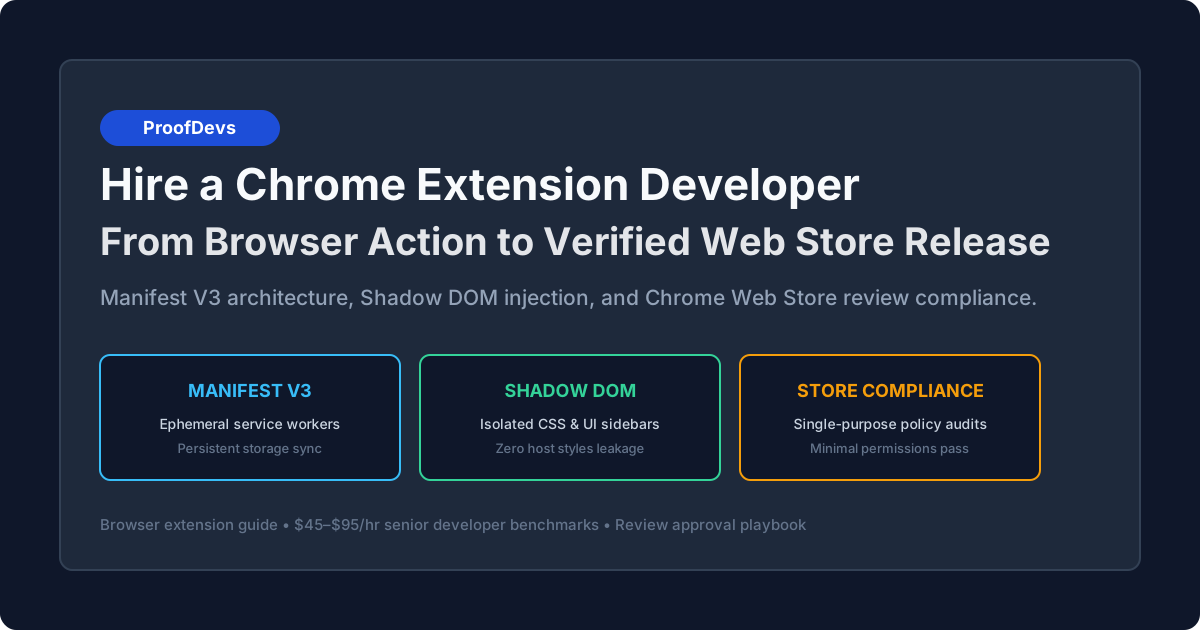
Hire a Chrome Extension Developer: From Browser Action to Verified Chrome Web Store Release
Building a browser extension that passes Google Web Store review requires Manifest V3 service worker management, Shadow DOM isolation, and strict permission scoping. Here is how to hire a specialist.

Updated October 2026. A Chrome extension developer is a front-end and browser-internals software engineer who builds client-side software that runs directly inside Chromium browsers (Google Chrome, Microsoft Edge, Brave, and Opera). Unlike traditional web development where applications execute within an isolated browser tab, extension development requires coordinating three isolated runtime environments: background service workers, content scripts injected into target web pages, and popup or side-panel user interfaces. Since Google's mandatory transition to Manifest V3 (MV3), building extensions requires specialized engineering: handling ephemeral service workers that shut down after 30 seconds of inactivity, isolating injected UI with Shadow DOM, and strictly adhering to Chrome Web Store security review policies.
Hiring an independent senior Chrome extension developer on an hourly arrangement costs between $45 and $95 per hour. In contrast, specialized mobile and web development agencies charge $150 to $250 per hour with minimum project commitments starting at $20,000, often delegating implementation to junior engineers unfamiliar with Manifest V3 restrictions. For businesses investing in custom Chrome extension development—such as building browser-based SaaS sidebars, automated data extractors, or internal workflow automation—contracting an independent engineer for a one-time developer task delivers a production-ready extension in three to six weeks. Whether you need to hire a developer to build a Chrome extension from initial wireframes or optimize an existing codebase, direct collaboration with a specialist eliminates agency overhead and architectural missteps. If you are ready to engage, you can hire a verified Chrome extension developer matched to your scope within hours.
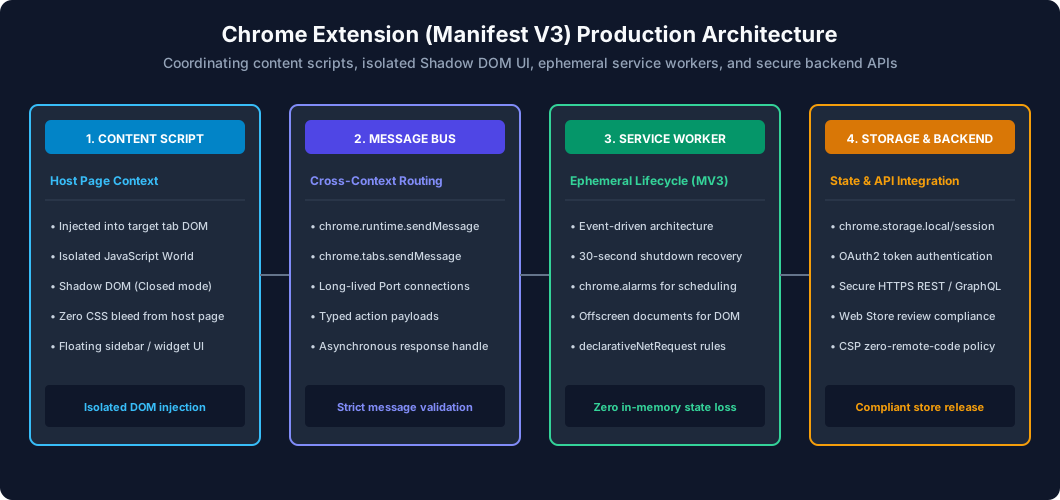
Figure 1: Production architecture of a Manifest V3 browser extension — illustrating script injection into host DOM via Shadow DOM, runtime message passing, ephemeral service workers, and verified Chrome Web Store distribution.
Extension vs Plugin: Navigating Browser Engineering Terminology
In commercial project briefs, founders and hiring managers frequently search for a Chrome plugin developer, browser plugin developer, or Chrome addon developer when their goal is to build a custom Chrome extension. In browser software history, "plugins" referred to NPAPI binaries (such as Adobe Flash Player or Java applets) that executed native code directly on user operating systems. Chromium browsers permanently disabled NPAPI architecture over a decade ago for security and stability reasons.
Today, whether a project requires a Chrome extension programmer, a dedicated Chrome extension specialist, or a senior Chrome extension engineer (or cross-platform browser extension specialist), the actual deliverable is a WebExtensions-compliant software package. It runs within a secure, sandboxed browser environment using HTML, CSS, JavaScript, and TypeScript. While non-technical stakeholders still refer to browser extensions colloquially as "plugins" or "add-ons", hiring an engineer who understands Chromium's architectural boundary ensures your extension conforms to current Manifest V3 security rules, isolated contexts, and Web Store publishing criteria.
The Engineering Reality of Manifest V3 (MV3)
In previous years under Manifest V2, browser extension development resembled standard single-page application programming: developers ran persistent background pages that remained active in memory indefinitely, holding WebSocket connections, running setInterval timers, and storing application state in global JavaScript variables. Google's Manifest V3 completely dismantled this model to conserve device memory and prevent background tracking. A qualified Chrome extension developer must engineer around four architectural constraints:
1. Ephemeral Service Workers (The 30-Second Shutdown Rule)
Under Manifest V3, background pages are replaced by Extension Service Workers. A service worker starts up in response to a specific browser event (such as a tab opening, a network request, or a user clicking the extension icon) and automatically terminates after 30 seconds of idle time. If an inexperienced developer stores authentication tokens, active timers, or WebSocket sessions in in-memory JavaScript variables, that data vanishes the moment the worker sleeps. A senior developer implements state persistence:
- Storage-Backed State: Saving all user sessions and active tasks to
chrome.storage.localorchrome.storage.sessionbefore completing execution. - Alarm-Driven Execution: Replacing native
setIntervalandsetTimeoutcalls with thechrome.alarmsAPI, which wakes the service worker at scheduled intervals. - Heartbeat WebSocket Reconnections: Implementing lightweight keep-alive pings or reconstructing WebSocket connections on demand when a user initiates an action.
2. Content Script Isolation vs The Host Page DOM
Content scripts are JavaScript files injected directly into web pages that the user visits (such as LinkedIn, Salesforce, or Gmail). Chrome executes content scripts in an Isolated World: they share the document object model (DOM) with the host page, but cannot access JavaScript variables, functions, or libraries defined by the host page's scripts. If your extension needs to read variables from the host window (e.g., extracting an internal React component state), the developer must inject an execution snippet into the "main world" via chrome.scripting.executeScript using the world: "MAIN" flag, relaying data back via custom DOM events or window.postMessage.
3. The Offscreen Documents API
Because service workers run without a window context, they lack access to the DOM, HTML canvas, audio playback, and the system clipboard. In Manifest V2, background pages handled audio alerts or clipboard parsing directly. In Manifest V3, Google introduced the Offscreen Documents API (chrome.offscreen). A senior developer creates an ephemeral, invisible HTML document specifically to parse complex HTML with DOMParser, play audio notifications, or interact with the clipboard, closing the offscreen document immediately after task completion to satisfy Google's resource guidelines.
4. DeclarativeNetRequest vs Legacy WebRequest
In Manifest V2, ad blockers and privacy extensions intercepted and blocked network requests programmatically in real time using chrome.webRequest.onBeforeRequest. Manifest V3 replaced programmatic blocking with the DeclarativeNetRequest API. Developers declare static JSON rulesets or runtime-evaluated regex patterns that the browser engine evaluates natively. This requires deep knowledge of rule priority indexing, regex size constraints, and header modification rules without executing arbitrary JavaScript on every packet.
Extension Complexity Tiers and Realistic Time Estimates
Project scopes vary widely based on whether an extension modifies host web pages, authenticates with external APIs, or injects interactive user interfaces. Below are realistic development benchmarks for an independent senior engineer charging $45 to $95 per hour.
| Project Tier | Typical Use Case | Key Technical Requirements | Estimated Timeline | Budget Range ($45–$95/hr) |
|---|---|---|---|---|
| Tier 1: Lightweight Utility / Scraper | Page text summarizer, price tracking alert, single-click bookmark manager, DOM metadata extractor. | Popup UI (HTML/Tailwind), content script DOM parser, chrome.storage.local, basic Chrome Web Store submission. |
20 – 40 hours | $900 – $3,800 |
| Tier 2: SaaS Workflow Ingestion Sidebar | Embedded drawer in LinkedIn/Gmail/Salesforce that syncs customer leads to your CRM, displays user data, and executes API mutations. | React / TypeScript injected via Shadow DOM, OAuth2 token refresh via chrome.identity, external REST/GraphQL API sync, Side Panel API. |
50 – 90 hours | $2,250 – $8,550 |
| Tier 3: Complex Multi-Page Automation Engine | Automated web testing assistant, complex network traffic modifier, cross-tab synchronization with real-time WebSockets, local canvas image manipulation. | DeclarativeNetRequest rulesets, Offscreen Documents API, long-lived chrome.runtime.Port connections, enterprise policy distribution. |
90 – 160 hours | $4,050 – $15,200 |
For most early-stage SaaS companies, Tier 2 represents the highest commercial return: embedding your product directly where users spend their workday (inside their email inbox or CRM) drastically increases daily active engagement. To explore hourly contracting benchmarks across different software specializations, review our guide on developer hourly rates.
Migrating Legacy Extensions: Manifest V2 to Manifest V3
With Google fully deprecating Manifest V2 across Chrome, unmigrated extensions face automatic deactivation and removal from the Chrome Web Store. Companies with established user bases or internal operations running on legacy extensions increasingly need to hire a Manifest V3 migration developer to audit and refactor their codebases. Contracting a specialist to migrate a Chrome extension to Manifest V3 typically requires 15 to 40 hours ($675 to $3,800), depending on how heavily the original extension relied on persistent background execution.
When you hire an engineer to upgrade a Chrome extension to Manifest V3, the migration involves five critical technical refactors:
| Legacy Manifest V2 Component | Manifest V3 Requirement | Engineering Scope & Refactoring Deliverable |
|---|---|---|
| Persistent Background Pages ( background.scripts) |
Extension Service Worker ( background.service_worker) |
Migrating in-memory variables to chrome.storage.local or session. Converting setInterval loops to chrome.alarms. Handling cold starts after 30 seconds of inactivity. |
| Blocking WebRequest API ( webRequestBlocking) |
DeclarativeNetRequest API ( declarativeNetRequest) |
Translating programmatic request-blocking callbacks into static JSON rulesets or session-scoped regex modification rules evaluated natively by the browser. |
| Remotely Hosted Code & CDNs ( <script src="https://...">) |
Locally Bundled Assets Only | Auditing third-party libraries, analytics trackers, and font dependencies. Bundling all executable code directly into the extension distribution archive. |
| Background DOM & Audio APIs ( document.createElement, Audio) |
Offscreen Documents API ( chrome.offscreen) |
Creating transient, offscreen HTML execution contexts for DOM parsing (DOMParser), audio alerts, or clipboard interaction without a visible window. |
| Permissive Content Security Policy ( unsafe-eval, inline scripts) |
Strict Content Security Policy | Refactoring templating engines that evaluate strings as code. Eliminating inline onclick handlers in popup HTML in favor of separate event listeners. |
A structured migration prevents store de-listing, eliminates security vulnerabilities, and optimizes memory consumption across user browser sessions.
UI Injection Without Breaking Host Pages: Shadow DOM & CSS Isolation
The single most common bug in amateur extension development is CSS leakage. When a developer injects a React sidebar directly into a target webpage's <body> using a standard <div id="my-extension-root">, two catastrophic issues occur:
- Host Page CSS Contaminates the Extension: If the target website (e.g., Salesforce or Jira) defines global styles like
button { background: red !important; font-size: 11px; }or uses an aggressive Tailwind reset, your extension's buttons, typography, and dropdowns will appear broken and misaligned. - Extension CSS Breaks the Host Page: If your extension imports a generic stylesheet or CSS framework, its global reset rules can overwrite the host website's layout, breaking the customer's active browsing experience.
The Solution: Shadow DOM (Closed Mode)
A senior Chrome extension developer isolates the extension's user interface using Shadow DOM:
// Content Script mounting React inside Shadow DOM
const hostElement = document.createElement('div');
hostElement.id = 'my-saas-extension-host';
document.body.appendChild(hostElement);// Attach Shadow Root in closed mode to prevent host page script snooping
const shadowRoot = hostElement.attachShadow({ mode: 'closed' });
// Inject isolated CSS directly into the Shadow Root
const styleSheet = document.createElement('link');
styleSheet.rel = 'stylesheet';
styleSheet.href = chrome.runtime.getURL('assets/sidebar.css');
shadowRoot.appendChild(styleSheet);
// Mount the React application inside the Shadow Root container
const mountPoint = document.createElement('div');
shadowRoot.appendChild(mountPoint);
ReactDOM.createRoot(mountPoint).render(<App />);
By mounting inside a Shadow Root, styles inside the extension cannot escape to the host page, and styles from the host page cannot pierce into the extension's internal elements. For complex sidebars that require complete iframe sandboxing, the developer uses an <iframe> pointing to an extension resource (chrome-extension://<id>/sidebar.html), which provides full execution and rendering isolation.
Developer Tooling: WXT and Plasmo Frameworks
Building extensions in vanilla JavaScript with manual Webpack configurations is inefficient in 2026. Experienced engineers use current browser extension frameworks such as WXT or Plasmo. These frameworks provide TypeScript support, Hot Module Reloading (HMR) during content script development, automated manifest generation, and single-codebase compilation across Chrome, Firefox, Microsoft Edge, and Safari (WebExtensions API standards).
Chrome Web Store Security Review: Avoiding Rejection
Submitting an extension to the Chrome Web Store is not an automated formality; it involves rigorous manual and automated security screening by Google reviewers. Rejections delay product launches by weeks. A seasoned developer engineers for compliance from day one:
1. Single Purpose Policy Enforcement
Google strictly enforces that an extension must have a single, clearly defined purpose. If an extension promises to "calculate discounts while shopping" but also includes a tab manager, a weather widget, and social media sharing buttons, Google will reject the submission. The manifest description, store listing, and feature set must align with one core functionality.
2. Minimal Permission Scoping (Principle of Least Privilege)
Google reviewers scrutinize the permissions array in manifest.json. If an extension requests <all_urls> or broad host permissions (*://*/*) when it only needs to function on LinkedIn, Google will delay review or reject the listing. A senior engineer scopes permissions tightly:
- Use
activeTab: If the extension only needs to run when the user explicitly clicks the extension icon in the toolbar,activeTabgrants temporary access to the active page without triggering scary browser warning dialogues like "This extension can read and change all your data on all websites you visit." - Explicit Host Matching: If the extension must automate a specific platform, restrict permissions explicitly to
https://*.linkedin.com/*rather than wildcards. - Optional Permissions: Utilizing
chrome.permissions.request()at runtime when the user enables an optional secondary integration.
3. Prohibition of Remotely Hosted Code
Under Manifest V3, extensions are strictly prohibited from executing code that is not packaged within the extension's distributed .zip file. You cannot load JavaScript libraries from external CDNs (such as https://cdn.jsdelivr.net/...) or use eval(), new Function(), or remote configurations that execute executable strings. All libraries (React, charting tools, tracking SDKs) must be bundled locally into the build artifact.
4. Account Ownership: Always Own Your Developer Account
Never permit an agency or freelance developer to publish your commercial extension under their personal Google account. Register a corporate Chrome Web Store Developer Account under your company's Google Workspace ($5 one-time registration fee). You then invite the developer to your Publisher Group with developer permissions. This ensures your company retains ownership of your extension's Web Store listing, user reviews, Chrome Extension ID, and analytics data.
Technical Vetting: 5 Interview Questions with Senior vs Junior Signals
Screen candidates with architectural questions addressing Manifest V3 lifecycles, DOM injection, and security rules.
1. "How do you maintain continuous state or background tasks when Manifest V3 service workers shut down after 30 seconds?"
- Junior / Amateur Signal: "I keep an interval running in the background script to keep it alive, or I tell users to keep the extension popup window open."
- Senior Developer Signal: "I design the service worker to be fully event-driven and stateless. All intermediate state, active job queues, and user authentication tokens are persisted to
chrome.storage.localorchrome.storage.sessionon every transaction. For scheduled or recurring tasks, I use thechrome.alarmsAPI. If long-lived bi-directional communication is required, I establish achrome.runtime.Portwith the content script or initiate an Offscreen Document."
2. "How do you guarantee that a target website's CSS won't distort our extension's injected sidebar UI?"
- Junior / Amateur Signal: "I write high-specificity CSS with
!importanton every style property to override the website's CSS." - Senior Developer Signal: "Using
!importantfails against host pages with aggressive CSS resets or CSS-in-JS frameworks. I mount our UI inside a Shadow Root in 'closed' mode (Shadow DOM). This creates an impenetrable CSS boundary: our component styles are completely isolated from host page rules, and our styles cannot bleed out to break the host page layout. For absolute isolation, I embed our interface within a sandboxed<iframe>pointing to an internal extension HTML asset."
3. "When should we request activeTab permission instead of broad host permissions in manifest.json?"
- Junior / Amateur Signal: "I usually put
<all_urls>in host permissions so the extension can run on any website without running into permission errors." - Senior Developer Signal: "Requesting
<all_urls>causes users to see scary installation warnings and triggers intensive manual security review by Google that can delay launch by weeks. If our extension only needs to inspect or modify a page when the user explicitly clicks our toolbar icon or triggers a shortcut,activeTabis the correct choice. It provides temporary, high-privilege access to the current tab with zero installation warning prompts and fast-tracks Web Store review."
4. "How do you handle user authentication in an extension that connects to our SaaS web app?"
- Junior / Amateur Signal: "I ask the user to type their username and password into the extension popup and store them in localStorage."
- Senior Developer Signal: "Storing raw user credentials in an extension is insecure. I use the
chrome.identityAPI to implement standard OAuth2 PKCE authorization, or I implement a one-click handshake: when the user logs into our web application, the web app sets a secure HTTP-only cookie, and the extension reads the session token or receives it via an authenticated cross-origin messaging handshake. Tokens are stored inchrome.storage.session(cleared on browser close) orchrome.storage.localwith automated refresh token rotation."
5. "What is the Offscreen Documents API in Manifest V3, and what is a real-world scenario where you must use it?"
- Junior / Amateur Signal: "I'm not sure; I haven't needed to use that API yet."
- Senior Developer Signal: "In Manifest V3, service workers run without a DOM or window context, meaning they cannot use
document.createElement, play audio, parse HTML strings usingDOMParser, or interact with the system clipboard. The Offscreen Documents API allows the extension to spawn an invisible, transient HTML document with full window capabilities to perform DOM-dependent tasks. For example, if we need to parse scraped HTML into a DOM tree or play an audio notification from the background, we create an offscreen document viachrome.offscreen.createDocument, execute the task, and immediately callchrome.offscreen.closeDocument."
The 3 to 5 Hour Practical Paid Test Task
Do not evaluate extension developers using standard LeetCode algorithm puzzles. Assess their ability to navigate the real browser extension sandbox.
The Candidate Assignment: Injected Page Scraper and Sync Popup
Provide the applicant with a clear technical brief for a standalone Manifest V3 extension. Instruct them to deliver:
- A
manifest.json(V3) requesting minimal necessary permissions. - A content script that injects a floating action button into a specified test domain (e.g., Wikipedia or a demo ecommerce page) using Shadow DOM.
- When the floating button is clicked:
- The content script scrapes the page title, URL, and main heading text.
- Sends a runtime message (
chrome.runtime.sendMessage) to the background service worker.
- The background service worker validates the payload and writes it to
chrome.storage.local. - The extension popup UI (opened via toolbar action) reads the stored items from
chrome.storage.localand renders them in a formatted list with a "Clear" button.
Pass/Fail Grading Rubric
| Evaluation Criteria | Passing Senior Signal | Failing Junior Signal |
|---|---|---|
| Manifest V3 Compliance | Uses background service worker; zero remote CDN script tags; minimal permission scoping. | Attempts to use deprecated Manifest V2 keys (e.g., background.scripts); requests unnecessary broad host permissions. |
| UI & CSS Isolation | Floating button is encapsulated in Shadow DOM (Closed mode); host page CSS cannot override button styles. | Injected as a plain <div> in the host body; inherits host styles or breaks host layout. |
| Cross-Context Messaging | Uses structured, typed message actions with asynchronous response handling (return true in onMessage). |
Direct variable sharing attempts; unhandled promise rejections when the service worker is asleep. |
| Code Architecture | Clean modular TypeScript/ES modules; clear separation of content, background, and popup contexts; error handling on storage limits. | Monolithic, unformatted JavaScript file with hardcoded global variables and no cleanup routines. |
Pay the candidate their standard hourly billing rate for the 3 to 5 hours of work. A senior engineer will deliver clean, working code with an unpacked installation guide, demonstrating immediate readiness for production. Prefer a done-for-you match instead of running the process yourself? Get matched with a verified Chrome extension developer — scope review and shortlist within hours.
Frequently Asked Questions
What is the difference between Manifest V2 and Manifest V3 in Chrome extensions?
Manifest V3 replaced persistent background pages with ephemeral service workers that automatically terminate after 30 seconds of inactivity to save device memory. It also prohibited remotely hosted code (all scripts must be packaged locally in the extension zip file), replaced the programmatic blocking webRequest API with the rule-based declarativeNetRequest API, and restricted Content Security Policy (CSP) options.
How much does it cost to hire a developer to build a custom Chrome extension?
Hiring an independent senior developer to build a custom Chrome extension costs between $45 and $95 per hour. A focused DOM scraper or utility requires 20 to 40 hours ($900 to $3,800), a SaaS workflow ingestion sidebar with backend API sync requires 50 to 90 hours ($2,250 to $8,550), and a complex automation engine with declarative network rules takes 90 to 160 hours ($4,050 to $15,200). Full Manifest V3 migrations for existing extensions take 15 to 40 hours ($675 to $3,800).
Can a Chrome extension work on Microsoft Edge, Firefox, and Safari?
Yes. Chrome, Microsoft Edge, Brave, and Opera all run on the Chromium engine and run identical Manifest V3 extensions without modification. Firefox and Safari support the standardized WebExtensions API with minor configuration differences (such as background script handling in Firefox or Xcode packaging for Safari). Cross-browser frameworks like WXT or Plasmo compile a single TypeScript codebase into separate distribution packages for all major browsers.
How long does Google take to review and approve an extension in the Chrome Web Store?
Initial review typically takes 24 to 72 hours for simple extensions requesting scoped permissions (like activeTab). Extensions requesting broad host permissions (*://*/*) or sensitive APIs (like declarativeNetRequest or identity) undergo deeper manual security audits that can take 5 to 14 business days. Subsequent version updates usually publish within 24 hours.
How do we prevent our Chrome extension from breaking when host websites update their layouts?
A senior developer avoids brittle DOM selectors like div > div:nth-child(3) > span and instead queries persistent semantic attributes, data attributes (e.g., data-testid), or text patterns with MutationObservers. They also build automated end-to-end regression tests (using Playwright or Puppeteer) that run against the target website daily to alert your team before users report broken scrapers.
What permissions should a Chrome extension request to avoid scary warning dialogs?
Using the activeTab permission instead of broad host permissions avoids warning prompts entirely, granting the extension temporary access only when the user explicitly clicks the toolbar icon. Requesting broad permissions (like <all_urls> or tabs) causes Chrome to display high-risk warnings like "Read and change all your data on the websites you visit," which reduces installation conversion rates.
How do we authenticate users in a Chrome extension with our SaaS backend?
The standard approach uses the chrome.identity API to implement OAuth2 PKCE authorization, opening a secure login tab that returns an access token to the extension. Alternatively, if the user is already logged into your SaaS web app, the extension content script can perform an authenticated handshake via postMessage or read a secure session cookie.
What is Shadow DOM and why is it necessary for Chrome extensions?
Shadow DOM is a browser API that encapsulates a component's internal HTML and CSS into a private subtree. In Chrome extensions that inject sidebars or floating buttons into third-party websites, Shadow DOM prevents host website styles (such as global Bootstrap or Tailwind resets) from breaking the extension's UI, while ensuring the extension's CSS does not break the host page.
Can an extension communicate with local desktop applications or hardware?
Yes, through the Native Messaging API (chrome.runtime.sendNativeMessage). The Chrome extension can send and receive JSON messages with a native application (written in Python, C++, or Go) installed on the user's computer, enabling interaction with local file systems, hardware devices, or private desktop software.
Can we publish an extension privately for internal company employees only?
Yes. In the Chrome Web Store Developer Dashboard, you can set the extension visibility to Private, restricting access to members of your Google Workspace domain or a specific list of Google accounts. For enterprise fleets, IT administrators can force-install extensions across all employee machines using Google Admin Console policies.
What happens if our extension needs to parse the DOM from the background in Manifest V3?
Because Manifest V3 background service workers lack a DOM or window object, the extension creates an ephemeral Offscreen Document using chrome.offscreen.createDocument(). The offscreen document parses the HTML string into a DOM tree, extracts the necessary data, sends the result back to the service worker, and is immediately closed.
How do we ensure full ownership of our extension when hiring a contractor?
Register your own Chrome Web Store Developer Account ($5 one-time fee to Google) under your company's Google Workspace email. Add the contractor to your Publisher Group with developer access so they can upload build packages without owning the listing. Ensure your contract stipulates that all source code, private keys, and Web Store assets are 100% owned by your business upon payment.
What is the difference between a Chrome plugin developer and a Chrome extension developer?
In web engineering terminology, there is no difference in the delivered software; both describe an engineer building tools for Chromium browsers. "Chrome plugin" is a colloquial term frequently used by business clients and non-technical stakeholders, whereas "Chrome extension" is the official technical standard. While historical browser plugins used NPAPI binaries that ran native desktop code, extensions are sandboxed programs written in HTML, CSS, JavaScript, and WebExtensions APIs.
How much does it cost to migrate a Chrome extension from Manifest V2 to Manifest V3?
Migrating a Chrome extension from Manifest V2 to Manifest V3 costs between $675 and $3,800, requiring 15 to 40 hours with an independent senior engineer ($45–$95/hr). The scope includes converting background pages into event-driven service workers, replacing blocking webRequest calls with declarativeNetRequest rulesets, bundling remote scripts into local builds, and using Offscreen Documents for DOM parsing.
Ready to build, migrate, or rescue your extension? Hire a verified Chrome extension developer — direct senior rates, your repository and store listing from day one.
Written by Michael Melnyk
Senior IT Technical Writer & Technology Analyst
Senior Technical Writer and IT Industry Analyst with over 7 years of experience analyzing software engineering ecosystems, tech leadership models, and developer procurement frameworks.