Hire a WordPress Plugin Developer: Custom Functionality, Costs, and Vetting
A custom plugin you will own forever is only worth building when no $49 extension does the job. Here is the decision rule, the 2026 rate ranges, and the security checks that separate update-safe code from a future outage.

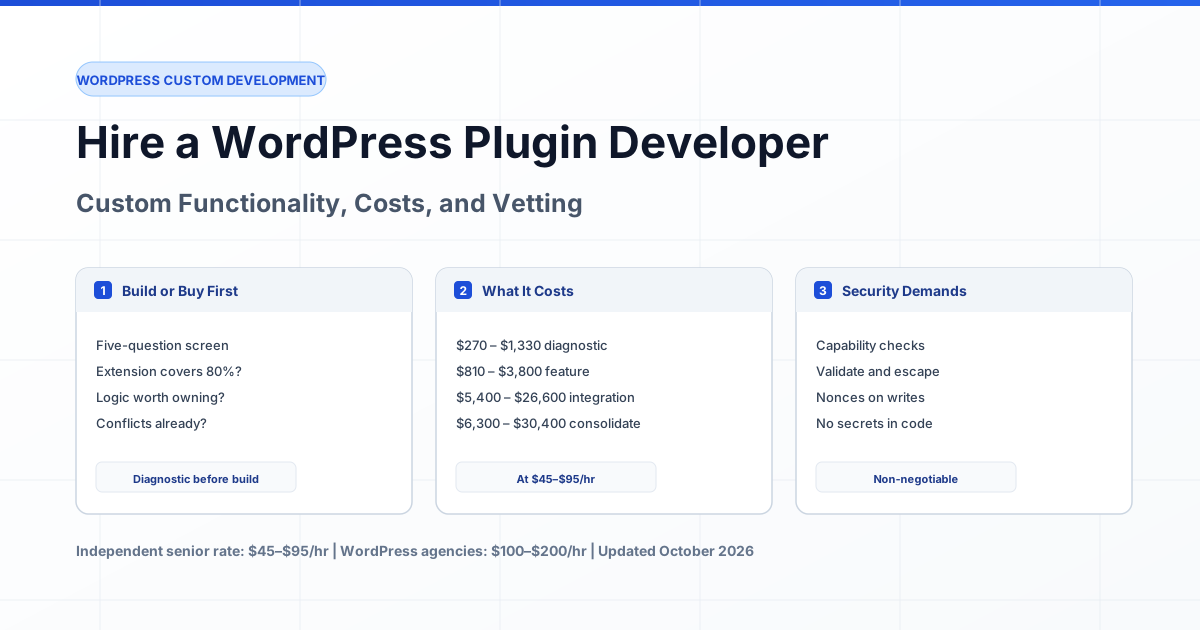
Current as of October 2026. A custom WordPress plugin developer writes PHP that hooks into WordPress through its documented actions, filters, and APIs — never by editing core files. That distinction is the whole job: code written against the official plugin API survives the next WordPress release, while code that writes directly into wp-includes or a theme's functions.php stops working the day you switch themes. An independent senior developer charges $45–$95 per hour for this work, against $100–$200 per hour at WordPress agencies, and the gap matters most on exactly the projects where plugins go wrong: security, conflicts, and updates.
The uncomfortable part of this market is that most people searching for a custom plugin developer do not need one. Five overlapping paid plugins already handle the request, or a $49 extension does the job adequately. The skill is telling you so before you sign — which is why this guide starts with the decision rule, not with the pitch. If you already know you need custom code, you can hire a verified WordPress developer matched to your stack.
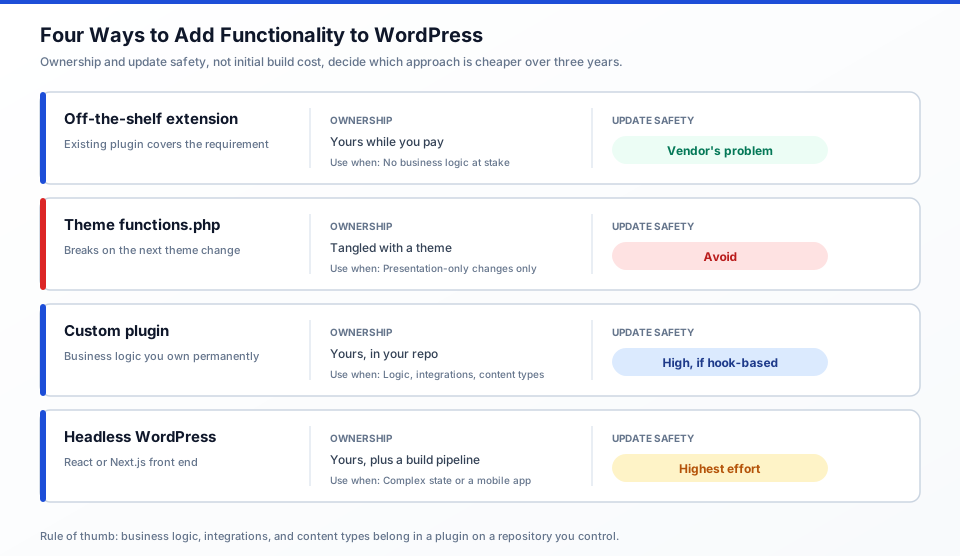
Figure 1: Four ways to add functionality to WordPress. Ownership and update safety, not initial build cost, determine which approach is cheaper over three years.
When You Need a Custom Plugin, and When You Do Not
You need a custom plugin when your requirement involves business logic that no extension models, when you must own the code outright, or when you are consolidating plugins that conflict with each other. You do not need one when an extension covers the requirement adequately, when the feature is genuinely presentation-only, or when it is a one-off that a shortcode solves in an afternoon.
Use this as a five-question screen before you commission anything:
- Does an existing extension cover it? Search the plugin directory and read the reviews, not just the feature list. If the closest match handles 80% of the requirement, price the 20% gap against rewriting the other 80%.
- Is the logic yours to keep? Business rules, pricing logic, permission schemes, and integration logic should live in code you own. If you would be upset to lose them when the vendor stops maintaining a plugin, that is a build case.
- Are current plugins conflicting? Two extensions writing the same hook, or a page builder and a form plugin fighting over output buffering, is a consolidation case — and consolidation is often cheaper than both a fix and a rebuild.
- Is it presentation-only? If it changes what a page looks like, that is theme work, not plugin work. Custom post types, admin logic, and scheduled jobs belong in a plugin.
- Will someone maintain it in year three? A plugin is a permanent liability. If nobody on your side will ever touch PHP again, prefer the extension and accept its limits deliberately.
A useful framing from the plugin development community: most WordPress problems do not need a custom plugin, and part of a competent developer's job is saying so. If an agency quotes you a plugin build without asking what you have already installed, that is a sales signal, not a technical one.
What a Custom WordPress Plugin Costs in 2026
Custom WordPress plugin development costs between $900 and $30,000 in 2026, driven almost entirely by scope rather than technology. Below are realistic hour ranges at the independent senior rate of $45–$95 per hour, with the equivalent agency figure at $100–$200 per hour for the same scope.
| Scope | Hours | At $45–$95/hr | At $100–$200/hr |
|---|---|---|---|
| Diagnostic: audit existing plugins, identify conflicts, recommend build vs fix | 6–14 | $270 – $1,330 | $600 – $2,800 |
| Small feature plugin: shortcode + admin settings + one REST endpoint | 18–40 | $810 – $3,800 | $1,800 – $8,000 |
| Business logic plugin: custom post types, taxonomies, role capabilities, admin screens | 60–130 | $2,700 – $12,350 | $6,000 – $26,000 |
| WooCommerce or LMS extension: hooks into checkout, orders, or enrolment flows | 90–200 | $4,050 – $19,000 | $9,000 – $40,000 |
| Third-party integration plugin (CRM, ERP, booking, payment) with webhooks and retries | 120–280 | $5,400 – $26,600 | $12,000 – $56,000 |
| Plugin consolidation: replace 4–6 overlapping extensions with one owned module | 140–320 | $6,300 – $30,400 | $14,000 – $64,000 |
The consolidation row is frequently the best value on this list. One agency quotes $800 per month in paid plugin licences, or $9,600 per year, against a typical consolidation build of $15,000–$25,000 — a payback measured in months if the overlapping extensions were actually causing conflicts and manual work.
The Four Ways to Add Functionality, and What Each Costs You
Most bad WordPress projects come from choosing the wrong mechanism, not from a bad developer. The four options are not interchangeable, and each transfers a different kind of risk to you.
| Approach | Use It When | Update Safety | Ownership |
|---|---|---|---|
| Off-the-shelf extension | An existing plugin covers the requirement at 80% or better. | Vendor's problem, until they abandon it. | Yours while you pay; gone if you stop. |
| Code in theme functions.php | Never, for anything you intend to keep. | Breaks on theme change. Avoid. | Yours, tangled with a theme you will replace. |
| Custom plugin | Business logic, integrations, custom content types, consolidation. | High, if built on hooks and the documented API. | Yours permanently, in your repository. |
| Headless WordPress | The front end is a React or Next.js app with complex state or a mobile app. | Highest effort, best separation. | Yours, plus a build pipeline to maintain. |
For a visual walkthrough of building a plugin the correct way — file structure, hooks, and where custom code should live — this is the clearest starting point: [Create Your Own WordPress Plugin (Coding Tutorial)](https://www.youtube.com/watch?v=syRi9p9aWYA). If your requirement involves blocks rather than hooks, [WordPress Plugin Development: Gutenberg Blocks, React & More](https://www.youtube.com/watch?v=hbJiwm5YL5Q) covers the modern block-editor path.
The Security Checks to Demand Before You Sign
Plugins are the most common source of WordPress vulnerabilities, which makes security the part of the conversation you cannot skip. Ask for these five things in writing — a senior developer answers them without hesitation, and a careless one gets vague.
- Capability checks on every privileged operation. Anything that changes data or settings must verify the current user's permission. The documented approach is the
current_user_can()capability API. A plugin that writes to the database without checking capabilities has a privilege escalation bug, regardless of how well the rest of it is written. - Input validation and output escaping, everywhere. WordPress separates these into two documented disciplines: validating input on the way in, and escaping output on the way out. A plugin that escapes only on output still processes attacker-controlled data; one that validates only on input still writes unescaped values into the database for later use.
- Nonces on every state-changing request. Forms, AJAX handlers, and REST mutations need nonces to prove the request came from a legitimate session rather than a forged cross-site request.
- No secrets in code. API keys, webhook signing secrets, and licence keys belong in environment variables or a configuration API — never in a committed PHP file. Ask where they will live before they are needed.
- Coding standards followed. The WordPress coding standards are not bureaucracy: PHPCS against them catches the escaping and naming mistakes that cause real incidents.
The WordPress security handbook at developer.wordpress.org/plugins/security/ covers each of these in detail and is worth reading yourself before a project starts, so you can tell whether the developer has read it too.
Update Safety: Will Your Plugin Survive the Next Release
The most common custom plugin failure is not a security breach — it is a plugin that stopped working after an update. A plugin built on documented hooks, with version checks and tested upgrade paths, keeps running. One that reaches into core internals breaks.
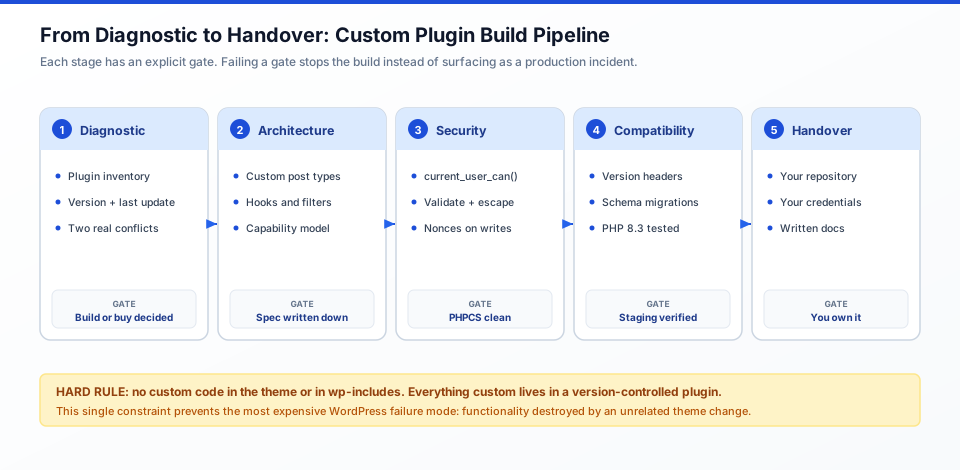
Figure 2: The staged build pipeline. Every stage ends in a gate; failing a gate stops the build instead of surfacing later as a production incident.
Ask specifically:
- Which core files or internals does it touch? The correct answer is none. If it modifies files in
wp-includes, treat it as a red flag regardless of how it performs today. - How does it handle database schema changes? A plugin that adds tables needs a versioned upgrade routine, not a fresh install script that assumes a clean database.
- What is its compatibility declaration? Check the plugin header for the
Requires PHP,Requires at least, andTested up tovalues. WordPress surfaces outdated plugins in the admin area for a reason. - How does it behave on PHP 8.3+? WordPress currently recommends PHP 8.3 or higher and works back to 7.4, but your plugins and themes must be tested — a plugin written against PHP 5-era patterns can emit deprecation warnings or fail outright. Use the PHP Compatibility Checker before you move versions, as WordPress.org's PHP update guidance recommends.
Establish one hard rule at the outset: no code goes into the theme or core. Everything custom lives in a version-controlled plugin repository you own. That single constraint prevents the most expensive category of WordPress problem — functionality destroyed by an unrelated theme change.
Three Custom Plugin Engagements
Engagement 1: Consolidation of five overlapping membership plugins
Situation: A subscription business ran a membership plugin, a paywall plugin, two separate form plugins, and a custom snippet someone added to functions.php two years ago. Checkout logic conflicted with itself and support spent hours a week on duplicate registrations.
Blocker: Every extension was individually maintained. The conflict was structural, so no amount of updating would fix it.
Approach: An eight-hour diagnostic mapped what each plugin actually did, found two features worth keeping from the paywall plugin, and identified a shortcode in the theme that had to move. One owned plugin replaced all five, using custom post types for member records and role capabilities for access tiers.
Result: Consolidation took 210 hours at an average of $65/hr, roughly $13,650, against $9,600 per year in plugin licences plus the support time. The functions.php snippet moved into the plugin repository, so the next theme change no longer threatens it.
Engagement 2: Integration plugin connecting WordPress to a CRM and booking system
Situation: A clinic needed appointment bookings on their WordPress site to write into their practice management system, with confirmation back to the patient.
Blocker: The vendor's generic connector did not handle their booking rules, and staff were re-keying bookings by hand — a few hours of staff time every week, plus transcription errors reaching patients.
Approach: A single integration plugin with a REST API webhook receiver, idempotent writes so a retried request cannot double-book, and queued retries instead of synchronous calls that would slow the booking page. Secrets held in environment variables.
Result: 160 hours at $70/hr, about $11,200, over four weeks including staging and a documented handover. The idempotency requirement was written into the spec before development rather than discovered during testing.
Engagement 3: The build that should have been an extension
Situation: A business owner was quoted $8,000 for a custom plugin to add a scheduling form to their site.
Blocker: The proposal had been written before anyone checked what was already installed.
Approach: A two-hour review found an installed form plugin with a scheduling add-on already covering the requirement, including availability rules. The requested feature was two conditional fields.
Result: The build was declined and configured in an afternoon for $0 in development. The diagnostic cost $540 and saved $8,000 — the most valuable outcome a developer can deliver on this kind of engagement, and the reason the diagnostic is worth paying for before signing anything larger.
How to Hire a WordPress Plugin Developer
Plugin work splits into three engagement shapes, and the right one depends on how much of the requirement is already understood. Rates below reflect independent senior developers on the hourly arrangement.
| Engagement | Best When | Cost Shape |
|---|---|---|
| Fixed-scope diagnostic | You have plugins and conflicts but no clear requirement. This is the normal first step. | 6–14 hours, fixed fee |
| Part-time ongoing (10–20 hrs/week) | Consolidation or a phased build across several months. | $45–$95/hr with a weekly cap |
| Project with milestones | The requirement is fixed and written down. | Milestone-based, 20–30% held back until acceptance |
Whatever the shape, require three things in writing: the plugin lives in a repository on your hosting or version control from the first commit, you hold all credentials, and the handover includes documentation your team or a future developer can act on without reverse-engineering the code.
Seven Questions to Ask a Plugin Developer
These separate engineers from people selling plugins. Compare the answers against each other — consistency of reasoning matters more than any individual answer.
- "Does my requirement need a custom plugin, or would an extension cover it?" The correct first answer is often "an extension, and here is why." A developer who must justify the build is more trustworthy than one who never questions it.
- "Where will the code live — theme, plugin, or core?" The answer must be plugin, in a repository you control. Anything else is disqualifying.
- "How do you handle capability checks on privileged operations?" Expect a specific answer naming
current_user_can()and the roles involved, not "we handle security." - "What happens to this plugin when WordPress or PHP updates?" They should describe version declarations, testing, and how they verified compatibility.
- "Which of my existing plugins will you remove, and what happens to the data in them?" Data migration is the most commonly underestimated part of consolidation. If they do not ask, they have not done it.
- "How do we roll this back if it breaks something in production?" Expect a concrete answer: versioned release, staging verification, and a deactivation path.
- "Who owns the plugin, and where is it hosted?" Yours, in your repository, on your accounts.
The 3–5 Hour Paid Plugin Assessment
Before a multi-week engagement, ask a candidate to run a paid assessment on your actual installation. Four to five hours is enough to reveal whether they can read someone else's plugin code and give an honest build-or-buy answer.
Assignment: With read-only access to a staging copy, produce (1) an inventory of installed plugins with version, last-updated date, and what each actually does, (2) identification of two concrete conflicts or abandoned dependencies, (3) a written recommendation of extension versus custom plugin versus consolidation with an hour estimate, and (4) a 20-minute walkthrough. Read-only — an assessment, not a delivery.
| Signal | Pass | Fail |
|---|---|---|
| Plugin inventory accuracy | Correct versions, dates, and roles for every plugin. | Guesses, or "it depends which plugins you have". |
| Conflict identification | Names specific conflicting hooks or overlapping features with evidence. | "Lots of plugins can slow your site." |
| Build-or-buy honesty | Recommends an extension where one fits, and says so plainly. | Concludes a custom build regardless of findings. |
| Security awareness | Notes capability checks, escaping, or a nulled/pirated plugin in the install. | Security is not mentioned at all. |
| Scope discipline | Stayed in five hours, listed open questions. | Started writing plugin code unprompted. |
Pay the candidate their standard rate. An engineer who declines a five-hour paid assessment is telling you something.
Typical Mistakes
- Building a plugin because it is cheaper than configuring an extension. The build is rarely cheaper once maintenance is counted.
- Putting custom code in
functions.php. It dies with the next theme change and leaves an unversioned file nobody dares touch. - Editing WordPress core files. A fatal core update overwrites the change, silently and completely.
- No plugin inventory before scoping. You cannot estimate a build while ignoring what is already installed and already conflicting.
- Accepting a build with no security review. Capability checks, escaping, and nonces are not optional extras on an authenticated plugin.
- Ignoring PHP version compatibility. A plugin that works on PHP 7.4 can emit deprecations or fail on 8.3, and your host will force the upgrade eventually.
- No version control. A plugin edited directly in
wp-content/pluginsover the next years cannot be rolled back. - Consolidating without a data migration plan. Members, orders, and subscriptions live in plugin-specific tables. Moving them is engineering, not copy-paste.
Expert Advice
Pay for the diagnostic before you pay for the build. It is the cheapest line item in the entire engagement and it is the only one that can tell you that you do not need the other things. Treat its deliverable as an asset — if you take the plan to a different developer, you own the map of your own installation.
Require a single repository and a single owner from day one. Every WordPress project that goes wrong went wrong at the boundaries: custom code in a theme, a plugin held on someone else's hosting, credentials with the contractor. Those boundaries are cheap to enforce at the start and expensive to unpick later.
Budget for the second plugin. The first one reveals adjacent requirements, and a plan that assumes exactly one build will stall the moment that happens. An explicit reserve for the follow-on work is what separates a plugin project that finishes from one that quietly overruns.
Frequently Asked Questions
How much does it cost to develop a custom WordPress plugin?
A small feature plugin costs $810–$3,800 (18–40 hours). Business logic with custom post types and admin screens costs $2,700–$12,350. A WooCommerce or LMS extension costs $4,050–$19,000. A third-party integration with webhooks costs $5,400–$26,600. Independent senior developers charge $45–$95 per hour; agencies charge $100–$200 per hour.
Do I need a custom plugin or can I use an existing one?
Use an existing extension if it covers the requirement at 80% or better and no business logic is at stake. Build custom when the logic is yours to keep, when current plugins conflict, or when you need capability no extension models. A two-hour diagnostic resolves most of these questions and often saves the entire build.
What is the difference between a WordPress plugin developer and a WordPress developer?
A WordPress developer covers the whole stack — theme work, site setup, content modelling, hosting, performance, SEO. A plugin developer is a specialist who writes PHP against the plugin API: hooks, filters, custom post types, capabilities, admin screens, and third-party integrations. For a site build or repair, you want the generalist; for owned business logic inside an existing site, the plugin specialist.
Should custom plugin code go in the theme instead?
No. Code in a theme's functions.php is destroyed when the theme is changed or updated, and it cannot be version-controlled independently. Anything you intend to keep belongs in a plugin. The exception is purely presentational CSS and template markup, which belongs in a child theme.
How long does a custom WordPress plugin take to build?
A small feature plugin takes 1–2 weeks. Business logic with custom content types takes 3–6 weeks. A WooCommerce or LMS extension takes 4–10 weeks. An integration plugin with webhooks and retries takes 5–12 weeks. Consolidation projects sit at 6–14 weeks because data migration determines the schedule.
How do I know a custom plugin is secure?
Check three things: capability checks via current_user_can() on every privileged operation, input validation and output escaping as separate disciplines on every path, and nonces on every state-changing request including REST endpoints. Also confirm no credentials are committed to code. The WordPress plugin security handbook documents each of these.
What happens to my plugin when WordPress updates?
A plugin built on documented hooks and the plugin API keeps working. Declare compatibility in the plugin header (Requires PHP, Requires at least, Tested up to), version your database migrations, and test on a staging copy before each major update. Code that edits core files or depends on internal APIs will break, and WordPress will not stop it from happening.
Can you replace a stack of overlapping plugins with one custom plugin?
Often yes, and it is frequently the best-value project on this list. It requires mapping what each plugin actually does, deciding what you keep and what you drop, and migrating data out of plugin-specific tables. Plan for 140–320 hours ($6,300–$30,400) and compare against the annual cost of the extensions you are replacing.
Do I need WordPress REST API knowledge for a custom plugin?
Only if the plugin exposes or consumes data programmatically. Most plugins that integrate with an external system register REST endpoints or webhook handlers, so the REST API becomes the contract between your site and the other system. Ask your developer to document that contract — it is what you will maintain after handover.
Who owns a custom WordPress plugin after it is built?
You do, if you set it up correctly. Require the plugin to be committed to a repository you control, hosted on your infrastructure, with credentials in your accounts and a written statement of ownership. If the plugin lives only in a contractor's account or a private repository, you do not own it regardless of what an invoice says.
How do I keep ownership and updates for the long term?
Three requirements: version-controlled source you own, a written handover covering what each module does and how it interacts with your other plugins, and a maintenance arrangement for when WordPress or PHP moves forward. Budget roughly 10–20% of build cost annually for compatibility maintenance, or accept that responsibility internally with the documentation in place to support it.
Ready to scope your own installation? Compare developer rates and hire a verified WordPress developer — starting with the diagnostic, so the build you pay for is one you actually need.
Written by Michael Melnyk
Senior IT Technical Writer & Technology Analyst
Senior Technical Writer and IT Industry Analyst with over 7 years of experience analyzing software engineering ecosystems, tech leadership models, and developer procurement frameworks.