WordPress Developer for Small Business: Rates, Hiring, and Red Flags
A WordPress developer should turn your site into a business asset: fast pages, working checkout or booking flow, and a setup your team can operate. This guide covers rates, hiring models, vetting, and the ownership details that keep you in control.

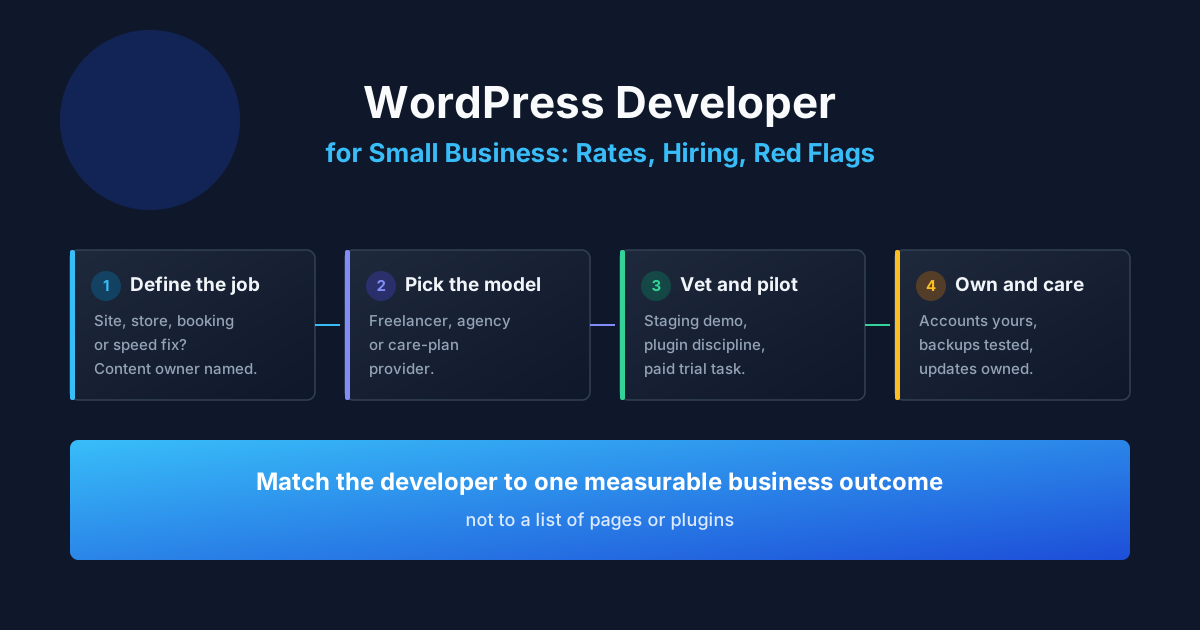
A WordPress developer for a small business should deliver a site that earns its keep: pages that load fast, a contact, booking, or checkout flow that works without staff help, and an admin area your team can operate after handover. The technology is rarely the hard part. The expensive mistakes happen in scoping, plugin choices, ownership of accounts, and the absence of a care plan after launch. Reviewed September 2026. Budget figures below are illustrative planning examples, not market averages or ProofDevs quotes.
WordPress powers a large share of small-business websites because the pattern is proven: a content system your staff can edit, a theme or builder for layout, plugins for forms, SEO, backups, and commerce, plus hosting you control. A developer earns their fee in the decisions around that pattern — which parts to configure, which to build, and which to leave out. If you are still deciding what kind of developer your business needs at all, start with our guide to hiring a developer for a small business or startup; this article goes deep on the WordPress-specific path.
What does a WordPress developer actually do?
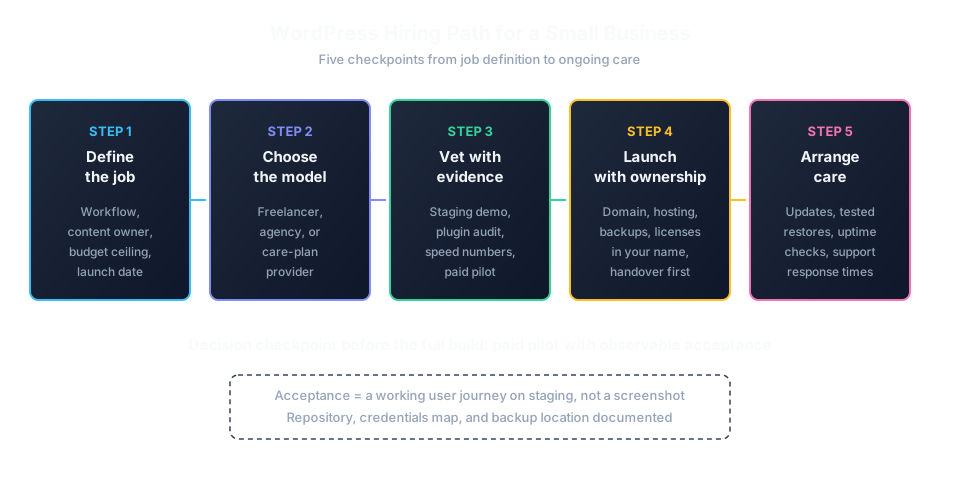
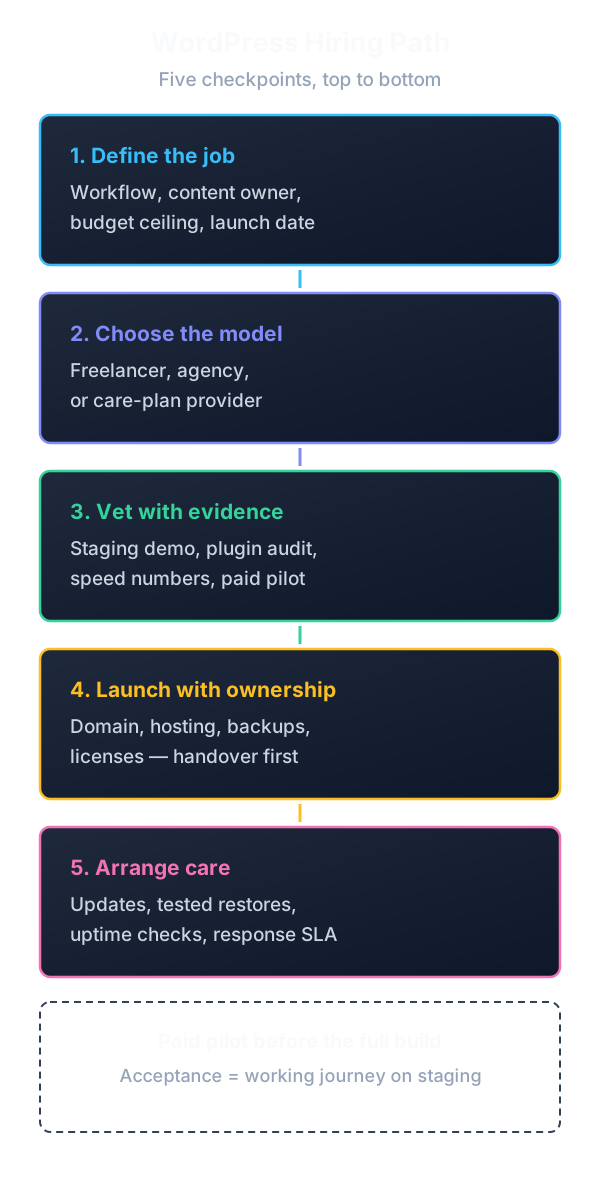
A WordPress developer builds, fixes, or maintains websites on WordPress: theme setup or custom theming, plugin selection and configuration, page-builder layouts, WooCommerce stores, forms and booking flows, performance tuning, security hardening, migrations, and ongoing care. For a small business, the deliverable should include the operational layer around the code: hosting and domain access, admin accounts, backups, update routines, analytics, and documentation your staff can follow.
Not everyone selling “WordPress services” is a developer. The market has three tiers, and the price difference between them explains most quote confusion:
| Tier | What they do | Right for |
|---|---|---|
| Implementer | Installs a theme, configures plugins and page builders, adds content | Brochure sites with standard layouts and no custom logic |
| Developer | Custom themes or child themes, custom post types and fields, hooks and filters, performance and security work, WooCommerce customization | Sites with booking, catalogs, integrations, multilingual content, or measurable traffic |
| Engineer / team | Custom plugins, headless setups, complex integrations, audits, rescue of hacked or broken sites | Stores with real revenue, membership systems, or a site that already failed once |
Ask which tier you are buying before comparing prices. A $500 implementer quote and a $5,000 developer quote are not two prices for the same job; they are different jobs that happen to mention WordPress.
When is WordPress the right choice — and when is a builder enough?
Choose WordPress when the site must grow beyond pages: a blog that brings search traffic, a service catalog with structured content, a WooCommerce store, bookings, memberships, multilingual pages, or integrations with a CRM, email platform, or inventory. Choose a website builder when the site is a digital business card with a phone number, a menu, and a contact form that rarely changes.
The honest middle ground: many small businesses start on a builder and migrate to WordPress when the builder blocks something — usually SEO control, checkout customization, content structure, or ownership of data. Our comparison of website builders for small business maps exactly where Wix, Squarespace, and Shopify stop being enough and a developer becomes the better choice.
Freelancer, agency, or in-house: which WordPress help fits?
Hire a freelance WordPress developer when one person can deliver a bounded outcome — a brochure site, a theme rebuild, a WooCommerce setup, a speed fix — and someone on your side can answer questions weekly. Choose an agency when you need design, copy, QA, project management, and support under one contract. In-house WordPress capacity only pays off with a continuous backlog of content, experiments, and store operations.
| Model | Good fit | Watch for |
|---|---|---|
| Freelancer | Defined site or store, clear content responsibility, weekly decisions on your side | Single point of failure; confirm backup coverage and handover terms |
| Small agency or studio | Design plus build, several disciplines, a manager who chases approvals | Higher overhead; confirm who actually does the work, not just who sells it |
| Care-plan provider | Updates, backups, uptime checks, small content changes for a monthly fee | Response times and what counts as “included” versus billable extra work |
| In-house hire | Ongoing publishing, testing, and store operations year-round | One person cannot cover strategy, design, development, and support alone |
For the wider tradeoff between outsourcing, hiring in-house, and engaging an independent developer, see our outsource-versus-hire comparison with real cost, control, and repository-access implications.
What do WordPress developers charge?
WordPress pricing depends on scope, geography, tier, and whether you buy hours or an outcome. Hourly rates vary widely: freelancers in lower-cost regions often quote a fraction of US or UK agency rates, which is exactly why searches like “wordpress developer hourly rate india” and “wordpress agencies usa” coexist — buyers are arbitraging the same skill across markets. The rate tells you little until you see hours, scope, and what happens after launch.
Illustrative planning example: a brochure site of 8 pages with a contact form and blog might take a freelancer 30 hours at $50 per hour ($1,500), plus $200 per year for premium theme and plugin licenses, plus $300 per year for managed hosting. A WooCommerce store with 100 products, payments, shipping rules, and tax setup might take 120 hours ($6,000) with the same rate. The arithmetic is an example for comparing scope, not a market rate — and offshore quotes that look 3–5x cheaper usually assume you supply content, testing, and project management.
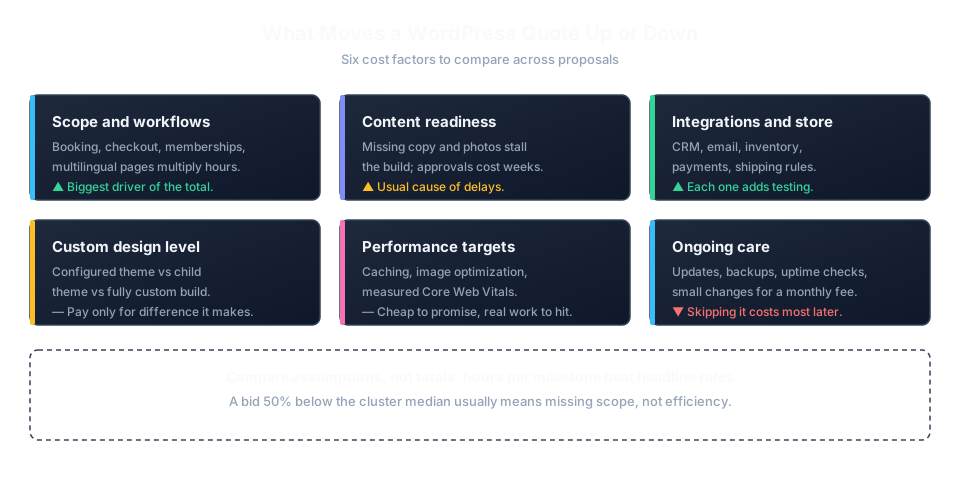
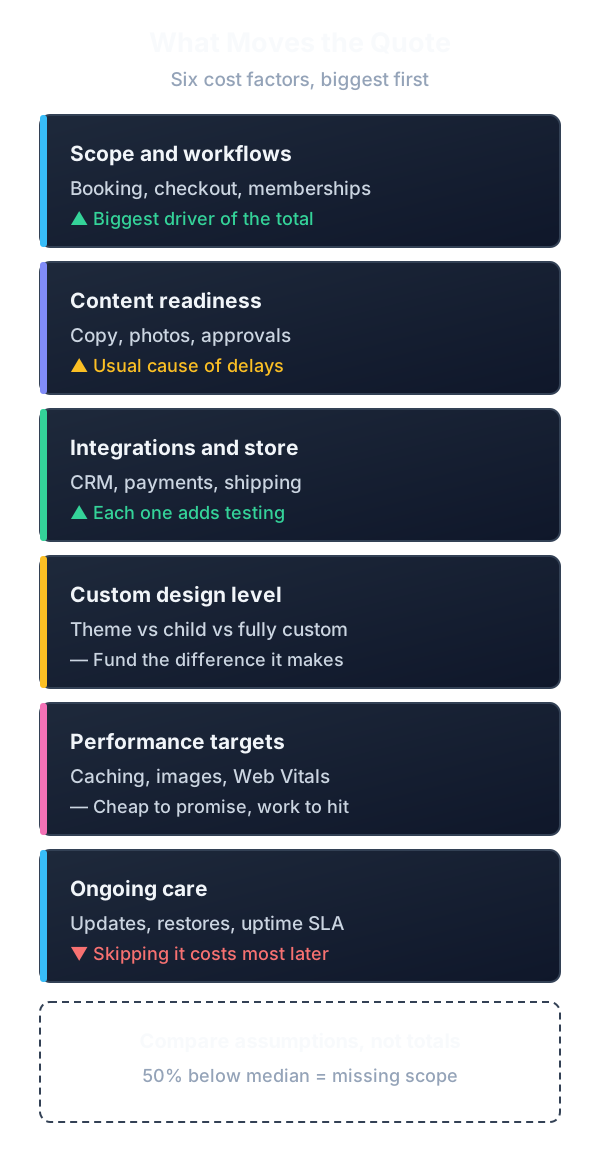
Ask every candidate to break the same scope into milestones with hours each, then compare the assumptions — not just the totals. A fixed bid 50% below the cluster median usually means misunderstood scope, not efficiency. For rate benchmarks and quote-review checklists, use our developer rates overview and the guide to judging whether a software quote is reasonable.
How to compare WordPress quotes without getting burned
A comparable WordPress quote states the theme approach (existing theme, child theme, custom theme, or page builder — and which one), the plugin list with license costs and who pays renewals, content responsibility, the staging process, testing scope, launch steps including redirects and backups, and post-launch support terms. Quotes that only list “10 pages + contact form” leave the expensive questions unanswered.
Run every proposal through the same checks: does it name the hosting environment and who controls it, does it separate design from development hours, does it state what happens to premium licenses if you stop paying, does it include a rollback plan for updates, and does it define acceptance as a working user journey rather than “site delivered”? Our proposal comparison checklist turns differing quotes into a side-by-side decision.
How to vet a WordPress developer before hiring
Vet around evidence, not claims. Ask what the developer personally shipped, which parts were configured versus custom-built, what broke after launch, and how the site is maintained today. Then verify with a staging demonstration and a technical review of one past site: admin structure, plugin count, update status, backup routine, and page speed on mobile.
- Portfolio relevance: a visually similar screenshot proves little; a clear explanation of a comparable workflow (booking, checkout, multilingual catalog) proves much more.
- Plugin discipline: ask how they choose plugins and when they refuse one. A developer who installs 40 plugins for a brochure site is selling future maintenance problems.
- Performance evidence: expect mention of caching, image optimization, and PageSpeed / Core Web Vitals measurements on past sites — not promises of “fast loading.”
- Security basics: least-privilege admin roles, two-factor authentication, update routine, and backups stored off the hosting account. The official WordPress hardening guide is a fair checklist to discuss.
- Staging habit: changes go to a staging copy first, then to production. No staging environment is a red flag at any budget.
If you cannot judge code yourself, that is normal — most founders cannot. Our guide to hiring a developer as a non-technical founder shows how a paid pilot with observable acceptance checks replaces code review as the hiring filter.
Protect ownership and continuity before work starts
The business should control the domain registration, hosting account, WordPress admin with the top-level role, database and file backups, premium plugin licenses, payment and email accounts, analytics, and DNS. Invite the developer with the minimum role needed, and document every access before the first release.
Your agreement should define intellectual-property transfer for custom code, license terms for premium themes and plugins, who pays renewals, backup frequency and retention, update responsibility, support response times, warranty or bug-fix terms, and a handover package: admin credentials map, license list, backup location, staging access, and deployment notes. Require the handover before the final payment, not after.
Care after launch: updates, backups, and support
A WordPress site without a care routine decays: core, theme, and plugin updates pile up, backups age out, PHP versions drift, and a hacked site is discovered through a customer complaint. A care plan should state update frequency, backup schedule with tested restores, uptime monitoring, a monthly report you can read, response times for incidents, and which small changes are included versus billable.
Typical small-business care arrangements range from a basic update-and-backup routine to a plan with content hours and priority support. Price it against the cost of one bad week — a hacked store or a failed update during a campaign — rather than against zero. If nobody owns updates, the site is already on a countdown.
Realistic WordPress scenarios
Bakery site with online ordering
Situation: a bakery takes orders by phone and Instagram messages; staff retype every order into a spreadsheet. Blocker: no menu structure, no online payment, owner cannot update prices. Fix: freelancer builds a WordPress site with a catalog, WooCommerce checkout with local pickup and delivery zones, and a two-hour handover so staff edit products. Result: phone orders drop by half within two months; the owner changes weekly specials without calling the developer.
Law firm site buried under plugins
Situation: a five-partner firm has a slow site with 47 active plugins from three previous contractors. Blocker: contact form spam, 9-second mobile loads, nobody knows which plugins are licensed. Fix: developer audits plugins down to 14, moves forms to a maintained solution with spam protection, configures caching and image optimization, documents licenses. Result: mobile loads under 3 seconds, spam enquiries near zero, one license renewal calendar the office manager owns.
Hacked WooCommerce store rescue
Situation: a gift store discovers injected spam links in search results two weeks before the holiday season. Blocker: no clean backup, admin accounts of two former contractors still active, hosting on the cheapest shared plan. Fix: independent developer freezes orders, cleans the install from known-good sources, resets all credentials, restores products into a fresh WordPress on managed hosting, and sets up off-site backups. Result: store back in 9 days; holiday revenue preserved; the owner now holds every admin account.
Typical mistakes
- Buying on page count. “Ten pages” says nothing about booking logic, checkout, integrations, or content responsibility — the actual cost drivers.
- Letting the developer own the hosting and domain. If the relationship ends, your site is a hostage. Accounts must be yours from day one.
- Accepting 40+ plugins without questions. Each plugin is a maintenance, security, and compatibility liability you will pay for later.
- Skipping staging. Updates tested directly on production will eventually break checkout during a campaign.
- Ignoring license renewals. Premium themes and plugins stop updating when licenses lapse — which is also when vulnerabilities appear.
- No backup restore test. A backup nobody restored is a hope, not a plan. Ask for one documented restore before launch.
- Choosing the cheapest quote without reading assumptions. The gap is usually missing scope — content, testing, migration, support — not efficiency.
- No care plan after launch. Updates, PHP upgrades, and backup rotation need an owner from week one.
- Paying 100% upfront. Tie payments to milestones with acceptance checks; keep a holdback until handover is delivered.
- Confusing an implementer with a developer. Theme installation is not custom development; judge the tier against the job, not the title.
Expert advice
Ask every candidate one question before discussing price: “Show me the admin area of a site you maintain and walk me through its update routine.” The answer reveals plugin discipline, backup habits, documentation quality, and whether past clients stayed — more signal in ten minutes than a portfolio gallery gives in an hour. A developer with nothing to show in wp-admin is selling screenshots, not maintenance.
FAQ: WordPress developer for small business
How much does a WordPress developer for a small business cost?
There is no useful single price without scope. A brochure site, a booking site, and a WooCommerce store differ by multiples. Ask for milestone-based quotes with hours, compare assumptions across proposals, and budget separately for premium licenses, hosting, and post-launch care.
What is the average WordPress developer hourly rate?
Rates vary widely by geography and tier — freelancers, agencies, and regions price the same skill very differently. Compare effective cost per delivered milestone rather than headline hourly numbers, and add content, testing, and management time you supply yourself.
Should I hire a freelance WordPress developer or an agency?
Hire a freelancer for a bounded build when someone on your side can make weekly decisions. Choose an agency when you need design, copy, QA, and project management under one contract. Confirm who actually does the work and who owns the handover in both cases.
How do I find WordPress developers near me?
Local directories, business referrals, and WordPress meetups surface nearby developers, but most WordPress work is fully remote-capable. Prioritize evidence of shipped comparable work over proximity; use local options when on-site training or photography coordination matters.
Is WordPress good for a small business website?
Yes, when the site must grow: blog traffic, structured catalogs, bookings, memberships, multilingual pages, or a WooCommerce store. For a rarely changing brochure site, a builder may be cheaper and easier to operate.
WordPress or a website builder for my business?
Use a builder while the site is pages plus a form. Move to WordPress when you need SEO control, checkout customization, structured content, or data ownership the builder blocks. Migrating later costs more than choosing correctly now, so decide against a two-year horizon.
What should a WordPress quote include?
Theme approach, full plugin list with license costs and renewal ownership, content responsibility, staging process, testing scope, launch steps with redirects and backups, acceptance criteria as working user journeys, and post-launch support terms.
How many plugins is too many for WordPress?
There is no magic number, but a brochure site needing 40 plugins signals poor architecture. Judge by necessity and maintenance: each plugin needs updates, compatibility checks, and a licensed, supported source. Ask the developer to justify every premium plugin.
Who owns my WordPress site, hosting, and domain?
You should, entirely: domain registration, hosting account, top-level admin, backups, licenses, payment and email accounts, analytics, and DNS. The developer gets minimum-role access. Anything else is a future hostage situation.
What is WordPress care plan and do I need one?
A care plan covers updates, backups with tested restores, uptime monitoring, and small changes for a recurring fee. You need one unless someone in-house owns that routine — unmaintained WordPress sites get hacked through known plugin vulnerabilities, not exotic attacks.
Can a WordPress developer build my online store?
Yes — WooCommerce covers catalogs, carts, payments, shipping, and taxes for most small stores. Confirm the developer has shipped stores with real orders, not just demo checkouts, and clarify who configures products, shipping rules, taxes, and refund flows.
How long does a small-business WordPress site take?
A brochure site with ready content can launch in 2–4 weeks; a WooCommerce store or booking site typically takes 6–12 weeks including content, testing, and revisions. The usual delay is not coding but missing content, photography, and approval cycles on your side.
What if my WordPress site gets hacked?
Freeze orders and forms, preserve evidence, clean from known-good sources or a verified clean backup — never patch a compromised install in place and hope. Reset all credentials, remove unknown admin accounts, move to current versions, and set up off-site backups. Then buy a post-incident review before adding features.
Have a WordPress job in mind — a slow site, a store that needs rebuilding, or a builder you have outgrown? Send the brief to ProofDevs and ask for a scope conversation with a developer who has shipped it before.
Written by Michael Melnyk
Senior IT Technical Writer & Technology Analyst
Senior Technical Writer and IT Industry Analyst with over 7 years of experience analyzing software engineering ecosystems, tech leadership models, and developer procurement frameworks.