Hire a WooCommerce Developer: Custom Code, Extension Subscriptions, and What It Costs
WooCommerce has no vendor charging you per order, so the real question is never platform cost — it is how many stacked extensions you are paying for and how much custom code breaks on the next core release. Here is the arithmetic.

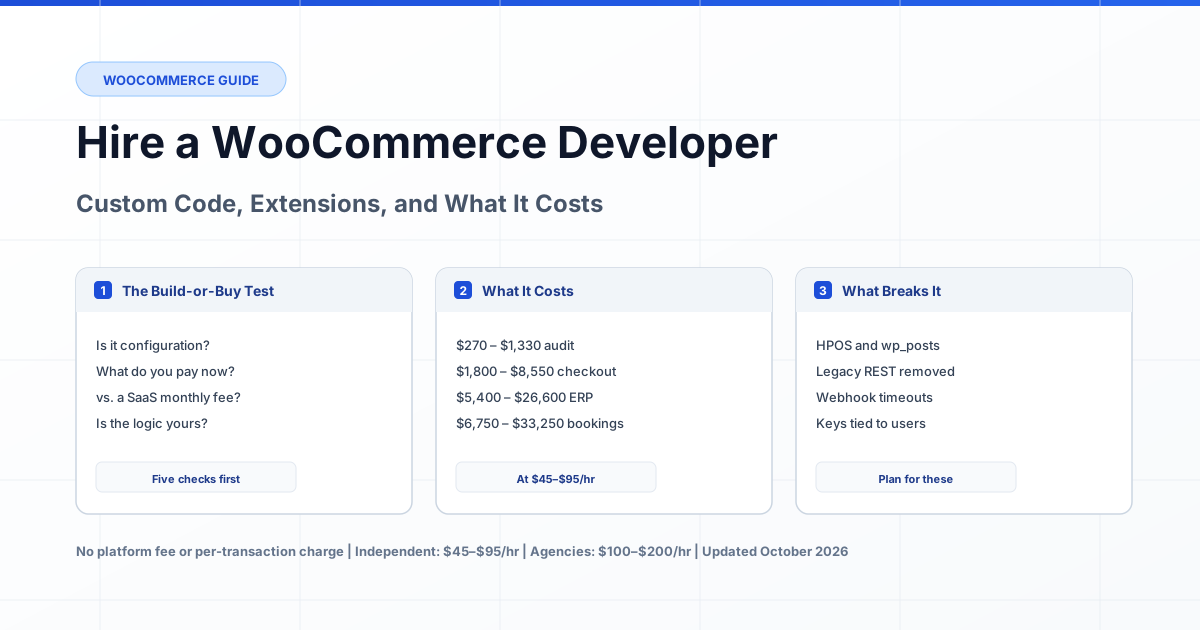
Current as of October 2026. WooCommerce has no platform fee and no per-transaction charge, which makes hiring decisions on this platform different from every other store option. The only software cost is the extensions you choose, and the only meaningful cost is engineering time. Hiring a WooCommerce developer for custom work costs $45–$95 per hour for an independent senior engineer, against $100–$200 per hour at WooCommerce agencies. The decision that matters is not platform cost — it is how many stacked extensions you are paying for annually, and how much custom code breaks on the next core release.
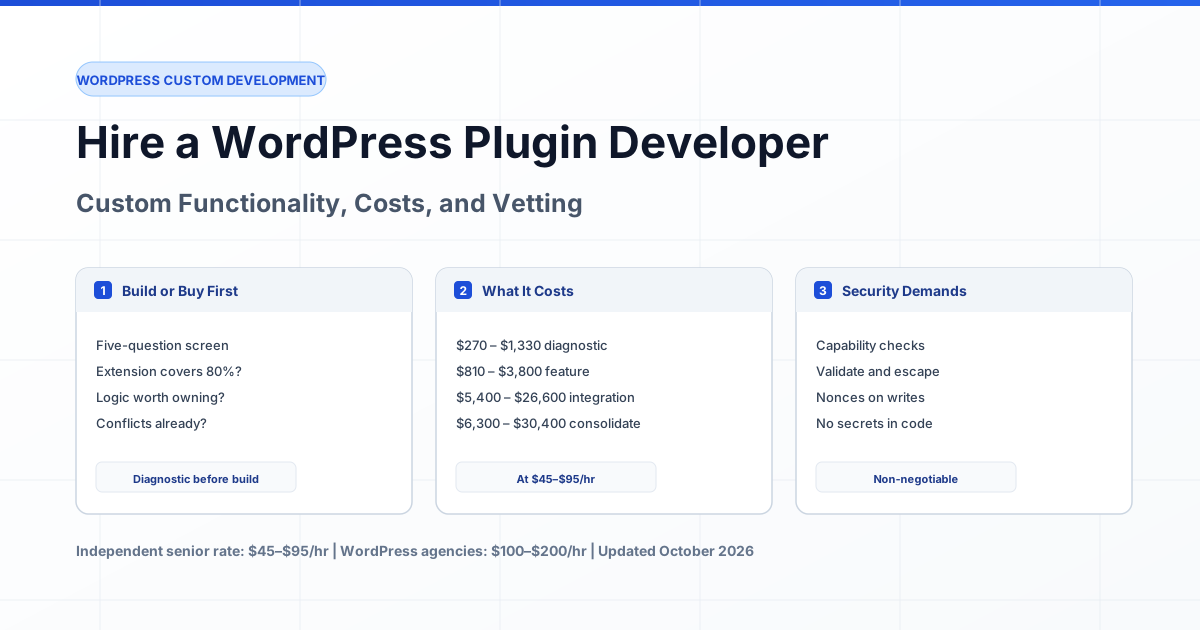
This guide is deliberately narrow. If you need a store built from scratch or you are choosing between WooCommerce and Shopify, start with our e-commerce developer hiring guide, which covers platform selection, migrations, and checkout vetting end to end. This article is about one thing: how to decide whether your specific WooCommerce requirement deserves custom code, what it costs, and which technical changes will break it if nobody planned for them. If you already know the answer is yes, hire a verified WordPress developer matched to your store.
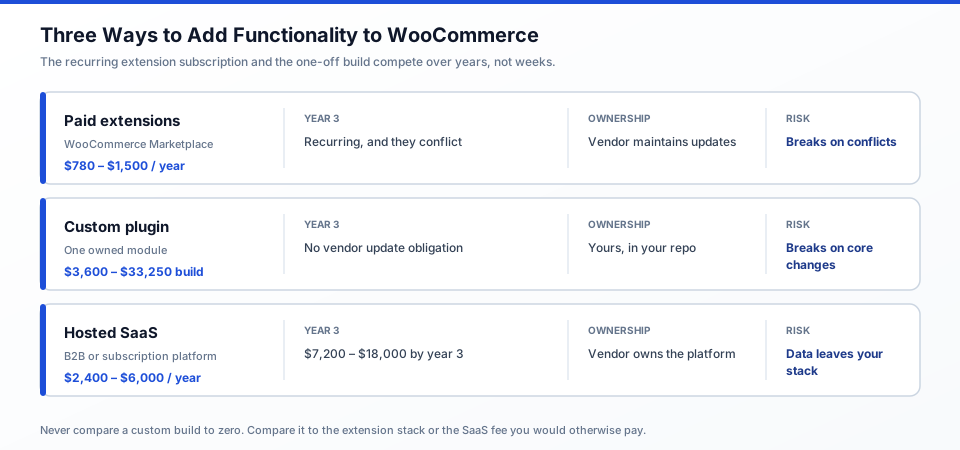
Figure 1: Three ways to add functionality to WooCommerce. The recurring extension subscription and the one-off custom build compete against each other over years, not weeks.
When WooCommerce Custom Code Is Worth It, and When It Is Not
Custom WooCommerce code earns its cost when your requirement involves logic the extension market does not model, when your order volume makes the per-transaction cost of a SaaS alternative worse than the build, or when you need ownership of the logic. It is a bad investment when a $100–$250 per year extension covers the requirement, or when the "customization" is a configuration the extension already exposes.
Work through this before requesting quotes:
- Check whether the requirement is configuration, not code. Shipping zones, tax rates, coupon logic, and product types are all configurable in core or in a well-made extension. If a support article answers it, no developer is needed.
- Add up what you are already paying. Five extensions at $150 each is $750 per year. Consolidation is frequently cheaper than the extension stack it replaces, and cheaper than a rebuild.
- Compare against the SaaS alternative, not against zero. A hosted B2B platform might cost $200–$500 per month. Against $2,400–$6,000 per year, a $6,000 custom build pays back in under two years — and keeps the data on infrastructure you control.
- Check whether the logic is yours to keep. Pricing rules, tax logic, and supplier-specific workflows should live in your codebase. If losing them would hurt, own them.
- Test whether an extension gets you 80% there. A $99 extension that handles 80% of your requirement is often better than a $7,000 plugin handling 100% of it, because you also get the vendor's update maintenance.
There is a case where no one will argue against you: you need something the WooCommerce Marketplace genuinely does not sell. Marketplace membership is far cheaper than a developer, which is why a boutique agency will quote you thousands of dollars for a plugin when a $79 annual extension already exists. That gap is where custom work is defensible.
What a WooCommerce Developer Costs in 2026
WooCommerce customization costs between $270 and $45,000 in 2026, driven by scope rather than platform complexity. Below are realistic hour ranges at the independent senior rate of $45–$95 per hour, with the agency equivalent at $100–$200 per hour for the same scope.
| Scope | Hours | At $45–$95/hr | At $100–$200/hr |
|---|---|---|---|
| Store audit: extension inventory, extension conflicts, build-vs-buy recommendation | 6–14 | $270 – $1,330 | $600 – $2,800 |
| Extension consolidation into one owned plugin | 80–180 | $3,600 – $17,100 | $8,000 – $36,000 |
| HPOS migration with extension compatibility verification | 14–30 | $630 – $2,850 | $1,400 – $6,000 |
| Checkout customization (custom fields, validation, step logic) | 40–90 | $1,800 – $8,550 | $4,000 – $18,000 |
| B2B pricing and quote workflow (tiered prices, approval flow, PDF) | 100–220 | $4,500 – $20,900 | $10,000 – $44,000 |
| ERP, accounting, or 3PL warehouse integration with webhooks and retries | 120–280 | $5,400 – $26,600 | $12,000 – $56,000 |
| Bookings or subscription logic that no extension models correctly | 150–350 | $6,750 – $33,250 | $15,000 – $70,000 |
These are planning estimates that assume you can supply a staging environment and product catalogue data. Both assumptions fail more often than store owners expect, which is why the audit row is worth paying for before committing to anything larger.
The Extension Stack Versus the Custom Build: The Real Arithmetic
The most common mistake in WooCommerce budgeting is comparing a custom build to zero. It is never zero. Compare against the extension stack you would otherwise run.
| Scenario | Year 1 | Year 3 |
|---|---|---|
| Six extensions ($110–$250/yr each, mixed vendor quality) | $780 – $1,500 | $2,340 – $4,500, plus the cost of a conflict when two of them break |
| Custom plugin consolidating those six (160 hrs at $65/hr) | $10,400 build | $10,400 + your maintenance time, no vendor update obligation |
| Hosted B2B SaaS ($200–$500/mo) | $2,400 – $6,000 | $7,200 – $18,000, and the data lives on someone else's platform |
Read that carefully. A $10,400 custom plugin costs more than six extensions in year one and usually more in year two. It wins only when the extensions are actually conflicting, when the consolidated logic is revenue-relevant enough that staff time savings pay it back, or when the requirement genuinely does not exist in the Marketplace. A $10,400 build to add a feature a $99 extension already handles is a bad trade, and a competent developer will tell you so before you sign.
The Technical Change That Breaks Custom Stores: HPOS
The single most consequential WooCommerce change for custom code is High-Performance Order Storage (HPOS). Before WooCommerce 8.2, orders lived in WordPress's _posts and _postmeta tables. HPOS moves them into four dedicated tables — _wc_orders, _wc_order_addresses, _wc_order_operational_data, and _wc_orders_meta — with dedicated indexes and far fewer read and write operations. It is enabled by default for all new installs from WooCommerce 8.2 onward, and it is opt-in for existing stores.
For store owners the benefit is real: faster checkout on high-volume stores, simpler targeted backups, and read/write locks that prevent race conditions on inventory. For custom code the consequence is concrete. Any custom code that queries order data directly through wp_posts or wp_postmeta breaks the moment HPOS is enabled. WooCommerce provides a compatibility layer that synchronises both storage locations, which is why a store can be silently running two copies of every order.
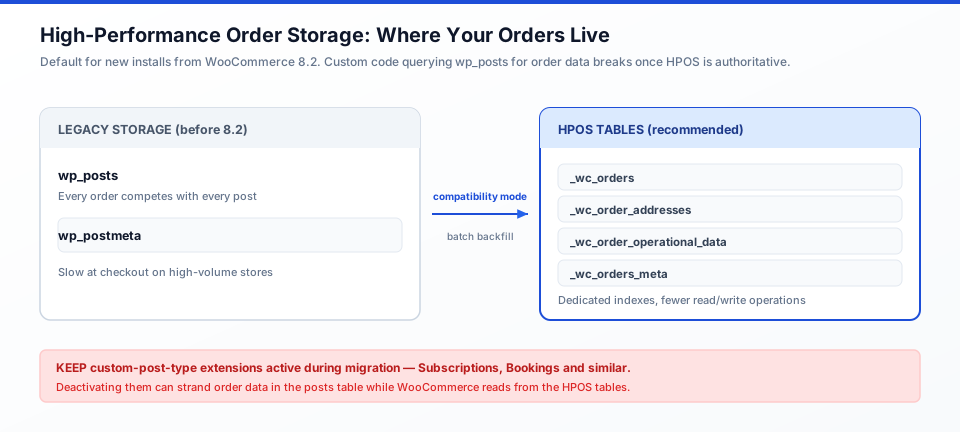
Figure 2: Where order data lives before and after HPOS. Compatibility mode synchronises both sides during the transition.
Ask your developer these questions specifically:
- Is compatibility mode enabled, and is it meant to stay on? Leaving it on indefinitely costs you the performance benefit you migrated for. It exists as a transition aid.
- Which extensions use custom post types, and are they HPOS-compatible? WooCommerce's own documentation warns specifically about extensions such as Subscriptions and Bookings: if they are deactivated during the HPOS migration, order data can end up stranded in one storage location while the system reads from another. The documented fix is to keep those extensions active throughout the migration.
- Does your custom code use the CRUD layer or direct SQL against WordPress tables? Direct queries against
wp_postsare the failure mode. The data store documentation explains the supported abstraction. - Has anyone verified the switch with real orders? WooCommerce blocks the HPOS toggle in the admin when an incompatible extension is detected, and links to a list of the offending extensions. If your developer cannot name them, they have not checked.
The full migration procedure, including the batch backfill and rollback path, is documented at WooCommerce's High-Performance Order Storage page. Read it before you commission the work, so you can tell whether the developer has.
The Second Change That Breaks Integrations: Legacy REST API Removal
The legacy REST API has been removed from WooCommerce core. WooCommerce now integrates directly with the WordPress REST API, and webhooks configured against the legacy API stop working. If an integration still needs it, WooCommerce ships a separate plugin to restore it — and if that plugin is what is keeping your ERP sync alive, you have a dependency on a compatibility shim rather than a supported integration.
What this means practically, and it is worth checking before you hire anyone:
- Any integration written against the old
wc-apiversion endpoints needs auditing. Current integrations should use the documented v3 endpoints, with the full reference in the WooCommerce REST API documentation. - API keys are tied to a WordPress user. Keys carry Read, Write, or Read/Write permissions based on that user's role. When staff leave, their keys must be revoked — and if an integration was running under a departed employee's account, you may have wider database access than you realised.
- Webhooks are the fragile part. The webhook documentation is explicit that delivery is not guaranteed: the receiving endpoint must respond quickly or WooCommerce retries, and repeated failure disables the webhook. An ERP that takes four seconds to acknowledge an order request will eventually silently stop receiving orders.
- Consumer secrets are shown once. If a developer generated keys and never recorded them, you are regenerating credentials, not recovering them.
These two changes — HPOS and legacy REST API removal — are the reason an experienced WooCommerce developer costs more than a generalist WordPress developer. They are not glamorous, and they are not the reason most stores call anyone. They are the reason a store with custom code eventually calls someone at 2am.
Three WooCommerce Engagements
Engagement 1: Consolidating six extensions into one owned plugin
Situation: A wholesale distributor ran separate extensions for tiered B2B pricing, quote requests, PDF invoices, shipping classes, product add-ons, and abandoned cart recovery. Two of them wrote to the same order meta key, and invoices intermittently showed the wrong customer.
Blocker: Each extension was individually maintained and individually fine. The conflict was structural, so no vendor patch would resolve it.
Approach: A nine-hour audit mapped what each extension actually did and identified one feature worth keeping from the abandoned-cart plugin and one worth dropping entirely. A single owned plugin consolidated tiered pricing and quote workflows, with the invoicing left to the existing extension after its data model was corrected.
Result: 170 hours at roughly $65/hr, about $11,000, against $1,020 per year in extension licences plus recurring billing errors. The intermittent invoice bug had been live for five months.
Engagement 2: HPOS migration on a high-volume store
Situation: A store with 40,000 orders was slow at checkout and had order queries timing out. The hosting provider had recommended more server resources.
Blocker: More hardware would have treated the symptom. Orders were stored in _posts and _postmeta, where every order query competed with every post on the site. One extension used custom post types and needed to stay active throughout the migration.
Approach: Verified extension compatibility first, then enabled compatibility mode to synchronise both locations, backfilled in batches, tested against real orders, and switched. Custom code was checked for direct wp_posts queries before the switch — two queries found and rewritten to the CRUD layer.
Result: 22 hours at $80/hr, $1,760, replacing a server upgrade that would have cost several times more per year. The two direct queries would have produced wrong results for customers once HPOS became authoritative.
Engagement 3: The build that should have been an extension
Situation: A store owner was quoted $9,500 to build a B2B quote-request workflow with tiered customer pricing.
Blocker: The quote was written before anyone checked the Marketplace or read the requirement carefully.
Approach: A four-hour review found the requirement matched an existing tiered-pricing extension, and that the quote-request flow could use an established plugin with a configuration change rather than a build. The gap was customer-group rules, which the extension supported through settings.
Result: The build was declined. Two extensions totalling $478 per year plus a day of configuration replaced a $9,500 custom project. The diagnostic cost $360 and saved $9,500.
How to Hire a WooCommerce Developer
WooCommerce work splits into three engagement shapes. The right one depends on whether you know the requirement yet.
| Engagement | Best When | Cost Shape |
|---|---|---|
| Fixed-scope audit | You have extensions and a growing list of complaints. This is the normal first step. | 6–14 hours, fixed fee |
| Part-time ongoing (10–20 hrs/week) | Consolidation or phased custom work across several months. | $45–$95/hr with a weekly cap |
| Project with milestones | The requirement is genuinely fixed and written down. | Milestone-based, 20–30% held back until acceptance |
Whatever the shape, require three things in writing: repository access on your hosting from the first commit, credentials owned by your company, and a handover document. The codebase takeover process we use for inherited projects applies here — a store owner should never be unable to maintain what a contractor built.
Seven Questions to Ask a WooCommerce Developer
These separate developers who have maintained stores from developers who build themes. The HPOS and API questions are the ones that reveal experience fastest.
- "Does this store need custom code, or would an extension plus configuration do it?" The correct first answer is often "an extension." A developer who must justify the build is more trustworthy than one who never questions it.
- "Is this store on HPOS, and does our custom code touch
wp_postsorwp_postmetafor order data?" They should answer with your actual version and your actual queries. If they do not know what HPOS is, you have your answer. - "Which of our extensions are HPOS-compatible, and which block the toggle?" WooCommerce shows this list in the admin. A developer who has not checked will not be able to name any.
- "Which API version do our integrations use, and have we revoked keys belonging to people who have left?" The legacy REST API is out of core, so anything still relying on it needs a plan.
- "What happens to our webhook deliveries if the receiving system is slow?" Expect an answer about acknowledgement timeouts and retries. "It just works" is not an answer.
- "What breaks if WooCommerce releases a major version next month?" They should describe staging verification and a rollback path, not enthusiasm.
- "Who owns the plugin, and where is it hosted?" Yours, in your repository, on your accounts.
The 3–5 Hour Paid WooCommerce Assessment
Before a multi-week engagement, ask a candidate to run a paid assessment on your actual store. Four to five hours is enough to reveal whether they can read a store's extension stack and give an honest answer.
Assignment: With read-only staging access, produce (1) an extension inventory with version, last update, annual cost, and what each actually does, (2) an HPOS readiness check — version, which extensions block the toggle, and any direct wp_posts order queries found, (3) a written recommendation of extension versus custom versus consolidation with an hour estimate, and (4) a 20-minute walkthrough. Read-only — an assessment, not a delivery.
| Signal | Pass | Fail |
|---|---|---|
| Extension inventory | Correct versions, dates, and costs, with what each plugin does. | "You have quite a few plugins there." |
| HPOS knowledge | Names the store's WooCommerce version and which extensions block the toggle. | Has not heard of HPOS. |
| Integration audit | Identifies the API version in use and any legacy dependency. | Assumes everything is current. |
| Build-or-buy honesty | Recommends extensions where they fit, and says so plainly. | Concludes a custom build regardless of findings. |
| Scope discipline | Stayed within five hours, listed open questions. | Started writing plugin code unprompted. |
Pay the candidate their standard rate. An engineer who declines a five-hour paid assessment is telling you something.
Typical Mistakes
- Comparing a custom build to zero instead of to the extension stack. The build is never competing against free.
- Buying a plugin that duplicates an extension already installed. Two pricing extensions conflict predictably and neither vendor will support you.
- Running custom order queries through
wp_posts. Works today, wrong the day HPOS becomes authoritative. Ask for a scan before enabling it. - Deactivating extensions during the HPOS migration. WooCommerce documents this as a cause of data discrepancy, because the extension's data stays in the posts table while the system reads from the HPOS tables.
- Leaving compatibility mode on permanently. It exists as a transition aid. Running it forever means running two copies of every order.
- Integrations on the legacy REST API. It is out of core. Anything relying on it runs through a compatibility shim.
- Long webhook acknowledgement times. Delivery is not guaranteed; slow endpoints cause retries, then silent disabling.
- No staging copy before a core update. A major WooCommerce release plus a Friday afternoon update is the standard failure narrative.
- Never revoking API keys for staff who left. Keys are tied to a WordPress user and inherit that user's role.
Expert Advice
Pay for the audit before you pay for the build, and keep the deliverable. It is the cheapest line item in the engagement and the only one that can tell you the build is unnecessary. If you take the plan to a different developer, you own the map of your own store.
Require a single repository and a single owner from day one. WooCommerce projects go wrong at boundaries: custom code in a theme, extensions nobody has audited, API keys held by a contractor, an integration running under a departed employee's account. Those boundaries are free to enforce at the start.
Treat HPOS as a scheduled project, not a setting to toggle. Enable compatibility mode, verify the extension list, scan your own code, backfill, test against real orders, then switch — and keep the rollback path documented. It is a two-hour task if planned and an outage if not.
Frequently Asked Questions
How much does it cost to hire a WooCommerce developer?
A store audit costs $270–$1,330 (6–14 hours). Extension consolidation costs $3,600–$17,100. HPOS migration costs $630–$2,850. Checkout customization costs $1,800–$8,550. B2B pricing and quote workflows cost $4,500–$20,900. ERP and warehouse integrations cost $5,400–$26,600. Independent senior developers charge $45–$95 per hour; WooCommerce agencies charge $100–$200 per hour.
Is custom WooCommerce development worth it, or should I buy extensions?
Buy extensions when one covers the requirement at 80% or better — the vendor handles updates and you avoid maintenance. Build custom when the logic is yours to keep, when extensions are genuinely conflicting, or when your requirement does not exist in the Marketplace. A $10,000 build rarely pays off against a $1,000 annual extension stack, but it can against a $500/month SaaS.
How much does WooCommerce itself cost?
The core plugin is free and there is no per-transaction or platform fee. Your software costs are the extensions you choose and your hosting. That absence of platform fees is what makes WooCommerce cost comparisons differ from Shopify — the real expense is engineering time, not the platform.
What is High-Performance Order Storage and does my store need it?
HPOS moves order data out of WordPress's _posts and _postmeta tables into four dedicated WooCommerce tables. It improves checkout speed on high-volume stores and simplifies targeted backups. It is default for new installs from WooCommerce 8.2 and opt-in for existing stores. It matters to you mainly because custom code querying order data directly through WordPress tables will return wrong results.
Can you migrate my store to HPOS?
Yes, and it typically takes 14–30 hours including verification. WooCommerce provides compatibility mode to synchronise both storage locations, a batch backfill process, and an instant rollback. The critical step is keeping custom-post-type extensions such as Subscriptions and Bookings active throughout the migration, because deactivating them can leave order data stranded.
Why did our integration stop working after a WooCommerce update?
The most likely cause is the legacy REST API, which was removed from WooCommerce core. WooCommerce now integrates directly with the WordPress REST API, and webhooks configured against the legacy API stop working. Restoring it requires a separate compatibility plugin — a sign the integration needs updating rather than patching.
How do I stop webhook deliveries from silently failing?
WooCommerce does not guarantee webhook delivery. The receiving endpoint must respond quickly; persistent failure causes retries and eventually disables the webhook. Ask your developer to confirm acknowledgement timeouts on the ERP side, and to set up monitoring on the webhook's failure log so a disabled webhook is noticed the same day rather than at month-end reconciliation.
Who owns a custom WooCommerce plugin after it is built?
You do, if you set it up correctly: source in a repository you control, hosted on your infrastructure, credentials in your company accounts, and a written statement of ownership. If the plugin exists only in a contractor's account, you do not own it regardless of what an invoice says. This also matters because WooCommerce extension code inherits your store's liability.
Do we need a developer after launch?
Most stores do, in small doses: core updates verified on staging, extension compatibility checked before major releases, and integrations monitored. Budget 2–4 hours a month at $45–$95 per hour, or roughly $400–$1,500 per month depending on how much custom code your store runs. Stores with no custom code need far less.
Should we migrate to headless WooCommerce?
Only for a specific reason: a React or Next.js front end that the block editor cannot express, or a mobile app sharing the same backend. It roughly doubles the engineering surface because you now maintain a build pipeline alongside WordPress. Our full-stack developers handle this, but treat it as a project decision rather than an upgrade.
Ready to scope your store? Compare developer rates and hire a verified WooCommerce developer — starting with the audit, so the build you pay for is one you actually need.
Written by Michael Melnyk
Senior IT Technical Writer & Technology Analyst
Senior Technical Writer and IT Industry Analyst with over 7 years of experience analyzing software engineering ecosystems, tech leadership models, and developer procurement frameworks.