How to Hire a Developer to Migrate Your Website to a VPS Without Downtime or Data Loss
When shared hosting throttles traffic or crashes under load, migrating to an unmanaged VPS delivers dedicated compute and sub-second response times. Here is how to hire a Linux engineer to handle database freezes, DNS propagation, and server hardening without downtime.

Updated October 2026. When an online store, SaaS application, or content portal outgrows shared cPanel hosting, the symptoms emerge quickly: pages freeze during traffic spikes, database queries hit memory execution ceilings, and hosting providers enforce artificial CPU throttling. Upgrading to a Virtual Private Server (VPS) on cloud providers such as Hetzner, DigitalOcean, Linode, or AWS Lightsail provides dedicated computing power, isolated memory, and root-level operating system control for as little as $7 to $25 per month. However, migrating a live production site involves critical operational risks: unsynchronized database records, broken checkout carts, disabled corporate email routing, and search engine index drops.
For non-technical business founders, moving away from managed shared hosting to an unmanaged Linux server requires specialized systems engineering expertise. An experienced freelance Linux administrator or DevOps engineer will audit runtime dependencies, configure reverse proxies, set up automated off-site backups, and execute a planned cutover with zero downtime. If you need an independent engineer to plan or execute your server migration, you can review vetted specialists for one-time developer tasks or retain an engineer on an hourly developer arrangement with transparent weekly caps.
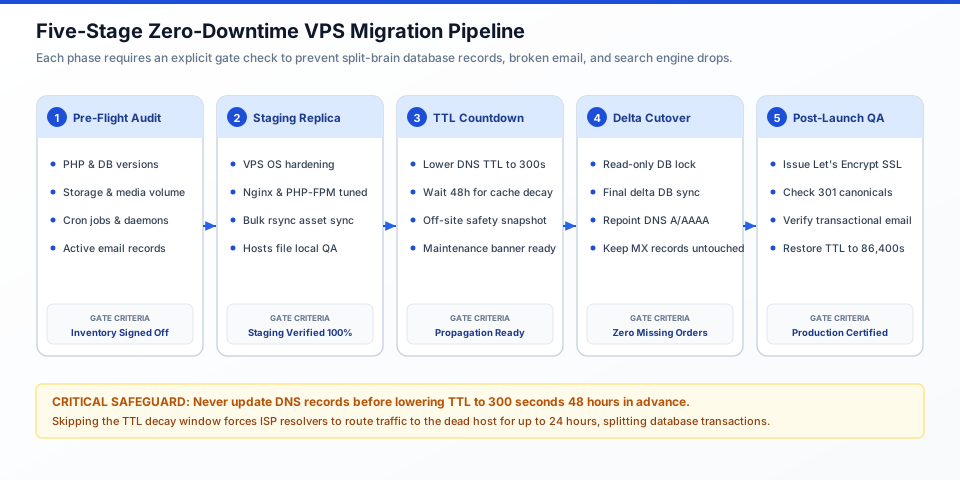
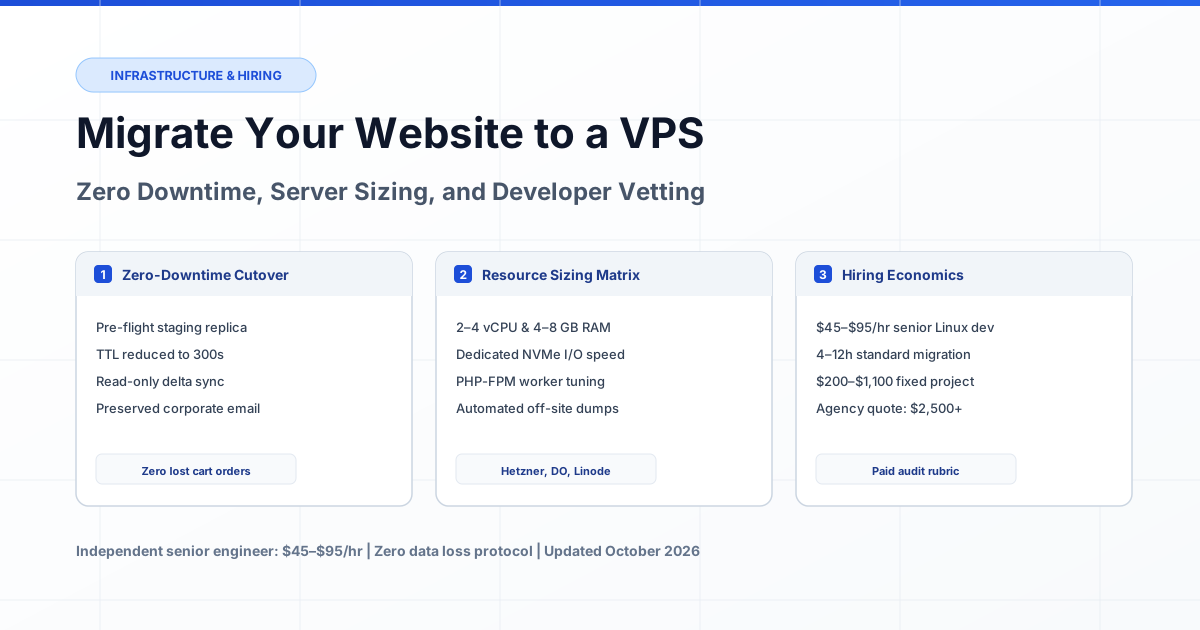
Figure 1: The five-stage zero-downtime migration pipeline — transitioning from initial audit to a staging replica, executing a read-only delta synchronization, and repointing DNS records without interrupting email routing.
What Is a VPS and When Does a Growing Website Require One?
A Virtual Private Server (VPS) is an isolated virtual machine running its own copy of an operating system with dedicated slices of CPU cores, RAM, and NVMe disk storage partitioned from a physical parent server. Unlike shared hosting, where hundreds of unrelated websites compete for the same execution threads and web server processes, a VPS guarantees predictable hardware allocations and grants administrative root access to customize system software.
Most commercial websites begin on shared cPanel hosting (such as Bluehost, SiteGround, or GoDaddy) because it is cheap and requires zero server configuration. However, shared environments impose hidden operational constraints that hinder growing commercial projects:
- Noisy Neighbor Syndrome: If an unrelated site sharing your physical hardware suffers a Distributed Denial of Service (DDoS) attack or executes poorly indexed database queries, your site suffers sluggish response times or temporary downtime.
- Resource Throttling: Shared hosts use utilities like CloudLinux LVE to aggressively terminate PHP worker processes when memory usage exceeds 512 MB or CPU usage peaks for longer than 30 consecutive seconds, generating 503 Service Unavailable errors.
- Restricted Software Stacks: Shared platforms disallow custom daemon workers, Redis object caching servers, Node.js background processors, and newer database optimization engines.
- High Latency (TTFB): Time to First Byte on typical shared hosting regularly fluctuates between 800 milliseconds and 2.5 seconds, directly penalizing Google Core Web Vitals rankings and user checkout conversions.
A website requires migration to a VPS when monthly pageviews exceed 25,000 to 50,000, when database size surpasses 1 GB, when an e-commerce catalog processes multiple simultaneous checkouts, or when background tasks (such as PDF generation, automated feeds, or email marketing dispatches) cause user-facing pages to stall.
Infrastructure Comparison: Shared Hosting vs Managed Cloud vs Unmanaged VPS
An unmanaged VPS offers the highest compute-to-cost ratio in infrastructure, delivering up to 4 dedicated vCPU cores and 8 GB of RAM for $12 to $25 per month, whereas managed cloud platforms charge $100 to $300 per month for equivalent hardware allocations. The critical distinction lies in administrative responsibility: on an unmanaged server, security hardening, firewall configuration, backup automation, and software updates belong entirely to you and your contracted engineer.
| Infrastructure Model | Monthly Hosting Fee | Hardware Resources | Administrative Burden | Best Suited For |
|---|---|---|---|---|
| Shared cPanel Hosting | $5 – $20 / month | Shared pool; pooled CPU and RAM; throttled | Zero system administration; managed via cPanel GUI | Hobby sites and early landing pages under 10,000 visits |
| Managed Cloud PaaS (WP Engine, Kinsta) | $35 – $350+ / month | Containerized runtime; strictly metered visits | Vendor manages patches; no root shell or custom daemons | Marketing teams without technical contractors |
| Unmanaged VPS (Hetzner, DO, Linode) | $7 – $48 / month | 2–8 dedicated vCPU; 4–16 GB RAM; NVMe storage | Requires initial OS setup, Nginx tuning, and hardening | Growing e-commerce, custom web apps, and serious portals |
| High-Availability VPS Cluster | $85 – $400 / month | Multi-node; decoupled database and load balancer | Requires ongoing DevOps monitoring and automated sync | Enterprise stores with strict 99.99% uptime requirements |
For mid-sized online businesses, spending $1,200 to $3,600 annually on managed WordPress or cloud hosting often represents misallocated capital. Paying an independent systems engineer a one-time fee of $300 to $700 to configure an unmanaged VPS running Ubuntu LTS, Nginx, and Redis reduces annual hosting overhead to less than $200 while unlocking superior server throughput.
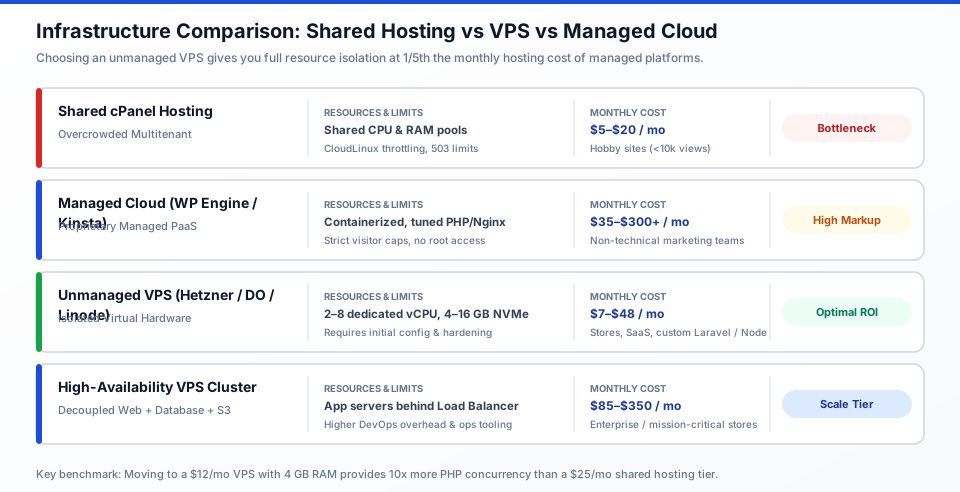
Figure 2: Comparing infrastructure tiers across resource isolation, monthly costs, and administrative boundaries to guide hardware selection.
The Five Technical Stages of a Zero-Downtime VPS Migration
Executing a website migration without downtime requires establishing a fully functional clone of the production environment on the destination VPS, testing functionality through local host overrides, and synchronizing only delta changes during a planned, 5-minute database freeze. Running a migration without this staged workflow guarantees corrupted order records, lost customer accounts, and missing uploaded media files.
1. Pre-Flight Architecture and Dependency Audit
Before launching a server or altering DNS records, a competent engineer catalogs the existing production runtime environment. This discovery milestone prevents runtime version mismatches that cause fatal application crashes after cutover.
- Runtime Versions: Document exact PHP, Node.js, Python, or Ruby versions, alongside installed system extensions (such as imagick, sodium, curl, or mbstring).
- Database Engine: Identify SQL versions (MySQL 8.0, MariaDB 10.11, PostgreSQL 16), character set collations (e.g., utf8mb4_unicode_ci), and storage engine types (InnoDB vs MyISAM).
- Background Daemons: Document active cron schedules, Supervisor workers, queued job processors, and email routing setups.
- DNS and Mail Inventory: Extract existing DNS zone files, identifying mail exchange (MX) records, Sender Policy Framework (SPF), DomainKeys Identified Mail (DKIM), and external domain verifications.
2. Staging Server Provisioning and Security Hardening
The systems engineer deploys a clean Linux operating system (typically Ubuntu 24.04 LTS or Debian 12) on the target VPS provider. Rather than relying on heavy, bloated server panels that consume 1.5 GB of RAM, senior engineers configure a lightweight, optimized software stack:
- Web Server and Proxy: Installation of Nginx or Caddy configured with HTTP/2 or HTTP/3, TLS 1.3 cryptographic ciphers, and optimized static asset caching headers.
- Process Manager: Fine-tuning PHP-FPM pool directives (`pm.max_children`, `pm.start_servers`, `pm.max_spare_servers`) based on available physical memory to prevent Out of Memory (OOM) kernel crashes.
- Database Tuning: Adjusting `innodb_buffer_pool_size` (typically 50% to 70% of total server RAM on dedicated database instances) and setting reasonable connection pool limits.
- Base Security Hardening: Enforcing SSH public-key authentication, disabling root login, configuring an uncomplicated firewall (UFW) to permit only ports 22, 80, and 443, and installing Fail2ban to block brute-force authentication attacks.
3. Staging Data Transfer and Pre-Launch Verification
The engineer transfers application files, uploaded media assets, and a baseline database snapshot from the source hosting account to the new VPS using encrypted file transfer utilities (`rsync` over SSH). At this stage, the public domain still points to the old server.
To verify that the site operates properly without exposing unfinished infrastructure to the public, the engineer configures the local computer's `hosts` file. By mapping the production domain name directly to the destination VPS IP address locally, the client and engineer can log into the admin dashboard, test payment gateways in sandbox mode, verify PDF invoice generation, and confirm that all media assets load over valid internal paths.
4. DNS TTL Reduction and the Delta Cutover
A "split-brain" database occurs when DNS traffic is updated while both servers accept new customer writes, creating conflicting database histories that require days of manual data reconciliation. Preventing this requires a two-step cutover protocol:
- Step 1 (48 Hours Prior): Lower the Time to Live (TTL) on domain A and AAAA records from standard values (86,400 seconds or 24 hours) down to 300 seconds (5 minutes). This ensures that Internet Service Providers across the globe flush cached IP addresses rapidly once the switch is announced.
- Step 2 (The Cutover Window): During a scheduled low-traffic window, place the old website into temporary read-only or maintenance mode. Export a final delta database dump of records created since the baseline sync, import it into the VPS database, and immediately update the domain A record at your DNS provider (such as Cloudflare, Route 53, or Namecheap).
5. SSL Handshake, Post-Launch QA, and TTL Restoration
Once DNS updates point to the new VPS IP address, an automated Let's Encrypt SSL certificate is provisioned via Certbot. The engineer audits HTTP to HTTPS 301 canonical redirects, verifies that transactional emails reach inboxes without spam penalties, validates scheduled backup automations, and restores domain TTL back to standard values.
Real-World Case Studies: How VPS Migrations Solve Business Bottlenecks
Examining real production migrations illustrates why infrastructure transitions succeed when planned around business workflows and where unprepared cutovers fail.
Case 1: Eliminating Black Friday Checkout Bottlenecks for a WooCommerce Store
- Initial Situation: A specialty apparel store generating $65,000 in monthly revenue hosted 4,500 product listings on shared cPanel hosting. Every time marketing sent an email newsletter to 25,000 subscribers, concurrent traffic caused page load times to climb from 1.8 seconds to 9.2 seconds.
- The Obstacle: During a seasonal promotion, the host's CloudLinux limit killed MySQL connections, returning 508 Resource Limit Reached errors for 40 minutes and abandoning approximately $4,200 in customer shopping carts.
- The Technical Solution: An independent DevOps engineer migrated the store to a Hetzner Cloud CPX31 instance (4 vCPU, 8 GB RAM) for $16 per month. The engineer installed Ubuntu 24.04, Nginx, PHP 8.3 FPM, and configured Redis persistent object caching for WooCommerce database transients.
- Business Outcome: Average Time to First Byte dropped from 1,400ms to 180ms. During the subsequent promotion, the server processed 180 concurrent active checkouts with CPU utilization remaining below 35%, and zero dropped transactions.
Case 2: Rescuing a Custom Laravel Web Application from an Unmaintained Agency Host
- Initial Situation: A B2B logistics company operated a proprietary shipment tracking portal built on Laravel. The agency that developed the application hosted it on their internal, unmonitored shared server running an end-of-life PHP 7.4 runtime with no automated backups.
- The Obstacle: The client wanted to terminate the agency relationship, but the agency refused to assist with the transfer, providing only basic FTP credentials and a database export.
- The Technical Solution: The company hired a freelance systems specialist on an hourly retainer. The specialist provisioned a DigitalOcean Droplet (2 vCPU, 4 GB RAM), installed PHP 8.2, resolved deprecated framework dependencies, configured Nginx, and established automated daily snapshots transferred to off-site Amazon S3 buckets.
- Business Outcome: Complete independence from the former agency, a 45% reduction in internal dashboard load times, and an encrypted, verified disaster recovery backup pipeline created in 7 billable developer hours ($560 total).
Case 3: Migrating Web Infrastructure Without Disrupting Corporate Microsoft 365 Email
- Initial Situation: A regional consulting firm with 40 employees hosted their corporate WordPress website on the same shared cPanel account that originally handled their domain email. While they had previously migrated their inboxes to Microsoft 365, their domain DNS was still hosted inside the shared cPanel zone editor.
- The Obstacle: Management hesitated to migrate web servers for two years because an earlier attempt by a junior contractor accidentally deleted the company's MX and DKIM records, paralyzing corporate communication for 36 hours.
- The Technical Solution: A senior systems administrator migrated the authoritative DNS management from the old hosting company to Cloudflare DNS before touching server files. The administrator copied all MX, SPF, Autodiscover, and DKIM cryptographic records, verified email flow via external diagnostic tools, and only then pointed the website A record to a newly hardened VPS.
- Business Outcome: Zero email bounces or downtime across 40 corporate accounts, uninterrupted website migration, and free DDoS mitigation enabled at the DNS edge.
How Much Does It Cost to Hire a Developer for a VPS Migration?
Hiring an experienced freelance Linux systems engineer for a standard website migration typically costs between $200 and $750 for 4 to 8 hours of focused work at market rates of $45 to $95 per hour. In contrast, traditional digital agencies charge $2,000 to $5,000 minimum project retainers for identical cutover tasks, often delegating the execution to junior staff while charging premium agency markups.
| Project Complexity | Typical Scope & Tech Stack | Required Hours | Independent Senior Cost ($45–$95/hr) | Traditional Agency Cost ($150–$250/hr) |
|---|---|---|---|---|
| Standard Website Migration | WordPress, static CMS, or simple blog; single MySQL database under 1 GB; media under 10 GB; Let's Encrypt SSL. | 4 – 6 hours | $180 – $570 | $1,200 – $2,500 |
| Dynamic E-Commerce Cutover | WooCommerce, Magento, or Prestashop; active customer orders; Redis cache setup; zero-downtime delta DB sync. | 6 – 10 hours | $270 – $950 | $2,000 – $4,000 |
| Custom Full-Stack Web App | Node.js, Laravel, Django, or Rails; background queue workers (Supervisor); PostgreSQL; cron jobs; S3 offloading. | 8 – 14 hours | $360 – $1,330 | $2,500 – $5,500 |
| Emergency Server Rescue & Migration | Existing host crashed, infected with malware, or unreachable; manual data extraction from raw filesystem backups. | 10 – 18 hours | $600 – $1,710 | $3,500 – $7,000 |
Engaging an independent developer under a time-and-materials agreement with a strict 8-hour cap guarantees that you pay solely for hands-on systems architecture. If an existing server has already collapsed or returns gateway timeouts, review our emergency intervention workflows on how to fix production server crashes or consult current market pricing trends on our software development cost planning guide.
Critical Migration Pitfalls and Architectural Disasters to Avoid
Most server migration failures do not stem from server hardware defects; they result from skipped procedural safeguards and unverified assumptions. Non-technical clients should verify that their contractor guards against these six critical failure modes:
- Neglecting the DNS TTL Countdown: Leaving DNS TTL at 86,400 seconds (24 hours) prior to cutover means that when the IP is repointed, international Internet Service Providers continue routing half your visitors to the decommissioned server for an entire day.
- The Unfrozen Database ("Split-Brain"): If dynamic writes remain enabled while a multi-gigabyte database transfers over a slow network pipe, orders and comments submitted during the transfer will not exist on the new server, causing permanent customer transaction loss.
- Overwriting MX and SPF Records: Pointing nameservers away from a shared host without first copying custom mail exchange records instantly disconnects corporate Google Workspace or Microsoft 365 services.
- Mismatched File Permissions: Incorrect Linux file ownership (e.g., assigning files to `root:root` instead of the web server user `www-data`) prevents WordPress or Laravel from saving uploaded media files or writing cache logs, triggering immediate 500 Internal Server Errors.
- Hardcoded Absolute Paths and IPs: Codebases that rely on static path configurations (such as `/home/username/public_html` from cPanel) fail silently when moved to standard Linux directories like `/var/www/html`.
- Missing Off-Site Automated Backups: Setting up a VPS without automated snapshots stored in an external geographic region leaves the business vulnerable to catastrophic hardware failures or human administrative error.
How to Vet a Freelance Systems Developer: Interview Questions and Red Flags
Vetting an infrastructure engineer requires testing their operational methodology rather than asking abstract theoretical questions. A senior Linux administrator focuses on reversibility, risk mitigation, and verification before executing commands.
Three Diagnostic Interview Questions to Ask Candidates
- "How will you guarantee that customer orders or user signups placed during the migration are not lost?"
Unsatisfactory Answer: "I will do the migration late at night so nobody is on the website."
Senior Engineer Answer: "We will lower the DNS TTL to 300 seconds 48 hours prior. During cutover, we will place the old site into read-only mode, dump the delta database, import it to the VPS, switch the DNS A record, and leave the old host routing to a maintenance notice until global propagation completes." - "How do we test the new VPS before updating our public domain DNS records?"
Unsatisfactory Answer: "We can use a temporary sub-domain or test it after we change nameservers."
Senior Engineer Answer: "We will configure your local machine's `hosts` file to resolve your actual production domain to the target VPS IP address. This enables thorough end-to-end testing of authentication, checkout flows, and SSL handshakes in the exact target environment without any public exposure." - "What happens to our corporate email during the server cutover?"
Unsatisfactory Answer: "Email will move over when we change the nameservers to the new host."
Senior Engineer Answer: "We will inspect your current DNS records before making any changes. If your email is on Google Workspace or Microsoft 365, we will keep nameserver authority decoupled or replicate MX, SPF, and DKIM records precisely on the new DNS zone so email delivery is 100% unaffected."
Candidate Red Flags vs Senior Signals
| Evaluation Dimension | Junior or Reckless Contractor (Red Flag) | Senior Systems Administrator (Green Flag) |
|---|---|---|
| Execution Strategy | Migrates live files directly; updates nameservers without staging tests. | Creates isolated staging replica; verifies via local hosts mapping first. |
| DNS Management | Changes nameservers abruptly; ignores TTL settings. | Lowers TTL to 300s 48 hours in advance; maintains external DNS authority. |
| Database Handling | Takes a single manual dump; leaves write operations open during transfer. | Enforces read-only freeze window; executes delta synchronization. |
| Server Security | Uses root password login; disables firewall to solve connectivity errors. | Enforces SSH key pairs; configures UFW firewall and Fail2ban protection. |
| Backup Protocol | Relies on whatever default backup the old host happens to provide. | Creates verified local tarballs and configures automated off-site S3 snapshots. |
The 3 to 5 Hour Practical Migration Audit and Trial Task
Rather than hiring a developer for an unverified full-scale cutover, begin by commissioning a paid 3 to 5 hour Pre-Migration Audit and Staging Proof-of-Concept. This initial trial ($150 to $450 at standard hourly rates) allows you to evaluate technical thoroughness, communication clarity, and architectural competence before touching production domain records.
Pre-Migration Audit Scope of Work
- Phase 1: Environment Diagnostic (1 Hour): The developer audits the existing hosting account, cataloging total storage footprints, active database table sizes, PHP extension requirements, background cron jobs, and third-party API dependencies.
- Phase 2: VPS Sizing and Staging Setup (2 Hours): The developer provisions the target VPS instance on your own cloud provider account (Hetzner, DigitalOcean, or Linode), hardens OS security settings, installs the optimized web stack, and configures a staging virtual host.
- Phase 3: Migration Runbook Delivery (1 Hour): The developer delivers a written phased cutover runbook detailing the planned maintenance window, expected delta synchronization duration, DNS switchover timeline, and rollback plan.
Pass/Fail Grading Rubric for the Migration Trial
| Grading Criteria | Passing Mark (Approved for Cutover) | Failing Mark (Disqualify Contractor) |
|---|---|---|
| Account Ownership | The developer sets up infrastructure directly within your own cloud account; you retain 100% administrative billing and root credentials. | The developer provisions the server on their personal account and attempts to resell hosting access. |
| Security Baseline | Root password login disabled; SSH key authentication active; UFW firewall enabled; SSL certificate ready. | Server accessed via plain root password; default open ports; no security hardening applied. |
| Staging Integrity | Staging site loads identically via local hosts override; admin dashboard accessible; zero PHP fatal errors. | Staging site exhibits broken styling, missing media assets, or database connection errors. |
| Cutover Plan Quality | Written runbook specifies exact TTL countdown, read-only maintenance window, and verified rollback procedure. | Developer proposes moving data whenever convenient without a structured cutover plan. |
Expert Advice: Ongoing VPS Hardening and Maintenance Retainers
Once your website is running on an unmanaged VPS, ongoing maintenance changes from passive shared-hosting complacency to active systems management. Unlike shared hosts that patch underlying operating systems automatically, an unmanaged Linux server requires deliberate maintenance routines.
Non-technical business owners should consider retaining their migration specialist for a lightweight fractional retainer (2 to 4 hours per month, approximately $100 to $350 monthly) to oversee the following ongoing health checks:
- Automated Security Upgrades: Configuring `unattended-upgrades` on Ubuntu to patch Linux kernel security vulnerabilities automatically without human intervention.
- Automated Off-Site Backups: Implementing automated daily database dumps and weekly file synchronizations encrypted and stored in Amazon S3 or Cloudflare R2, completely isolated from the primary VPS provider.
- Uptime and Resource Monitoring: Setting up lightweight monitoring (via Netdata, UptimeKuma, or Datadog) to alert the engineer if memory consumption exceeds 85% or available disk space falls below 15%.
- SSL Auto-Renewal Verification: Verifying that Certbot Let's Encrypt cron jobs execute without manual intervention every 60 days before certificates expire.
If you prefer to engage verified senior engineers without agency overhead or long-term staffing contracts, explore our catalog of vetted talent on ProofDevs verified software engineers.
Frequently Asked Questions
How long does a website migration to a VPS typically take?
A standard website migration requires between 4 and 10 hours of hands-on engineering time distributed across 2 to 3 calendar days. The calendar duration is necessary because DNS Time to Live (TTL) values must be lowered 48 hours before the actual cutover to prevent international routing delays.
Will my website experience downtime during the migration?
No, a properly managed migration achieves zero user-facing downtime. The existing website continues serving traffic on the old host while files and databases are cloned to the VPS. The only interruption is a brief 3 to 5 minute read-only maintenance window during which final database delta changes are synchronized immediately before the DNS switch.
How much does it cost to hire an engineer to migrate a website to a VPS?
Hiring an independent senior Linux systems engineer costs between $200 and $750 for most commercial websites, based on 4 to 8 hours of work at $45 to $95 per hour. Large-scale platforms with multi-gigabyte databases or custom distributed microservices require 10 to 16 hours, costing between $600 and $1,500.
What is the difference between shared hosting and an unmanaged VPS?
Shared hosting pools hundreds of independent websites onto one physical server, where unmonitored neighbors can consume shared CPU, and hosts strictly limit memory and process runtimes. An unmanaged VPS provides dedicated CPU cores and RAM with complete root administrative control, but requires the customer or their engineer to configure security, firewalls, and updates.
What happens to my corporate email when migrating website hosting?
If your corporate email is managed via Google Workspace or Microsoft 365, your email is completely independent of your web hosting and will experience zero downtime, provided your engineer preserves existing MX, SPF, and DKIM DNS records. If your email currently runs inside cPanel Webmail on the old host, your engineer must migrate email mailboxes separately or help transition them to a dedicated business email provider before shutting down the old host.
Which VPS provider should I choose for my website?
For European and North American audiences seeking optimal performance per dollar, Hetzner Cloud offers the strongest compute value in the industry (e.g., 4 vCPU and 8 GB RAM for approximately €14 per month). For global edge networks and straightforward developer tooling, DigitalOcean and Linode (Akamai) deliver consistent uptime metrics starting at $12 to $24 per month.
How far in advance should DNS TTL be reduced before cutover?
DNS TTL should be reduced to 300 seconds (5 minutes) exactly 48 hours prior to the planned cutover. This allows existing 86,400-second (24-hour) DNS cache records stored in Internet Service Provider resolvers across the globe to expire naturally before the IP address change is executed.
Can a non-technical founder manage an unmanaged VPS without a developer?
Managing an unmanaged Linux VPS via command-line SSH is not recommended for non-technical founders, as improper commands or missed security patches can leave the server vulnerable to malware or accidental data deletion. However, installing a dedicated web-based control panel such as CloudPanel, SpinupWP, or RunCloud allows founders to manage daily site backups and SSL certificates through a clean web GUI while a developer handles root server configuration.
How does an engineer test the new server before changing domain DNS?
The engineer tests the destination VPS by editing the local computer's `hosts` file (`/etc/hosts` on macOS/Linux or `C:\Windows\System32\drivers\etc\hosts` on Windows). By mapping the actual domain name to the new VPS IP address locally, the engineer can browse the live site, execute checkout transactions, and test dashboard functionality without affecting public visitors.
What is a "split-brain" database and how is it prevented?
A split-brain database occurs when DNS traffic points partially to the old server and partially to the new server while both database instances accept new data, creating two diverging histories of customer orders or user signups. It is prevented by enforcing a read-only lock on the old database during cutover and syncing the final delta dump right before repointing DNS records.
Do I need cPanel on my new VPS?
No, cPanel is not required on an unmanaged VPS and is often discouraged because it consumes 1 to 1.5 GB of system memory solely to run its management interface and requires expensive monthly licensing ($17 to $35+ per month). Senior engineers typically run a clean Nginx stack directly on Ubuntu or utilize lightweight, high-performance panels such as CloudPanel or RunCloud.
What credentials should I provide to the developer for the migration?
You should provide SSH or control panel access to the old hosting account, access to your domain DNS registrar (such as Cloudflare or Namecheap), and an administrative user invite to your newly created cloud hosting account (DigitalOcean, Hetzner, or AWS). Never share master account passwords; use team invites, delegated access, and temporary passwords that are revoked immediately after cutover.
Planning to migrate your production website or e-commerce store to an unmanaged VPS? Submit a project request on ProofDevs one-time developer tasks or browse available specialists on our verified independent developer directory to receive fixed-scope proposals from senior systems engineers with zero downtime guarantees.
Written by Michael Melnyk
Senior IT Technical Writer & Technology Analyst
Senior Technical Writer and IT Industry Analyst with over 7 years of experience analyzing software engineering ecosystems, tech leadership models, and developer procurement frameworks.