Hire an HTML/CSS Developer: Mobile-First Layouts, Cross-Browser Compatibility & Speed
Hiring an independent HTML/CSS developer delivers mobile-first responsiveness, cross-browser rendering parity, and sub-second Core Web Vitals without bloated JavaScript frameworks.

Updated October 2026. An HTML/CSS developer—frequently designated as an HTML markup specialist, web markup developer, or front-end markup engineer—is a specialized software practitioner focused on crafting clean, standards-compliant HTML5 structure and responsive CSS styling. While full-stack engineers and JavaScript framework developers concentrate primarily on application state, database schemas, and API integration, they often assemble markup out of generic <div> tags. This practice leads to bloated stylesheets, severe Cumulative Layout Shift (CLS), broken viewport rendering on mobile devices, and accessibility non-compliance. Contracting a dedicated HTML/CSS specialist ensures your web interfaces render instantaneously, scale across device form factors, and pass strict Web Content Accessibility Guidelines (WCAG).
Hiring an independent senior HTML/CSS developer on an hourly arrangement costs between $35 and $75 per hour. In contrast, traditional front-end agencies and conversion studios charge $100 to $180 per hour with rigid minimum contract commitments, often routing implementation to offshore teams that rely on automated export tools. For software companies, marketing agencies, and founders launching marketing pre-landers, refactoring bloated design systems, or converting complex design files into clean code, engaging an independent engineer for a one-time developer task delivers production-ready templates in 1 to 4 days.
On freelance marketplaces like Upwork, Freelancer.com, and Fiverr, businesses often post job requirements seeking an HTML CSS coder, hire HTML coder, or HTML CSS programmer. While "coder" remains a frequent colloquial search query among non-technical business operators, professional web markup engineering demands rigorous knowledge of layout algorithms, DOM rendering engines, CSS specificity architectures, and cross-browser rendering quirks.
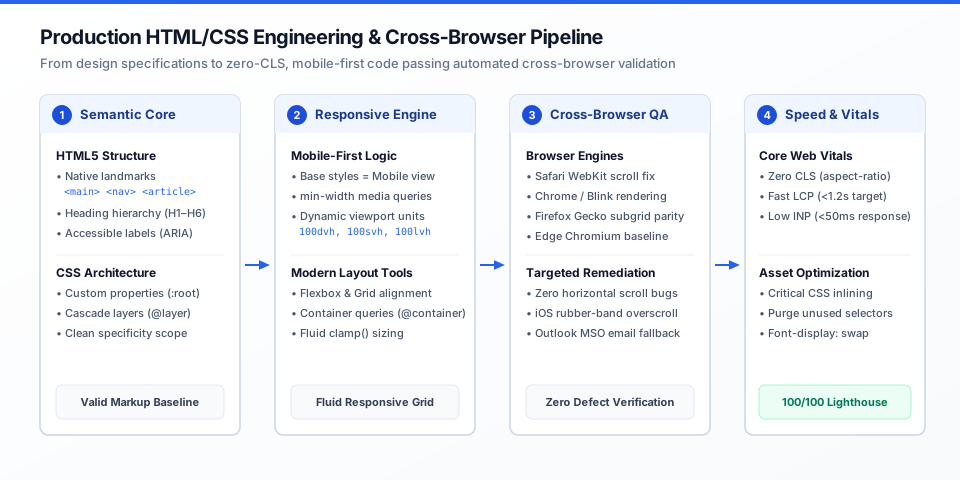
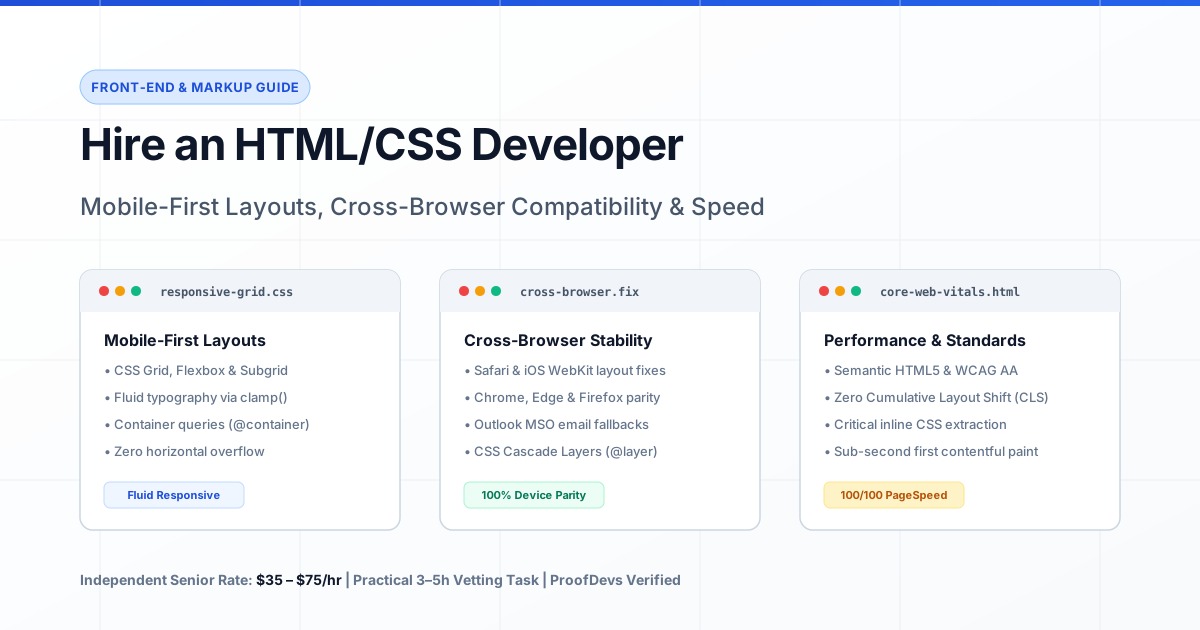
Figure 1: Production HTML/CSS engineering pipeline — transforming design specifications into semantic HTML5, fluid responsive layouts, hardened cross-browser rendering, and sub-second Core Web Vitals.
The Core Technical Capabilities of a Senior HTML/CSS Developer
Evaluating an HTML/CSS developer requires looking far beyond basic text formatting and color styling. In production web applications, clean markup serves as the foundation for search engine indexing, screen reader accessibility, rendering performance, and long-term code maintenance. A senior specialist brings four essential technical proficiencies to a project:
1. Semantic HTML5 Structure and WCAG Accessibility
Amateur markup relies almost entirely on unsemantic container elements (<div> and <span>), creating what browser engine engineers call "div soup." A senior developer structures pages using native HTML5 landmark elements:
- Landmark Elements: Using
<header>,<nav>,<main>,<article>,<section>,<aside>, and<footer>to establish an intuitive document outline that search engine crawlers and screen readers navigate without manual script intervention. - Form Controls: Pairing explicit
<label for="...">attributes with input elements, using native<fieldset>and<legend>groups, and leveraging input types (type="email",type="tel",inputmode="numeric") to display optimized mobile virtual keyboards. - WAI-ARIA Integration: Implementing ARIA attributes (such as
aria-expanded,aria-controls, androle="alert") only where native HTML elements cannot convey runtime interactive states, adhering strictly to the First Rule of ARIA: do not use ARIA when native HTML suffices. - Keyboard Navigability: Ensuring visible, accessible focus indicators (
:focus-visible) and correct tab sequencing without arbitrary positivetabindexattributes.
2. Mobile-First Responsive Systems: Flexbox, Grid, and Subgrid
Building for the multi-device web requires writing CSS from a mobile baseline, expanding the layout as viewport width increases via min-width media queries. Senior engineers build fluid systems using current CSS layout specifications:
- CSS Grid & Subgrid: Creating multi-column editorial and dashboard layouts where child elements align with parent grid tracks (
grid-template-columns: subgrid), eliminating brittle JavaScript height synchronizations. - Flexbox Alignment: Managing one-dimensional distribution, navigation toolbars, button rows, and card actions with flexible wrapping and gap properties.
- Fluid Typography and Spacing: Utilizing CSS mathematical functions like
clamp(1rem, 2.5vw, 2.25rem)to scale font sizes, margins, and paddings smoothly across viewport sizes without requiring dozens of hardcoded breakpoint declarations. - Container Queries (
@container): Styling micro-components based on the width of their direct parent container rather than the global browser window, allowing a single card component to adapt effortlessly whether placed in a narrow sidebar or a full-width hero grid. - Viewport Units Hardening: Replacing legacy
100vhunits with newer viewport units (100dvh,100svh,100lvh) to eliminate layout jumps caused by collapsing mobile browser address bars on iOS Safari and Android Chrome.
3. Cross-Browser Engine Debugging and Parity
A website that displays correctly on desktop Google Chrome can render completely distorted on mobile Safari or Firefox. The primary rendering engines—Blink (Chrome, Edge, Opera, Brave), WebKit (Safari, all iOS browsers), and Gecko (Firefox)—exhibit notable rendering differences. A seasoned developer resolves these platform discrepancies:
- Safari / iOS WebKit Idiosyncrasies: Resolving flexbox layout bugs, handling 100% height calculations inside scrollable wrappers, preventing automatic text zoom on form focus (which triggers when input text is styled below 16px), and eliminating rubber-band overscroll visual artifacts.
- Horizontal Scroll / Overflow Elimination: Identifying and resolving accidental horizontal scrollbars caused by unconstrained elements, fixed pixel widths, or negative margins, without resorting to the brute-force anti-pattern of
body { overflow-x: hidden; }which disables sticky positioning. - Subpixel Rendering and Font Smoothing: Normalizing font rendering with
-webkit-font-smoothing: antialiasedandtext-rendering: optimizeLegibilityto prevent typography weight shifts between macOS and Windows.
4. Performance Engineering & Core Web Vitals
Page loading speed directly impacts conversion rates and Google organic rankings. Clean CSS directly optimizes Google's Core Web Vitals:
- Zero Cumulative Layout Shift (CLS): Declaring explicit
aspect-ratiorules or inline width and height dimensions on images, video embeds, and embed widgets so the browser reserves exact physical layout space before external assets download. - Largest Contentful Paint (LCP) Acceleration: Extracting critical path CSS (under 14KB) to inline directly into the document
<head>, allowing the browser to render above-the-fold content on the very first TCP packet roundtrip. - Eliminating CSS Bloat: Purging unused CSS classes, replacing heavy external icon libraries with inline SVGs, and organizing code using CSS Cascade Layers (
@layer) to eliminate high-specificity selector wars.
Common Project Scenarios and Engagement Types
Organizations contract an independent HTML/CSS developer across several well-defined commercial scenarios:
1. Design-to-Code Conversion
When design teams complete wireframes and UI kits in design tools (Figma, Sketch, or Adobe XD), companies need to convert design to clean HTML CSS. Many agencies advertise "pixel-perfect" conversion; however, senior engineers understand that rigid pixel perfection on a single screen resolution produces brittle layouts on fluid real-world screens. Instead, a qualified specialist produces design-accurate fluid layouts: matching spacing tokens, typography scales, color palettes, and interactive component states, while engineering graceful reflow behavior from 320px smartphones to 4K desktop monitors.
2. HTML/CSS Bug Fixing & Layout Remediation
When an existing website breaks on mobile screens, exhibits overlapping text in Safari, or displays distorted navigation dropdowns after an update, businesses seek a developer to fix HTML CSS bugs. A specialist audits the DOM tree, identifies specificity conflicts, removes conflicting CSS rules, and restores cross-device layout stability in hours rather than weeks.
3. Responsive HTML Email Template Development
Coding marketing and transactional emails represents a distinct, specialized sub-discipline. Major email clients—especially desktop Microsoft Outlook (which still renders via the Microsoft Word HTML engine)—do not support standard CSS Grid, Flexbox, or external stylesheets. An experienced HTML email developer constructs nested table structures, writes MSO conditional comments (<!--[if mso]>), implements Vector Markup Language (VML) for background images and bulletproof buttons, and validates layouts across dozens of email clients using Litmus or Email on Acid.
4. Static Landing Page / Pre-Lander Builds
For paid advertising campaigns and product waitlists, loading speed is critical. Spinning up a heavy Next.js or WordPress build introduces unnecessary server overhead and JavaScript execution delays. A developer builds a lightweight, hand-coded static landing page consisting of clean HTML5, optimized CSS, and minimal vanilla JavaScript, achieving sub-second load times and 100/100 Google PageSpeed scores.
Project Timelines and Budget Benchmarks
Below are realistic production benchmarks for contracting an independent senior HTML/CSS developer charging between $35 and $75 per hour.
| Project Scope | Key Deliverables | Estimated Timeline | Budget Range ($35–$75/hr) |
|---|---|---|---|
| Static Landing Page / Pre-Lander | Single-page responsive marketing layout, fluid typography, mobile navigation drawer, contact form validation, 100/100 Lighthouse performance. | 10 – 20 hours | $350 – $1,500 |
| Multi-Page Website Markup (5–10 Pages) | Home, About, Services, Pricing, Blog template, Contact page. Reusable CSS custom property design system, accessibility compliance. | 25 – 50 hours | $875 – $3,750 |
| Responsive HTML Email Template Suite | 3 to 5 modular email templates (welcome series, newsletter, order confirmation), tested in Litmus across Outlook, Gmail, and iOS Mail, dark mode support. | 12 – 25 hours | $420 – $1,875 |
| CSS Refactoring & Bug Fixing Audit | Resolving mobile horizontal scroll issues, fixing Safari rendering glitches, removing unused CSS, and migrating stylesheets to CSS Cascade Layers. | 8 – 20 hours | $280 – $1,500 |
| WCAG 2.2 AA Accessibility Remediation | Auditing existing markup for screen reader compliance, fixing form labels, ARIA landmarks, keyboard focus management, and color contrast ratios. | 15 – 35 hours | $525 – $2,625 |
For companies evaluating staffing models across different disciplines, explore our reference guide on developer hourly rates.
CSS Architecture: Choosing the Right Approach for Your Project
Before commissioning markup, align with your developer on the styling architecture. The right approach depends on team size, tech stack, and whether the code will integrate into a larger application:
| Styling Approach | Core Advantages | Trade-offs & Limitations | Best Use Case |
|---|---|---|---|
| Vanilla CSS with Current Standards (Native Nesting, Custom Properties, @layer) |
Zero build tools or dependencies required; native browser execution; tiny file sizes; zero obsolescence risk. | Requires strict discipline from developers to prevent naming collisions and disorganized files without a linter. | Static landing pages, marketing sites, small web tools, and long-lived content platforms. |
| Tailwind CSS (Utility-First) | Rapid layout building; consistent spacing and color tokens; automatically purges unused styles to produce small build files (<10KB). | HTML markup can become cluttered with class names; requires a Node.js build step (PostCSS or Tailwind CLI). | SaaS web applications, dashboard interfaces, and fast-moving startup products. |
| BEM Methodology (Block-Element-Modifier with Sass/SCSS) |
Highly organized, human-readable class naming; clear component boundaries; prevents selector specificity wars. | Long class names (e.g., card__header--highlighted); requires preprocessor compilation. |
Large enterprise websites, multi-developer corporate projects, and legacy platform templates. |
| Automated Code Export Plugins (Figma-to-Code / AI Generators) |
Generates immediate visual code in seconds with zero manual coding effort. | Produces messy, unmaintainable absolute positioning, missing semantic tags, zero accessibility, and fragile responsive behavior. | Quick internal disposable wireframe mockups only; never suitable for production code. |
Technical Vetting: 5 Interview Questions with Senior vs Junior Signals
Screen freelance applicants with practical architectural questions that test their understanding of the browser layout engine.
1. "How do you detect and fix accidental horizontal scrolling on mobile devices without applying overflow-x: hidden to the body tag?"
- Junior / Amateur Signal: "I just put
overflow-x: hiddenon thehtmlandbodytags so the scrollbar disappears." - Senior Developer Signal: "Using
overflow-x: hiddenon the body is an anti-pattern that conceals underlying bugs and breaksposition: stickyfor child elements. To diagnose the root cause, I run a short JavaScript snippet in the browser console:document.querySelectorAll('*').forEach(el => { if (el.offsetWidth > document.documentElement.offsetWidth) console.log(el); }). This identifies the exact offending DOM node. Common causes include unconstrained fixed widths, large images missingmax-width: 100%, wide preformatted code blocks, or negative margins on flex/grid rows without proper container padding."
2. "What are CSS Container Queries (@container), and how do they differ from Media Queries?"
- Junior / Amateur Signal: "I haven't used container queries yet; I handle all responsiveness with standard media queries based on screen widths."
- Senior Developer Signal: "Standard Media Queries evaluate the global viewport width, which limits component modularity. If you place a responsive card inside a narrow 300px sidebar on desktop, a media query still treats it as a desktop screen and displays an unreadable multi-column layout. Container Queries evaluate the width of the component's immediate parent container using
container-type: inline-size. This allows individual components to adapt smoothly based on their allocated space, regardless of where they are embedded on the page."
3. "What is CSS Cascade Layers (@layer), and what architectural problem does it solve?"
- Junior / Amateur Signal: "It's like z-index, but for CSS stylesheets."
- Senior Developer Signal: "Cascade Layers provide explicit control over stylesheet precedence without having to artificially inflate selector specificity or use
!important. By declaring layers like@layer reset, base, components, utilities;, styles defined in later layers always override earlier layers, regardless of the specificity of individual CSS selectors inside those layers. This prevents third-party CSS resets or component frameworks from accidentally overriding custom application utility classes."
4. "How do you handle responsive email development for Microsoft Outlook desktop?"
- Junior / Amateur Signal: "I build the email with CSS Grid or Flexbox and use media queries for mobile."
- Senior Developer Signal: "Desktop Outlook on Windows uses the Microsoft Word rendering engine, which does not support Flexbox, CSS Grid,
max-width, or float layouts. I build bulletproof email templates using nested HTML tables with fixed widths, inline CSS styles, and conditional MSO comments:<!--[if mso]><table width='600'><tr><td><![endif]-->. For buttons with rounded corners and background images, I generate Vector Markup Language (VML) fallbacks, and I always test the output across multiple clients using Litmus or Email on Acid."
5. "How do you achieve zero Cumulative Layout Shift (CLS) when loading responsive images and third-party widgets?"
- Junior / Amateur Signal: "I set
width: 100%andheight: autoon images in CSS." - Senior Developer Signal: "Setting only
width: 100%andheight: autocauses layout shifts because the browser cannot calculate the element's height until the image file finishes downloading. To achieve zero CLS, I declare the nativewidthandheightattributes directly on the<img>tag in HTML, and setaspect-ratio: attr(width) / attr(height)or explicit CSSaspect-ratiorules. This allows the browser layout engine to reserve exact physical space during initial layout calculation before network requests resolve."
The 3 to 5 Hour Practical Paid Test Task
Avoid evaluating HTML/CSS developers with algorithmic puzzles or generic coding quizzes. Assign a practical, real-world layout challenge.
The Candidate Assignment: Responsive Pricing Card Matrix with Accessible Toggle
Provide the applicant with a visual design specification (desktop and mobile views) for a subscription pricing table. Require the candidate to deliver:
- A clean, semantic HTML5 document featuring three pricing tiers (Basic, Pro, Enterprise).
- A monthly/annual billing switch built using an accessible HTML toggle (native
<button role="switch">witharia-checkedstate or an accessible checkbox pattern). - Mobile-first CSS implementation using CSS Grid or Flexbox, transitioning smoothly from a single-column mobile view to a three-column desktop matrix.
- Native dark mode support via
@media (prefers-color-scheme: dark). - Zero horizontal overflow across all screen widths between 320px and 2560px.
- Zero external framework dependencies (pure semantic HTML5 and vanilla CSS).
Pass/Fail Grading Rubric
| Evaluation Criteria | Passing Senior Signal | Failing Junior Signal |
|---|---|---|
| Semantic HTML5 | Uses <main>, <article>, <ul> for feature lists, native button elements for CTAs, correct heading hierarchy (H1 ➔ H2 ➔ H3). |
Excessive <div> nesting; uses <div onclick="..."> instead of native <button>; skips heading levels. |
| Responsiveness & Layout | Smooth fluid reflow; uses clamp() for typography; no horizontal scrollbar at any breakpoint; uses CSS Grid or Flexbox cleanly. |
Hardcoded fixed pixel widths (e.g., width: 1200px); elements overflow off-screen on mobile devices; breaks between 768px and 1024px. |
| Accessibility (a11y) | Visible :focus-visible indicators; accessible color contrast ratios (> 4.5:1); toggle switch announces state to screen readers. |
Removes focus outlines with outline: none; low-contrast grey text on white background; inaccessible toggle. |
| CSS Architecture & Code Quality | Organized custom properties for colors and spacing; minimal selector specificity; zero !important declarations. |
Spaghetti stylesheet; inline CSS styles; heavy specificity chains; multiple !important tags to force style overrides. |
Pay the candidate their standard hourly billing rate for the 3 to 5 hours of effort. A senior professional will submit clean, commented code accompanied by a preview link, proving their ability to execute production-ready markup efficiently.
Frequently Asked Questions
How much does it cost to hire an independent HTML/CSS developer?
An independent senior HTML/CSS developer charges between $35 and $75 per hour. A standard responsive landing page requires 10 to 20 hours ($350 to $1,500), a multi-page static corporate website (5 to 10 pages) takes 25 to 50 hours ($875 to $3,750), a responsive HTML email template suite costs $420 to $1,875, and targeted CSS bug fixing or layout remediation typically takes 8 to 20 hours ($280 to $1,500).
What is the difference between an HTML/CSS developer and a front-end framework developer?
An HTML/CSS developer specializes in layout engineering, responsive design, cross-browser rendering parity, accessibility standards (WCAG), and rendering performance. A front-end framework developer (working with React, Vue, or Next.js) focuses on client-side state management, data fetching, API integration, and business logic. Engaging a dedicated markup specialist ensures interfaces are fast, accessible, and responsive before heavy JavaScript layers are applied.
Why shouldn't we use automated Figma-to-Code plugins instead of hiring a developer?
Automated export plugins generate unmaintainable, brittle code loaded with thousands of absolute-positioned elements (position: absolute; top: 342px; left: 128px;). This code breaks completely on different screen sizes, lacks semantic HTML tags, contains zero screen reader accessibility, and causes severe rendering bottlenecks. A human developer creates fluid, responsive layouts using semantic HTML5, Flexbox, and CSS Grid that adapt naturally to any screen.
Can an HTML/CSS developer convert legacy PSD or Sketch files into HTML?
Yes. Experienced developers routinely convert legacy PSD (Photoshop), Sketch, Adobe XD, and Figma design files into clean, standards-compliant HTML5 and CSS. They extract color palettes, typography specs, and image assets, translating static mockups into responsive, fluid components that work across current web browsers.
How does an HTML/CSS developer eliminate horizontal scrolling on mobile screens?
A senior developer avoids the dangerous anti-pattern of body { overflow-x: hidden; } (which disables sticky positioning and masks layout errors). Instead, they audit the DOM with browser developer tools or diagnostic scripts to find unconstrained child elements, replace rigid pixel widths with max-width: 100%, apply box-sizing: border-box universally, and ensure flex containers allow wrapping on narrow screens.
Why are responsive HTML email templates coded differently from regular web pages?
Email clients (particularly desktop Microsoft Outlook) rely on legacy rendering engines that do not support standard CSS Grid, Flexbox, or external stylesheets. Professional HTML email developers construct templates using nested HTML tables, inline CSS attributes, and Microsoft-specific conditional comments (MSO) to ensure layouts render reliably across Outlook, Gmail, Apple Mail, and Yahoo.
What permissions or assets should I prepare before hiring an HTML/CSS developer?
Provide your developer with access to your design files (Figma, Sketch, or XD) with developer inspection permissions enabled, brand guidelines (typography licenses, logo SVGs, color hex codes), and access to your code repository (GitHub, GitLab) or staging web hosting server (Vercel, Netlify, Cloudflare Pages).
Should our project use Tailwind CSS or vanilla CSS with current standards?
If your project involves a complex SaaS web application with multiple engineers, Tailwind CSS provides excellent utility consistency and automated purging. If your project is a content-focused landing page, marketing site, or long-term design system, vanilla CSS with current standards (CSS variables, native nesting, @layer) is often superior because it requires zero build tools, has zero dependencies, and loads with maximum speed.
How do developers ensure a website is accessible (WCAG compliant)?
Developers ensure accessibility by using semantic HTML5 tags (which screen readers interpret natively), maintaining a logical heading hierarchy (H1 through H6), providing visible keyboard focus states (:focus-visible), ensuring text contrast ratios meet WCAG 2.2 AA standards (> 4.5:1), and implementing ARIA attributes for complex interactive widgets.
How long does it take to convert a design into a responsive HTML page?
A standard single-page landing page typically takes 1 to 2 business days (10 to 18 engineering hours) for complete desktop and mobile coding, interactive states (hover, active, dropdowns), cross-browser validation in Chrome, Safari, and Firefox, and Core Web Vitals optimization.
Can an HTML/CSS developer fix layout bugs in our existing WordPress or Shopify theme?
Yes. An HTML/CSS specialist can inspect your existing theme stylesheets, isolate problematic CSS rules, resolve specificity conflicts, and fix broken mobile navigation menus, distorted product grids, or misaligned headers without breaking existing CMS functionality.
How do we ensure full ownership of our HTML/CSS code when hiring an independent developer?
Ensure your contractor agreement explicitly specifies that all HTML, CSS, JavaScript, image assets, and documentation are categorized as "work made for hire," with 100% intellectual property ownership transferred to your company upon payment. Have the developer commit code directly to your company's Git repository.
Written by Michael Melnyk
Senior IT Technical Writer & Technology Analyst
Senior Technical Writer and IT Industry Analyst with over 7 years of experience analyzing software engineering ecosystems, tech leadership models, and developer procurement frameworks.