Hire an iOS Developer: Swift, SwiftUI, and What App Review Actually Rejects
App Review guideline 4.2.6 rejects apps built from a commercialized template or app generation service — which quietly disqualifies a large share of AI-generated prototypes submitted as native apps. Here is what the rules actually say, and what it costs to comply.

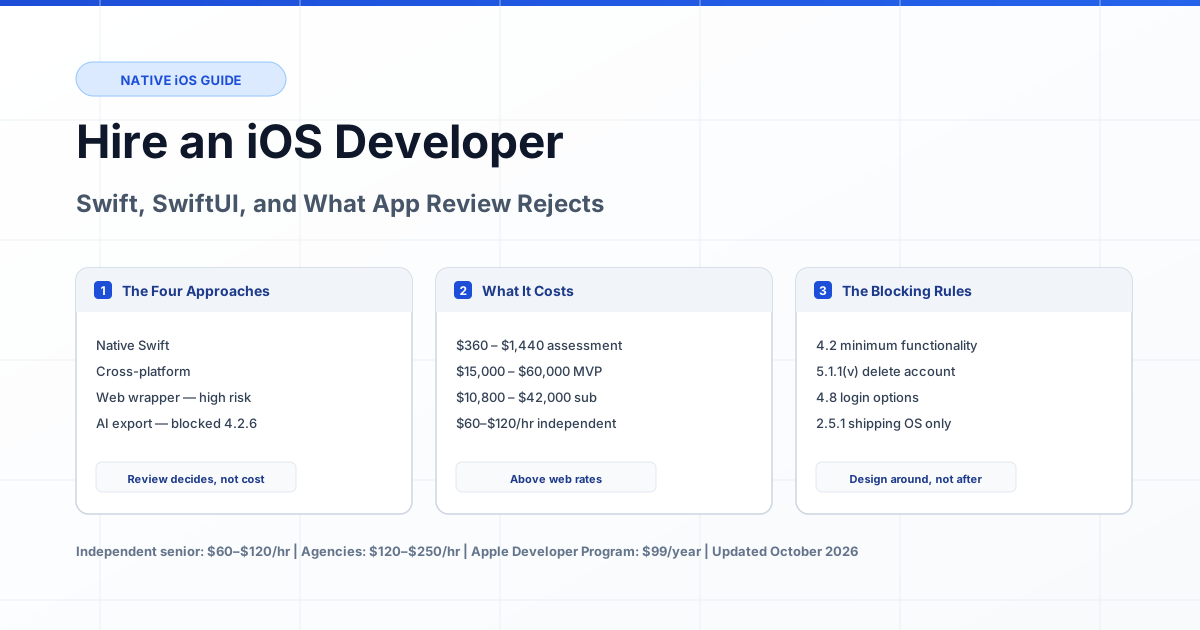
Current as of October 2026. An iOS developer writes native code in Swift against Apple's frameworks, signs it with a certificate tied to your developer account, and submits it to App Review — a human process that rejects roughly a third of first submissions. Hiring an independent senior iOS engineer costs $60–$120 per hour, above the $45–$95 range for web work because the platform is stricter and the hire must understand review rules, not just write screens. The reason that premium exists is specific: App Review guideline 4.2.6 states that "apps created from a commercialized template or app generation service will be rejected unless they are submitted directly by the provider of the app's content." That single sentence disqualifies a large share of AI-generated prototypes exported into a native shell.
This guide is about the commercial decision, not the Swift tutorial. If you are choosing between building an app and shipping a responsive web app, that decision is covered in our developer hiring guide. If you already know you need a native iOS app, hire a verified developer matched to your app scope.
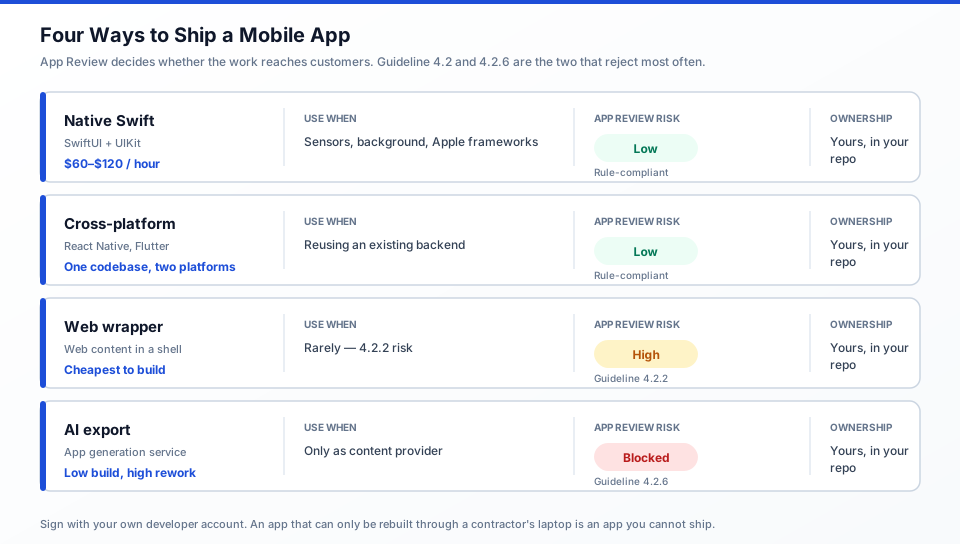
Figure 1: Four ways to ship a mobile app. The App Review column is what determines whether the work reaches customers at all.
What You Are Actually Hiring For
An iOS developer's job is not writing screens. It is producing a build that survives review, a bundle that passes Apple's technical checks, and a codebase someone can maintain after the launch push. That distinction shows up in what they actually spend time on.
- Review compliance. Reading the guidelines and applying them to your specific feature set before submission. Guideline 2.1 is explicit: "we will reject incomplete app bundles and binaries that crash or exhibit obvious technical problems," and requires a working demo account with a live backend during review.
- Signing and distribution. Certificates, provisioning profiles, App Store Connect configuration, and TestFlight distribution. This is where projects stall, and it is the first place a junior developer and a senior one behave differently.
- SwiftUI or UIKit decisions. SwiftUI for new interface work, UIKit for anything with deep existing UIKit dependencies or precise control requirements. Mixing both badly is the most common source of performance problems in SwiftUI-based apps.
- Data and permissions. Purpose strings that "clearly and completely describe your use of the data" (5.1.1), account deletion when account creation exists (5.1.1(v)), and data minimisation (5.1.1(iii)).
- Release management. Guideline 2.5.1 requires apps to "run on the currently shipping OS" and to "phase out any deprecated features, frameworks or technologies." A developer who ignores this ships an app that is rejected at the next OS release.
A developer who has never been through a rejection cycle can write competent Swift and still cost you two extra months, because the rejection is usually not about the code.
Native, Cross-Platform, or a Web Wrapper
This decision determines whether your app passes review, so make it deliberately rather than by default. The table below uses Apple's own published rules rather than opinion.
| Approach | Review Risk | Cost Shape | Use It When |
|---|---|---|---|
| Native Swift (SwiftUI + UIKit) | Lowest once review rules are applied up front | Highest hourly, lowest total cost at scale | You need sensors, background execution, Apple frameworks, or the full App Store surface. |
| Cross-platform (React Native, Flutter) | Low, but reviewers scrutinise thinly-wrapped web views | One codebase, two platforms | You already ship the web app and need mobile parity quickly. |
| Web app in a native shell | High. Guideline 4.2 requires apps that "elevate it beyond a repackaged website"; 4.2.2 states apps "shouldn't primarily be marketing materials, advertisements, web clippings, content aggregators, or a collection of links." | Cheapest to produce, most expensive if rejected | Rarely. Native notifications and offline behaviour usually justify building it properly. |
| Export from an app generation service | Blocked by 4.2.6 unless submitted directly by the provider of the content | Low build cost, high remediation cost | You are the content provider and submit it yourself under your own account. |
Two related rules are worth knowing before you commit. Guideline 2.5.6 requires apps that browse the web to use "the appropriate WebKit framework and WebKit JavaScript," with alternative browser engines available only by entitlement in the EU and Japan. And guideline 5.1.1(vii) states that SafariViewController "must be used to visibly present information to users; the controller may not be hidden or obscured by other views or layers." A wrapper that loads your site in a full-screen web view with no native surface is exactly what 4.2.2 describes.
What an iOS Developer Costs in 2026
iOS development costs between $720 and $60,000 in 2026 for the scopes below, at the independent senior rate of $60–$120 per hour. Mobile agencies quote $120–$250 per hour for the same work, and a US-based agency building one app typically quotes a project minimum in the five figures before a single screen exists.
| Scope | Hours | At $60–$120/hr | At $120–$250/hr |
|---|---|---|---|
| Technical review and App Review risk assessment of an existing prototype | 6–12 | $360 – $1,440 | $720 – $3,000 |
| Native shell: build config, signing, TestFlight pipeline, push notifications | 40–80 | $2,400 – $9,600 | $4,800 – $20,000 |
| MVP app, 5–8 screens, one backend, login, App Store submission | 250–500 | $15,000 – $60,000 | $30,000 – $125,000 |
| Subscription app with StoreKit purchases, paywalls, restore purchases | 180–350 | $10,800 – $42,000 | $21,600 – $87,500 |
| React Native or Flutter app reusing an existing backend | 300–700 | $18,000 – $84,000 | $36,000 – $175,000 |
| Post-launch iteration and OS version updates | 10–25/month | $600 – $3,000/month | $1,200 – $6,250/month |
Platform costs sit on top: the Apple Developer Program membership is 99 USD per year and the Enterprise Program is 299 USD per year, in local currency where available. One membership covers every app you publish. A free Apple account is not an option for client work: Apple's documentation of Personal Team limitations states you can register "up to 10 App IDs, which expire after 7 days" and "up to 3 devices, which expire after 7 days," with provisioning profiles that "expire 7 days from issuance," so apps must be rebuilt and reinstalled weekly.
The Review Rules That Cause Rejections
Most rejections are not about code quality. They come from a short list of predictable causes, each with an explicit rule you can design around before submission.
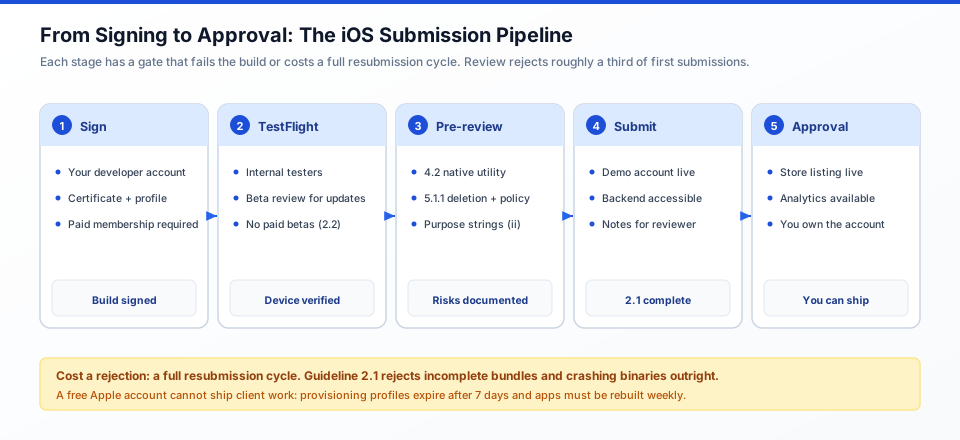
Figure 2: The submission path from a signed build to approval. Each gate either fails the build early or costs a full resubmission cycle later.
| Guideline | Requirement | What It Costs to Fix After the Fact |
|---|---|---|
| 2.1 App Completeness | Final builds, no placeholder text, working demo account, backend services live during review. Crashing binaries are rejected. | A full resubmission cycle. This is the most common first-rejection cause. |
| 4.2 Minimum Functionality | Must "elevate it beyond a repackaged website." 4.2.2 restricts apps that are primarily marketing material, web clippings, or link collections. | Potentially the entire app. If the only value is your website, you need a different product. |
| 4.2.6 Generated apps | Apps from a commercialized template or app generation service are rejected unless submitted directly by the provider of the content. | Rewriting the app to add native utility, or changing who submits it. |
| 5.1.1(v) Account Sign-In | If the app supports account creation, it "must also offer account deletion within the app." Apps may not require personal information unless directly relevant to core functionality. Social tokens may not be stored off-device. | A settings screen, a backend endpoint, and a review resubmission. |
| 5.1.1(i) Privacy | Privacy policy linked in App Store Connect metadata and within the app, and it must state what data is collected, how, and explain retention and deletion. | Usually quick if a policy exists. Blocking if one does not. |
| 5.1.1(ii) Permission | Purpose strings must "clearly and completely describe your use of the data." Paid functionality "must not be dependent on or require a user to grant access to this data." | Each rejected purpose string costs a build and a resubmission. |
| 3.1.1 In-App Purchase | Unlocking digital features requires in-app purchase. Credits may not expire, and a restore mechanism is required for restorable purchases. | Rewriting the entitlement model and the payment flow. |
| 2.5.1 Software Requirements | Public APIs only, must run on the currently shipping OS, deprecated features must be phased out. | Ongoing maintenance debt that surfaces as a rejection, not a warning. |
Guideline 4.8 is the one most teams discover late. If you use any third-party or social login — Google, Facebook, X, LinkedIn — to establish a user's primary account, you must also offer an equivalent login option that limits data collection to the user's name and email, allows the user to keep their email private, and does not collect in-app interactions for advertising without consent. There are narrow exemptions, including apps that exclusively use your own account system. If you planned to ship Google Sign-In only, this is a design change, not a config change.
Two more constraints shape scope rather than cause rejections: guideline 2.4.1 states "iPhone apps should run on iPad whenever possible," and guideline 2.5.5 requires apps to "be fully functional on IPv6-only networks." Neither is negotiable in practice.
Swift vs SwiftUI vs UIKit
This is the question every stakeholder asks and few need a long answer for. Ask what already exists, what the app does, and who maintains it after launch.
| Choice | Best For | Cost of Getting It Wrong |
|---|---|---|
| SwiftUI | New apps, forms, lists, settings, anything with a clean state model. | Low initially. Performance problems appear later in complex list-heavy screens. |
| UIKit | Deep existing UIKit dependencies, precise control over scroll and layout behaviour, older codebases. | More verbose and slower to write, but predictable. |
| Mixed | Apps migrating from UIKit to SwiftUI incrementally. This is the normal path for an existing app. | Real, if handled loosely: bridging between the two is where bugs hide. |
The developer's recommendation should name one of these with a reason tied to your app. "It depends" is not an answer; "UIKit for the camera screen because the SDK is UIKit-first, SwiftUI for the rest" is.
Three iOS Engagements
Engagement 1: AI prototype rejected under 4.2.6 before release
Situation: A startup exported a web prototype into a Capacitor shell and submitted it. The app worked and had real users on a waitlist.
Blocker: The rejection cited 4.2.6: the build was produced by an app generation service. Rewriting the shell would not have helped, because the provenance was the issue.
Approach: A two-day review established what the app genuinely needed from the platform — offline access to saved records, background sync, and native push. Those three capabilities justified a real native build, and the developer added depth that cleared 4.2: native share sheet integration, background refresh, and a widget.
Result: The rewritten build passed review. The startup lost roughly five weeks it had planned to skip, and the waitlist conversion suffered accordingly. A nine-hour review at $95/hr would have saved it.
Engagement 2: Subscription app blocked on account deletion
Situation: A fitness app was rejected because it allowed account creation but had no in-app account deletion path, violating 5.1.1(v).
Blocker: Deletion existed as an email request to support. The guideline requires it "within the app."
Approach: A deletion endpoint that cascades across the user's workout history and subscriptions, a settings row confirming it with an explicit warning about losing data, and a review note explaining the path. Also checked 3.1.1 compliance on subscription restore while the build was open, since a restore mechanism was missing for the annual plan.
Result: 34 hours at $85/hr, $2,890, covering deletion, restore purchases, and a resubmission. Both issues cleared on the next submission instead of the one after that.
Engagement 3: Review-risk review that prevented a build
Situation: A client wanted an app that was, functionally, a catalogue of their products with a checkout link.
Blocker: Guideline 4.2.2 states apps "shouldn't primarily be marketing materials, advertisements, web clippings, content aggregators, or a collection of links." The proposed app was exactly that.
Approach: A six-hour assessment documented the rejection risk and mapped which capabilities would clear the minimum functionality bar: offline catalogue access, saved wishlists per account, native wallet and share integration, and in-app purchasing to remove the redirect to a website.
Result: The client decided a native app was not worth $20,000 for the scope they had. They shipped the web version and spent $720 on the assessment instead. No app was built, and none would have been approved.
How to Hire an iOS Developer
Three engagement shapes, depending on how much of the scope is settled.
| Engagement | Best When | Cost Shape |
|---|---|---|
| Fixed-scope review or assessment | You have a prototype and want to know if it is shippable before paying for a build. | 6–12 hours, fixed fee |
| Part-time ongoing (10–20 hrs/week) | An existing app needs OS updates, features, and review fixes over several months. | $60–$120/hr with a weekly cap |
| Project with milestones | Scope is written down and the release date is fixed. | Milestone-based, 20–30% held back until App Store approval |
Three requirements are non-negotiable. The developer account stays yours — your company is the Account Holder and your certificate is the one that signs builds; a contractor joins your team rather than shipping from their account. Apple's documentation confirms this model is supported, noting that team members' roles determine access to resources "such as certificates, provisioning profiles, and app details." The source lives in your repository from the first commit. And the handover includes the signing assets, because an app whose only build path runs through a departed contractor's machine is an app you cannot ship.
Seven Questions to Ask an iOS Developer
These separate developers who have shipped through review from developers who have only built locally.
- "What is our App Review risk under guideline 4.2, and would you build this as native or wrap it?" The correct answer names 4.2 and 4.2.2 and reasons about native utility. If they have never heard of the minimum functionality guideline, that is your answer.
- "Have you had an app rejected, and what was the cause?" Every experienced iOS developer has. A candidate who says never is either lying or has never submitted.
- "Who owns the developer account and the signing certificate?" The answer must be your company. "It is in my account because it is easier" is a disqualifying answer.
- "SwiftUI or UIKit for this app, and why?" Expect a concrete reason tied to your screens.
- "How do you handle device types and OS versions?" Look for iPad support and IPv6-only operation. Both are documented requirements.
- "How do we test before submission?" TestFlight, including beta review for significant updates. Guideline 2.2 requires significant beta changes to be reviewed before distribution to testers.
- "What happens to the project when you stop working on it?" Repository, certificates, provisioning profiles, and documentation, all in your accounts.
The 3–5 Hour Paid iOS Assessment
Before committing to a build, ask a candidate to run a paid assessment on your actual prototype or repository. Four to five hours reveals whether they can read review rules and give an honest answer.
Assignment: Given the repository or a build of the current app, produce (1) a written App Review risk assessment naming the specific guidelines at risk and why, (2) a SwiftUI-versus-UIKit recommendation for the app's three most complex screens, (3) a signed test build uploaded to TestFlight, proving the signing pipeline works, and (4) a 20-minute walkthrough. Do not grant App Store Connect access at this stage.
| Signal | Pass | Fail |
|---|---|---|
| Review knowledge | Names specific guideline numbers and applies them to your app. | "Rejections are random, just resubmit." |
| Honest scoping | Says the app may need native work rather than a wrapper, or that it is not viable. | Confirms shippability regardless of findings. |
| Signing pipeline | Produces a signed build on your account, or explains precisely what access is needed. | Cannot get a TestFlight build out, or asks for your App Store Connect password. |
| UI framework reasoning | Picks per screen with a stated reason. | "SwiftUI for everything." |
| Scope discipline | Stayed within five hours, listed open questions. | Started refactoring production code unprompted. |
Pay the candidate their standard rate. An iOS developer who declines a five-hour paid assessment is telling you something.
Typical Mistakes
- Building a web wrapper. Guideline 4.2.2 names link collections and web clippings explicitly. This is the single most expensive mistake, because the build looks finished right up until review.
- Submitting an export from an app generation service. Guideline 4.2.6 blocks it unless you are the provider of the content submitting it yourself.
- Social login as the only option. Guideline 4.8 requires an equivalent alternative that limits data collection to name and email.
- No in-app account deletion. Guideline 5.1.1(v) requires it wherever account creation exists. An email-only process is not compliance.
- Privacy policy only in App Store Connect. 5.1.1(i) requires it in both places, and the content requirements are specific.
- Generic purpose strings. 5.1.1(ii) requires strings that clearly describe actual use; each rejection costs a build cycle.
- Gating paid features behind data consent. The same guideline prohibits paid functionality depending on a user granting data access.
- Building on a contractor's developer account. You lose signing control and the ability to ship if the relationship ends.
- Skipping iPad and IPv6. 2.4.1 and 2.5.5 are documented requirements, not nice-to-haves.
- No restore mechanism for purchases. 3.1.1 requires it for restorable in-app purchases, and 3.1.2(a) requires subscriptions to work across the user's devices.
Expert Advice
Pay for the review-risk assessment before the build. It is the cheapest line item in the entire engagement, and it is the only one that can tell you the app will not pass review — which in our cases saved clients $20,000 of work and, more importantly, two months of waiting.
Put your company in control of the developer account before the first line of code. Enrol as an organization rather than an individual if your app represents a business, so the App Store seller name is your company and not a personal legal name. Adding a contractor to your team is the supported model and takes minutes.
Write the review notes before submission, not after a rejection. Guideline 2.1 requires the reviewer to have full access to your app, including a demo account and live backend, and 2.1(b) requires that any in-app purchase item the reviewer cannot find is explained in the notes. An hour spent writing clear notes routinely saves a resubmission.
Frequently Asked Questions
How much does it cost to hire an iOS developer?
A review-risk assessment costs $360–$1,440 (6–12 hours). A native shell with signing, TestFlight, and push costs $2,400–$9,600. An MVP app with 5–8 screens and a backend costs $15,000–$60,000. A subscription app with StoreKit costs $10,800–$42,000. Post-launch iteration runs $600–$3,000 per month. Independent senior iOS engineers charge $60–$120 per hour; agencies charge $120–$250 per hour.
How much does it cost to publish an app on the App Store?
The Apple Developer Program membership is 99 USD per year, in local currency where available, and the Enterprise Program is 299 USD per year. One membership covers every app you publish. This is separate from development cost, and separate from the App Store commission on digital sales.
Can I submit an app I generated with an AI tool?
Guideline 4.2.6 states that "apps created from a commercialized template or app generation service will be rejected unless they are submitted directly by the provider of the app's content." A prototype you generated and submit yourself as the content provider is the case the exception contemplates. What is not permitted is submitting a generated template on behalf of a client's content. Separately, every app must still satisfy 4.2 minimum functionality, so a thin wrapper fails regardless of how it was produced.
Can I just wrap my website in an app?
Probably not. Guideline 4.2 requires apps that "elevate it beyond a repackaged website," and 4.2.2 states apps "shouldn't primarily be marketing materials, advertisements, web clippings, content aggregators, or a collection of links." If you show web content you must use WebKit and SafariViewController must be used to "visibly present information to users" and may not be obscured. Native notifications, offline access, and background sync are usually the features that justify a real build.
Do I need to add account deletion?
Yes, if your app supports account creation. Guideline 5.1.1(v) states that "if your app supports account creation, you must also offer account deletion within the app." A support email address does not satisfy it. The same clause states apps may not require personal information unless directly relevant to core functionality, and may not store social network credentials off-device.
Can I use only Google Sign-In?
Not as your only login option. Guideline 4.8 requires apps using a third-party or social login for the user's primary account to also offer an equivalent login that limits data collection to name and email, lets users keep their email private, and does not collect in-app interactions for advertising without consent. Apps that exclusively use their own account system are exempt.
How long does App Review take?
The published documentation does not commit to a fixed timeline, and review volume varies. Plan around the process rather than a promise: expect at least one full build-submission-feedback cycle before approval, and keep a staging build ready so a rejection costs a resubmission rather than a rebuild. This is why our milestone contracts hold payment until App Store approval rather than until code is delivered.
Do I need TestFlight before submitting to the App Store?
TestFlight is the required distribution path for betas — guideline 2.2 states that "demos, betas, and trial versions of your app don't belong on the App Store." Note also that apps using TestFlight cannot be distributed to testers in exchange for compensation, and significant updates to a beta build must be reviewed before distribution to testers.
Should I build native or use React Native?
Native Swift if the app needs sensors, background execution, deep Apple framework integration, or the full App Store surface. Cross-platform if you already have a web backend and need mobile parity quickly, and you accept that reviewers scrutinise web views. The deciding question is usually not preference — it is whether your differentiating features need native capability, because a thin cross-platform app with no native surface is what triggers minimum functionality concerns.
Who owns the app and the developer account?
You should own both, from the start. Enrol in the Apple Developer Program yourself, keep the account and signing certificates under your organisation, and add contractors to your team as members. Apple documents that roles determine access to "certificates, provisioning profiles, and app details." An app that can only be rebuilt through your contractor's laptop is an app you cannot ship when the engagement ends.
Ready to scope your app? Compare developer rates and hire a verified developer matched to your app — starting with the review-risk assessment, so the build you pay for is one that can actually ship.
Written by Michael Melnyk
Senior IT Technical Writer & Technology Analyst
Senior Technical Writer and IT Industry Analyst with over 7 years of experience analyzing software engineering ecosystems, tech leadership models, and developer procurement frameworks.