Shopify Feed Script Optimization: SFTP, Dynamic Pricing, and Metafield Enrichment on AWS
Legacy FTP inventory scripts and static price feeds create silent margin loss and international shipping rejections. Here is how to upgrade to encrypted SFTP, build dynamic price balancers with margin floors, and enrich Shopify metafields on AWS.

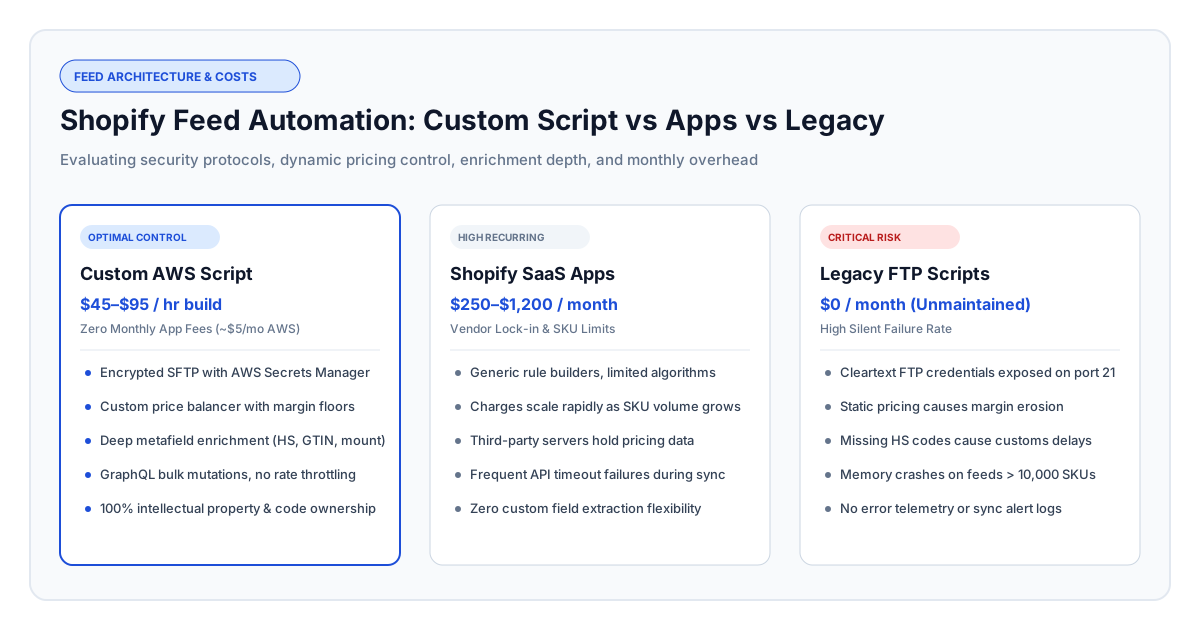
Current as of October 2026. Modernizing a custom Shopify product feed script on Amazon Web Services (AWS) costs between $1,800 and $7,600 in engineering work (40 to 80 hours at $45–$95/hr for an independent senior developer), compared to $3,000 to $14,000+ per year in ongoing software subscriptions for commercial aggregators that enforce strict SKU limits. An optimized feed script replaces vulnerable unencrypted data transfers with encrypted SSH File Transfer Protocol (SFTP), integrates an automated competitor price balancer with strict gross margin safeguards, and enriches product records with customs-compliant tariff classifications, verified barcodes, and structured equipment specifications directly into Shopify.
High-ticket retail catalogs—including camera bodies, specialty lenses, luxury audio, and technical electronics—face operational hurdles that off-the-shelf Shopify apps cannot resolve. Marketplace feed plugins frequently crash when catalogs scale past 20,000 items, fail to parse technical attributes like lens mount compatibility, and offer crude pricing rules that risk selling expensive equipment at a loss during competitor clearance sales. If your current inventory synchronization process is failing or unmonitored, you can hire a verified Shopify developer or an AWS cloud specialist to build a dependable, automated data pipeline tailored to your commercial margins.
Figure 1: Evaluating custom AWS automation against recurring commercial apps and unmaintained legacy scripts across security, pricing intelligence, and operating overhead.
The Hidden Costs of Unmaintained Product Feed Scripts
A product feed script is a background data pipeline that retrieves wholesale catalog data, stock counts, and price lists from distributor servers, cleans the data, and updates an e-commerce storefront. When built as temporary cron jobs on unmanaged servers, these scripts quietly deteriorate, producing inventory stockouts, customs hold-ups, and degraded profit margins.
E-commerce merchants with legacy inventory feeds consistently encounter five operational bottlenecks:
- Vulnerable Data Transfer Protocols: Legacy scripts communicate over standard unencrypted FTP, broadcasting distributor credentials and proprietary wholesale pricing lists across open networks. Enterprise suppliers are increasingly cutting off unencrypted connections, requiring encrypted SFTP with cryptographic key pairs.
- Memory Crashes on Growing Catalogs: Basic feed scripts attempt to process large catalog files in single memory allocations. As distributors add seasonal product lines, the script consumes all available server memory and crashes without notifying store operators, leaving stock counts out of sync.
- API Rate Limit Blocks: Older scripts update products one by one, exceeding platform request limits. Shopify blocks these sequential requests, causing multi-hour delays in updating prices and available inventory.
- Customs Delays and Non-Compliance Penalties: Without automated extraction of Country of Origin and Harmonized System (HS) tariff codes, international packages stall at customs inspection hubs, creating customer chargebacks and carrier compliance surcharges.
- Unprotected Price Matching: Elementary repricing scripts match competitor price drops blindly without factoring in shipping overhead, processing fees, or minimum profitability thresholds, triggering automated races to the bottom.
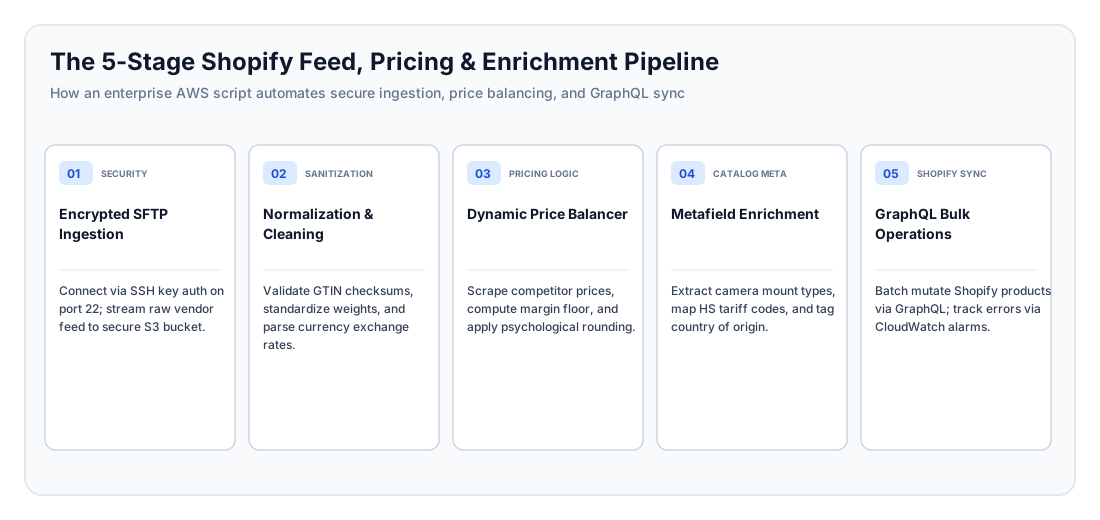
Figure 2: The end-to-end operational architecture moving data from supplier SFTP servers to live Shopify storefronts via managed cloud infrastructure.
Data Ingestion Security: Moving from Legacy FTP to Encrypted SFTP
SFTP (SSH File Transfer Protocol) is an encrypted network protocol that secures data and authentication credentials during transmission over port 22. Migrating supplier connections from plain FTP to SFTP eliminates credential theft risks and fulfills distributor security standards.
From an operational and security perspective, an enterprise-grade ingestion upgrade focuses on three core principles:
1. Cryptographic Key Authentication Over Shared Passwords
Modern distributor feeds require asymmetric SSH key pairs instead of static passwords. Passwords can be intercepted, shared across teams, or leaked. In a well-designed architecture, private authentication keys are stored in dedicated cloud credential vaults and retrieved only at runtime by automated execution environments, preventing keys from ever appearing in version control repositories.
2. Streaming Ingestion to Cloud Storage
Rather than downloading massive wholesale feeds directly onto application servers, an optimized architecture streams raw files directly into secure cloud staging storage. This ensures that catalogs containing 100,000 SKUs can be processed smoothly without requiring costly, oversized server instances.
3. Automated Checksum Comparison
Executing an entire catalog update when supplier inventory has not changed burns through API quotas and compute budgets. The ingestion process generates a cryptographic hash of the incoming file and compares it to the previous run. If the distributor has made no changes, the pipeline logs a clean status and terminates immediately, conserving platform resources.
Building a Competitor Price Balancer with Profit Safeguards
A competitor price balancer is an automated commercial engine that tracks competitor price movements across e-commerce channels, cross-references wholesale cost data, and recalculates store prices based on business rules. Automating prices without strict mathematical boundaries is dangerous: a single competitor data error or scraping anomaly can cause a store to liquidate high-ticket merchandise below cost.
A resilient pricing algorithm enforces four defensive business rules:
1. The Absolute Gross Margin Floor
The repricing algorithm must never adjust a product's price below a pre-set profitability threshold, regardless of competitor discounting. The system calculates a dynamic floor price combining wholesale cost, required gross margin percentage, payment processing fees, and mandatory shipping insurance. If an aggressive competitor prices a camera body below your store's margin floor, the algorithm holds your price at the floor level and alerts merchandising managers to investigate supplier rebates.
2. Deadband Thresholds to Prevent Jitter
Competitor pricing bots frequently make micro-adjustments of a few cents throughout the day. Firing platform updates for tiny adjustments confuses shoppers and wastes API allocations. A deadband filter requires price divergences to exceed a set commercial threshold—such as 1.5% or $5.00—before publishing an updated price to the storefront.
3. Anomaly and Poison Pricing Quarantine
Competitors occasionally list discontinued items at absurdly low prices or display corrupted data during website maintenance. A senior automation engineer designs anomaly detection rules that flag price swings exceeding 30% against a 30-day moving average. Suspect items are quarantined for human approval, preventing automated price collapse.
4. Commercial Price Ending Formatting
Raw algorithmic calculations produce awkward price points like $843.17. The final stage of the pricing engine rounds calculated values to established psychological commercial endings (such as .99 or .95) in alignment with your brand strategy.
Catalog Enrichment: HS Tariff Codes, GTINs, and Technical Metafields
Data enrichment is the automated extraction, validation, and structuring of raw supplier information into searchable, customs-ready e-commerce attributes. For specialized equipment merchants, supplier descriptions contain vital technical details that must be organized into structured storefront filters.
1. Camera Mount Compatibility and Equipment Metafields
Photographers and filmmakers filter lenses and accessories based on their camera body's mount standard. Unoptimized supplier feeds bury mount compatibility inside paragraphs of descriptive text. An automated enrichment pipeline categorizes gear into standardized Shopify Metafields:
- Mirrorless Mount Families: Categorizing Sony E-Mount, Canon RF, Nikon Z, and L-Mount Alliance gear into dedicated, filterable specifications.
- Legacy DSLR Standards: Distinguishing vintage and professional DSLR mounts (such as Canon EF and Nikon F) from modern mirrorless counterparts.
- Sensor Coverage Designations: Identifying whether optics cover Full-Frame, APS-C, or Medium Format sensors.
By mapping these attributes into structured Shopify Metafields, store owners enable accurate faceted navigation in storefront search filters without spending hundreds of hours on manual catalog tagging.
2. Customs Clearance: Harmonized System (HS) Tariff Codes
International shipping couriers require 6-digit Harmonized System (HS) codes and Country of Origin declarations on commercial invoices. Camera and optics equipment follow strict international tariff classifications:
| Product Classification | Standard 6-Digit HS Code | Commercial Purpose |
|---|---|---|
| Digital Cameras & Camcorders | 8525.89 | Required on all digital capture bodies for cross-border customs declarations. |
| Interchangeable Camera Lenses | 9002.11 | Critical for optical objectives; prevents customs re-classification as generic glass. |
| Electronic Flashes & Studio Strobes | 9006.61 | Used for photographic discharge lamps and electronic lighting units. |
| Tripods, Monopods & Mounts | 9620.00 | Standard classification for camera support apparatus and stabilizing heads. |
| Padded Equipment Bags & Hard Cases | 4202.92 | Prevents luxury leather/textile import surcharges on protective gear. |
Automating the assignment of these codes directly to Shopify inventory records ensures that fulfillment software generates customs documentation instantly, preventing shipment delays and customs inspection penalties.
3. Global Trade Item Number (GTIN) Validation
Google Shopping, marketplace channels, and search engines reject product feeds containing invalid or missing UPC/EAN barcodes. An enrichment script validates barcode checksums before synchronizing, catching malformed supplier numbers and protecting your advertising accounts from merchant center suspensions.
Shopify Architecture: High-Throughput Bulk Operations vs. Sequential Sync
Shopify regulates data updates through strict API limits to protect platform stability. Older automation scripts rely on sequential updates, making individual calls for every SKU, which quickly triggers platform rate limiting.
Modern feed architecture leverages Shopify's high-capacity Bulk Operations framework to handle tens of thousands of items simultaneously:
| Performance Dimension | Legacy Sequential Synchronization | Modern Bulk Operations Architecture |
|---|---|---|
| Execution Method | Individual updates sent SKU by SKU. | Single compiled batch file processed asynchronously. |
| Speed on 25,000 SKUs | 2 to 4 hours with frequent rate-limit delays. | 4 to 8 minutes of background platform processing. |
| Metafield Integration | Requires multiple round-trip calls per product. | Bundled atomically alongside core price and inventory updates. |
| Error Visibility | Failures scattered across connection logs. | Unified error report pinpointing exact validation issues. |
| Storefront Impact | Heavy continuous API traffic can slow store apps. | Zero daytime impact on customer-facing storefront speed. |
By compiling all catalog changes into an asynchronous bulk payload, your store updates complete in minutes rather than hours, ensuring that distributor price changes and out-of-stock notices reflect immediately on your storefront.
Cloud Infrastructure: Choosing Between Serverless and Containerized AWS
Amazon Web Services (AWS) provides the underlying infrastructure for hosting, scheduling, and monitoring product feed automation. Selecting the right architectural pattern depends on catalog scale and scraper requirements:
When to Deploy Serverless AWS Lambda
Serverless architecture is optimal for catalogs up to 30,000 items where feeds can be retrieved, processed, and submitted within a 15-minute execution window. Event triggers schedule the pipeline to run on recurring intervals (e.g., inventory counts every 30 minutes; competitor pricing twice daily). Because serverless environments charge only for active compute seconds, monthly hosting bills typically remain under $5.00 to $10.00 per month.
When to Deploy Containerized AWS ECS Fargate
If your pricing intelligence requires scraping complex competitor websites using headless browsers, or if your catalog exceeds 100,000 SKUs across multiple distributor feeds, execution times will exceed serverless time limits. Containerizing the application provides dedicated processing power, unlimited runtime, and managed network proxies. Expected hosting costs range from $15.00 to $40.00 per month, which remains a fraction of third-party software pricing.
Budget Planning, Developer Rates, and Agency Comparison
Hiring an independent senior full-stack developer with specialized e-commerce automation and AWS experience costs $45–$95 per hour. Completing an end-to-end feed script upgrade—including SFTP security, dynamic pricing safeguards, catalog enrichment, and cloud deployment—typically requires 40 to 80 engineering hours, translating to a one-time project investment of $1,800 to $7,600.
By comparison, full-service e-commerce agencies bill at $150–$250 per hour ($6,000–$20,000 for the same deliverable), while commercial catalog apps charge ongoing subscriptions between $250 and $1,200 every month. A custom automated script provides permanent intellectual property ownership, zero ongoing app fees, and complete freedom to customize business rules.
| Project Milestone | Scope and Deliverables | Estimated Hours | Independent Cost ($45–$95/hr) | Agency Cost ($150–$250/hr) |
|---|---|---|---|---|
| 1. SFTP Security & Storage Setup | Migrate from FTP to SFTP; configure credential vaults, access roles, and cloud storage buckets. | 8–14 hrs | $360 – $1,330 | $1,200 – $3,500 |
| 2. Stream Parsing & Validation | Build memory-efficient file parsing; integrate barcode verification and weight unit standardization. | 10–18 hrs | $450 – $1,710 | $1,500 – $4,500 |
| 3. Dynamic Price Balancer Engine | Build competitor data ingestion, gross margin floors, deadband thresholds, and price rounding logic. | 14–24 hrs | $630 – $2,280 | $2,100 – $6,000 |
| 4. Catalog & Metafield Enrichment | Automate mount attribute extraction; map international HS tariff codes; standardize condition classifications. | 10–16 hrs | $450 – $1,520 | $1,500 – $4,000 |
| 5. Bulk Platform Synchronization | Implement asynchronous bulk catalog mutations; configure inventory updates and webhook listeners. | 12–20 hrs | $540 – $1,900 | $1,800 – $5,000 |
| 6. Monitoring & Error Telemetry | Set up automated alerts for failed sync runs, missing distributor items, and staging dry-run tests. | 6–10 hrs | $270 – $950 | $900 – $2,500 |
| Total Project Scope | Complete Automated Feed Modernization | 60–102 hrs | $2,700 – $9,690 | $9,000 – $25,500 |
If you have already received an estimate from another provider, you can request an independent second opinion software review to ensure your project scope, hourly estimates, and technical architecture are structured soundly.
Real-World Case Studies: Feed Automation in Practice
The operational and financial impact of upgrading inventory feeds is best understood through real-world commercial implementations.
Case Study 1: Camera & Optics Retailer Customs Compliance
Initial Situation: A European photography retailer managing 18,000 SKUs relied on an unmonitored script on a shared server to synchronize camera bodies and lenses from three distributor FTP portals.
What Was Blocking the Project: Distributors announced they were discontinuing plain FTP in favor of secure SFTP. In addition, 22% of international shipments to the United States and the United Kingdom were held at customs inspection stations due to missing HS tariff classifications, generating €3,400 monthly in carrier storage fees and customer cancellations.
The Solution: A senior automation developer migrated the ingestion pipeline to encrypted SFTP with cloud credential storage, built an enrichment engine that automatically mapped distributor categories to certified optical HS codes, and extracted lens mount classifications (Sony E, Canon RF, Nikon Z, L-Mount) into structured storefront filters.
The Business Outcome: The catalog updated in under 6 minutes, international customs rejections fell to zero, and newly available mount filters increased storefront search conversion rates by 14%.
Case Study 2: Consumer Electronics Competitor Price Balancer
Initial Situation: A consumer electronics merchant with 8,500 items manually adjusted product pricing once a week, frequently losing Buy Box visibility to competitors undercutting them by $2 to $5 on key accessories.
What Was Blocking the Project: The merchant tested a commercial marketplace pricing tool, but the tool lacked margin guardrails. During a distributor price list error, the app matched an incorrect competitor price and liquidated 45 studio strobe lights at a $120 per-unit loss before staff discovered the issue.
The Solution: A senior developer built a custom pricing engine on AWS: integrated competitor price tracking, instituted an unbreakable cost-plus gross margin floor (minimum 12% profit margin after fees), established anomaly detection for competitor price drops greater than 30%, and introduced a $2.00 deadband filter with .95 commercial rounding.
The Business Outcome: The retailer automated daily pricing across their entire catalog without risking margin breaches, recovered $28,000 in lost gross profit within three months, and grew Buy Box share by 31%.
Case Study 3: Overhauling a Failing 150,000-SKU Monolithic Feed
Initial Situation: An electronics distributor ran an unmaintained script that processed 150,000 SKUs by making individual product updates sequentially throughout the day.
What Was Blocking the Project: The script took 3.5 hours to run, regularly crashed due to memory leaks, and lagged so far behind distributor stock changes that the store oversold out-of-stock merchandise 15 to 20 times per week.
The Solution: The engineer re-architected the pipeline into an asynchronous bulk update system on AWS: migrated to streaming file processing, added cryptographic checksum matching to skip unchanged supplier catalogs, and batched all modifications into asynchronous bulk mutation payloads.
The Business Outcome: Processing time dropped from 210 minutes to 7 minutes, out-of-stock order cancellations fell to zero, and monthly cloud hosting expenses dropped from $65/month to under $9.00/month.
Pre-Hire Vetting: 7 Questions to Ask Automation Developers
When interviewing developers to modernize your Shopify product feed and pricing infrastructure, focus on system reliability, rate limit management, and commercial safeguards:
- "How do you secure credentials and private keys when migrating from FTP to SFTP?"
Strong signal: Recommends SSH key pair authentication over passwords; explains storing credentials in managed cloud vaults rather than environment files committed to code repositories.
Red flag: Suggests hardcoding login credentials or private keys directly in script files. - "How do you synchronize 30,000 product updates to Shopify without triggering API rate limits?"
Strong signal: Recommends Shopify's asynchronous Bulk Operations framework; explains how batch payloads avoid rate-limit bottlenecks and complete in minutes.
Red flag: Proposes looping through products with individual update requests or adding arbitrary sleep timers. - "How do you ensure a competitor repricing script never sells products at a financial loss?"
Strong signal: Explains an absolute gross margin floor formula that factors in wholesale cost, shipping insurance, and merchant processing fees before considering competitor price signals.
Red flag: Assumes matching competitor prices directly is sufficient without checking underlying cost data. - "How do you process a multi-gigabyte supplier feed without exhausting cloud server memory?"
Strong signal: Explains streaming data parsers that process files record by record rather than loading the entire file into memory at once.
Red flag: Recommends provisioning expensive high-memory server instances to compensate for inefficient file reading. - "Where should international customs data (HS codes, Country of Origin) be stored in Shopify?"
Strong signal: Points to Shopify's native inventory records where shipping carriers look for customs declarations, while keeping technical attributes in dedicated storefront Metafields.
Red flag: Suggests pasting HS codes into general product description text or unstructured tags. - "How will our team be notified if a supplier feed format changes or a sync run fails?"
Strong signal: Details automated cloud monitoring that triggers alerts to Slack or email whenever sync failures or missing inventory thresholds are breached.
Red flag: Relies on staff manually checking error logs after issues occur. - "How do you choose between serverless execution and containerized hosting for feed scripts?"
Strong signal: Demonstrates understanding of serverless execution time limits; recommends containers for long-running competitor scrapers and serverless for fast catalog syncing.
Red flag: Treats serverless and containerized environments as interchangeable without considering execution duration.
The 3–5 Hour Practical Trial Task & Pass/Fail Rubric
Never grant access to your live e-commerce store without evaluating a candidate through a paid, 3–5 hour practical trial task. Compensate the engineer at their full hourly rate ($45–$95/hr) and provide a test dataset in a sandbox environment.
Provide the developer with a 50-item sample catalog containing wholesale costs, competitor prices, and raw equipment descriptions. Ask the candidate to build a prototype script that:
- Extracts camera mount compatibility into structured storefront attribute payloads.
- Calculates adjusted prices adhering to a mandatory 15% gross margin floor and commercial price endings.
- Validates barcode checksums to prevent malformed data from reaching the storefront.
- Compiles the updates into an asynchronous bulk payload ready for Shopify synchronization.
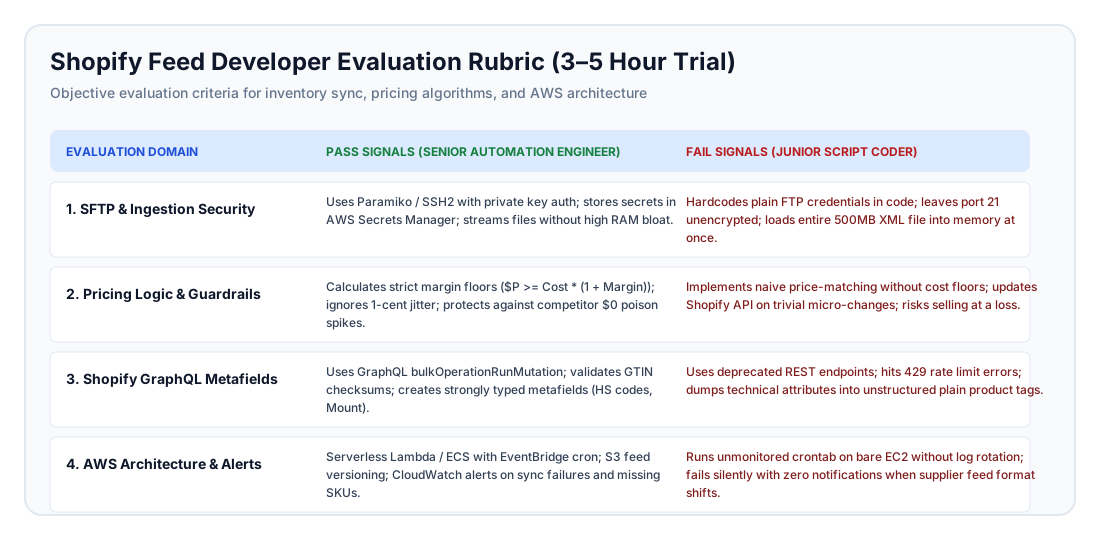
Figure 3: Practical evaluation rubric assessing ingestion security, pricing safeguards, platform proficiency, and cloud monitoring.
Candidate Assessment Matrix
| Evaluation Domain | Pass Signal (Senior Automation Engineer) | Fail Signal (Junior Script Coder) |
|---|---|---|
| Security & Credential Management | Manages secrets via secure configuration stores; documents key management and environment isolation clearly. | Hardcodes API tokens or credentials directly inside script source code. |
| Pricing Algorithm Safeguards | Enforces cost-plus margin floors; handles scenarios where competitor prices dip below cost; applies clean commercial rounding. | Matches competitor prices below wholesale cost; creates decimal rounding errors. |
| Platform Data Structuring | Formats payloads for asynchronous bulk updates; assigns attributes to appropriate native fields and Metafields. | Attempts individual sequential API updates; dumps technical specifications into unformatted product tags. |
| Barcode & Data Verification | Validates barcode checksums; extracts technical parameters accurately from descriptive text. | Passes corrupted barcodes without validation; regex logic misses common equipment variations. |
| Architecture & Telemetry | Structured modular design; comprehensive error trapping; clear dry-run execution instructions. | Unstructured single-file script; crashes completely when optional data fields are omitted. |
Common Pitfalls in E-Commerce Feed Automation
E-commerce merchants frequently stumble over common strategic missteps when automating inventory workflows:
- Overusing Product Tags for Technical Specifications: Storing specifications (like mount compatibility or condition codes) as plain product tags creates messy navigation filters and makes automated updating fragile. Always utilize strongly typed Shopify Metafields.
- Ignoring Currency Fluctuations on Multi-Currency Feeds: If suppliers bill in EUR or JPY while your store prices in USD, failing to incorporate automated daily currency exchange rates into your pricing engine will erode profit margins unexpectedly.
- Running Web Scrapers Without Proxy Infrastructure: Competitor websites quickly block repetitive pricing requests originating from standard cloud data centers. A senior engineer routes scrapers through residential proxy pools with sensible request pacing.
- Failing to Account for Discontinued Inventory: When a distributor drops a discontinued SKU from their catalog feed, naive scripts leave the item active on the storefront. The pipeline must detect missing items and automatically archive or mark them as out of stock.
- Testing Automation Directly on Production Storefronts: Never execute unverified synchronization scripts against a live production store. Always test against an isolated development store and verify proposed updates in dry-run mode before publishing.
Expert Advice for Store Owners and E-Commerce Directors
To ensure long-term stability and profitability across your automated e-commerce pipelines:
- Require Dry-Run Preview Modes: Mandate that developers include a command-line preview mode that processes feeds, calculates prices, and outputs an audit log of proposed changes without writing updates to Shopify. This allows merchandising teams to verify pricing logic before deployment.
- Enforce Architectural Idempotency: Ensure your feed script can run multiple times consecutively without duplicating inventory records, firing redundant customer notifications, or creating conflicting data logs.
- Retain Raw Feed Historical Archives: Archive incoming supplier feed files in cloud storage with automated 30-day lifecycle expiration. If a distributor introduces data corruptions into their catalog, historical archives allow you to identify exactly when the error occurred.
- Maintain Direct Corporate Account Ownership: Always establish cloud infrastructure under your company's master cloud account and store code in your corporate GitHub repository, providing developers with restricted access roles rather than delegating ownership to third-party accounts.
Frequently Asked Questions
How much does it cost to hire an engineer to upgrade an automated Shopify feed script?
An independent senior automation engineer costs between $1,800 and $7,600 (40 to 80 hours at $45–$95/hr) to modernize an existing product feed. Specialized agencies typically charge between $6,000 and $20,000 ($150–$250/hr) for comparable scope.
Why is SFTP preferred over traditional FTP for supplier catalog feeds?
Standard FTP transmits authentication credentials and catalog files in clear, unencrypted text over port 21, creating severe data exposure risks. SFTP encrypts all communication over SSH on port 22, fulfilling modern cybersecurity standards and enterprise supplier compliance policies.
How does a competitor price balancer prevent selling inventory at a loss?
An optimized price balancer enforces a non-negotiable gross margin floor that accounts for wholesale product cost, payment processing fees, and fulfillment expenses. If a competitor discounts below your floor, the algorithm holds your price at the floor level and flags the SKU for manual review.
Where should Country of Origin and HS tariff codes be stored in Shopify?
Customs information must be stored directly on Shopify's native InventoryItem object within the designated Country of Origin and Harmonized System code fields. This ensures that fulfillment and shipping platforms generate compliant commercial customs documents automatically.
How should technical equipment attributes like camera mounts be structured?
Technical specifications should be parsed from catalog descriptions and mapped into custom Shopify Metafields rather than plain product tags. Metafields provide structured, type-safe data that connects seamlessly to storefront faceted search filters.
Why is Shopify's Bulk Operations framework necessary for large catalogs?
Shopify enforces platform rate limits on standard API requests, causing scripts that update products one by one to stall or fail on large catalogs. The Bulk Operations framework processes thousands of updates concurrently on Shopify's internal infrastructure, finishing full catalog syncs in minutes.
When should feed scripts run on AWS Lambda versus containerized cloud services?
Use AWS Lambda if your entire feed processing workflow completes within 15 minutes. Use containerized cloud environments (such as AWS ECS Fargate) if your catalog exceeds 50,000 SKUs, requires long-running competitor scrapers, or needs dedicated compute resources.
What are typical monthly AWS hosting expenses for a custom product feed script?
A serverless script running on AWS Lambda and cloud storage typically incurs under $5.00 to $10.00 per month in infrastructure charges. Containerized environments rarely exceed $20.00 to $40.00 monthly, compared to commercial app subscriptions that cost hundreds of dollars every month.
How long does an end-to-end feed script upgrade project typically take?
A complete modernization project—including SFTP security, streaming file parsing, price balancing logic, attribute enrichment, and cloud deployment—typically takes 2 to 4 weeks from project kickoff to production deployment.
What are the biggest warning signs when interviewing automation developers?
Major red flags include: proposing hardcoded passwords in script repositories, suggesting individual API updates for thousands of products, implementing repricing without margin floors, and lacking experience with cloud credential vaults.
How can an e-commerce merchant safely test feed automation before going live?
Never test unverified automation scripts against a live production store. Always test against a staging development store, execute scripts in dry-run preview mode, and manually verify that prices and enriched attributes align with business expectations.
Who owns the automated scripts and infrastructure after the project ends?
Under standard independent contractor agreements with "work made for hire" provisions, your company retains 100% intellectual property ownership of all custom source code, documentation, and cloud architecture templates upon final invoice settlement.
Modernize Your Storefront Feed Architecture
Automating your Shopify catalog with secure data ingestion, intelligent dynamic pricing, and customs-compliant attribute enrichment safeguards your profit margins while eliminating manual data entry. Building custom automation on AWS frees your business from expensive recurring app fees while ensuring total control over your pricing logic.
If you have an existing product feed script that needs upgrading or security optimization, connect with our network of vetted engineers. Hire a verified Shopify developer or an AWS cloud engineer matched to your technology stack, or explore our flexible hourly arrangements to start with an architectural review of your inventory pipeline.
Written by Michael Melnyk
Senior IT Technical Writer & Technology Analyst
Senior Technical Writer and IT Industry Analyst with over 7 years of experience analyzing software engineering ecosystems, tech leadership models, and developer procurement frameworks.