Website Recovery from WebArchive: Sourcing Developers, Wayback Machine Limits & Rebuild Costs
When hosting accounts are deleted, backups are missing, and your developer is unreachable, WebArchive is often the only surviving copy of your business. Here is how to find a qualified developer, what Wayback Machine actually saves, and what a clean rebuild costs in 2026.


Website recovery from WebArchive (Wayback Machine) is technically restricted to static public assets — client-side HTML markup, text content, image files, CSS stylesheets, and front-end user interface scripts. Relational databases, server-side backends (PHP, Python, Node.js), customer accounts, order transaction histories, and secure payment processing endpoints do not exist in the archive. When an unpaid hosting account is wiped, a server drive suffers catastrophic failure with no offsite backups, or an offshore contractor disappears with root credentials, web.archive.org serves as the final lifeline for business continuity. However, business owners attempting to download an archived snapshot with one-click scrapers inevitably end up with broken proxy URLs, missing assets, and non-functional forms.
Transforming fragmented historical snapshots into an autonomous, revenue-generating website requires an engineer experienced in archive extraction, sanitization, and infrastructure deployment. Below is a rigorous analysis of Wayback Machine crawling mechanics, where to source verified recovery specialists without agency markups, benchmark pricing at $45–$95 per hour, and the exact protocol required to protect organic Google rankings.
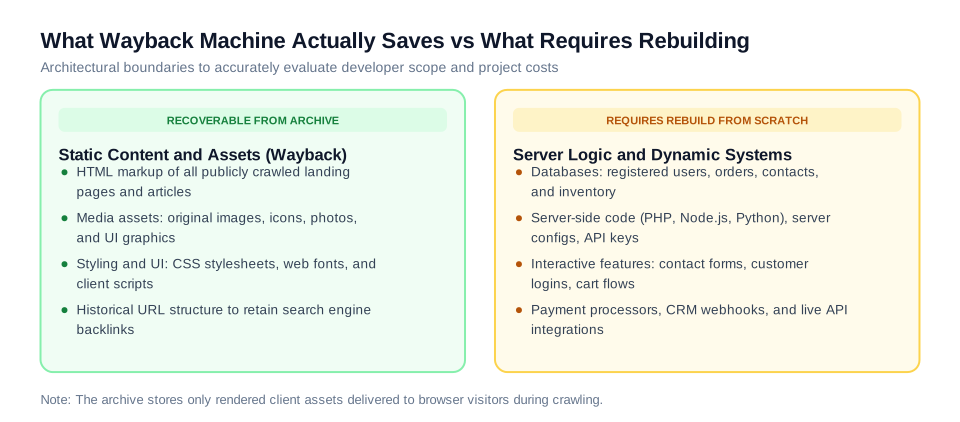
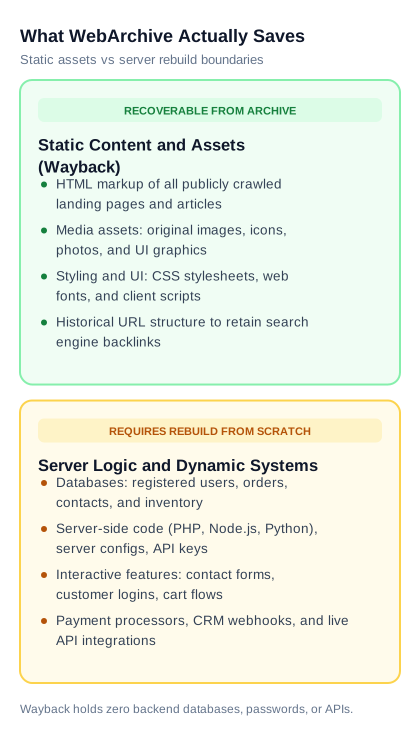
Figure 1: The architectural boundary of Wayback Machine recovery — public client-side assets are extracted directly, while server logic, customer records, and database backends require re-engineering.
Anatomy of a WebArchive Snapshot: What Exists vs What Is Lost
The Internet Archive operates automated web crawlers that periodically query publicly accessible URLs and store the rendered HTTP response sent back to a standard browser. The crawler never touches the underlying server file system, command-line environment, cron schedules, or internal databases. It simply captures what an unauthenticated visitor could see on a screen at that exact moment in time.
Establishing this technical boundary protects non-technical founders from dishonest contractors who claim they can "restore an entire e-commerce store with past order records in 48 hours":
- Fully Recoverable Assets: Public text copy across articles, service offerings, and landing pages; structural HTML page trees; hierarchical heading structures (H1 through H4); original raster images, vector logos, and graphic assets (provided the crawler captured high-resolution source files); CSS stylesheets, icon fonts, and typography.
- Partially Recoverable Assets: Client-side JavaScript libraries (galleries, accordions, visual sliders, interactive calculators). If scripts depend on legacy third-party CDN links or defunct tracking endpoints, they generate console errors and require manual decoupling and refactoring.
- Permanently Unrecoverable Elements: SQL/NoSQL databases (MySQL, PostgreSQL, MongoDB); customer login tables, password hashes, and profiles; e-commerce order histories and cart records; server-side form submission scripts; active payment processing webhooks (Stripe, PayPal, Authorize.Net); CMS administrative dashboards (such as WordPress wp-admin).
For corporate landing pages, law firm portfolios, consultancy portals, and content blogs, WebArchive extraction restores 90% to 95% of total asset value. For complex web applications, subscription platforms, or two-sided marketplaces, an archive snapshot functions purely as a visual front-end specification, requiring backend architecture to be rebuilt from scratch.
Four Commercial Scenarios Where WebArchive Recovery Is Viable
Engaging an engineer to rebuild a website from Wayback Machine is an emergency disaster-recovery protocol. It is invoked when standard recovery paths — such as restoring recent hosting snapshots, local backups, or Git repositories — have failed or do not exist.
| Disaster Scenario | Technical Asset Condition | Engineer Deliverable Scope |
|---|---|---|
| Hosting account deletion due to billing failure, company credit card expiration, or host bankruptcy | Server wiped clean, hosting support backups expired, domain ownership retained by business | Extract the most recent uncorrupted historical snapshot, provision clean cloud hosting (VPS or static CDN), restore the static page hierarchy, and connect production DNS. |
| Rogue or abandoned developer who disappeared with credentials and source code | Server offline or hostage, zero Git repository access, registrar domain remains under client control | Extract client-facing HTML/CSS assets, decouple proprietary external dependencies, rebuild clean contact forms, and transfer 100% root access to client. |
| Ransomware infection or destructive malware with compromised backup snapshots | Live server infected, automated host backups carry infected payloads, database tables corrupted | Identify a clean archive snapshot 3–6 weeks prior to breach, sanitize codebase against spam injections, deploy on hardened infrastructure with isolated permissions. |
| Catastrophic platform migration that wiped organic rankings and high-converting pages | New framework launched with broken URL paths, organic search impressions dropped by 50–80% | Harvest legacy URLs, metadata tags, and content blocks from WebArchive, then deploy an exact 301 redirect map or restore critical landing pages to regain authority. |
Why Automated Scrapers Fail: The Technical Trap of Raw Wayback Dumps
Dozens of commercial tools and Python scripts claim to "download any website from Wayback Machine for $15." Business owners who attempt to rely on raw scrapers without engineering intervention encounter structural defects that render the resulting files unusable in production.
Defect 1: Hardcoded Wayback Proxy Prefixes. Unprocessed crawler dumps contain internal proxy URLs embedded in every anchor link, image source, and stylesheet reference (e.g., https://web.archive.org/web/20240410080000/https://example.com/assets/style.css). When placed on a standard web host, the site continues fetching assets from Internet Archive servers. If Internet Archive experiences downtime, rate limits traffic, or enforces CORS restrictions, the site loads as unstyled broken text.
Defect 2: Fragmented Chronological Snapshots. Wayback Machine crawlers do not index an entire domain in a single pass. The homepage may be recorded in August 2025, the pricing page in May 2025, and the blog in November 2024. Downloading a single date timestamp creates a patchwork of missing subpages, outdated phone numbers, and broken relative links. A qualified engineer writes recursive scripts to merge the latest clean version of each distinct URL across multiple snapshot timestamps.
Defect 3: Wayback Toolbar Injections and DOM Pollution. The Internet Archive injects its own navigation header, analytics trackers, and event interceptors directly into the DOM tree of cached pages. Leaving these scripts active bloats page weight by 400+ KB, triggers cross-origin script errors, breaks responsive mobile menus, and degrades Google Core Web Vitals scores.
Defect 4: Dead Contact and Lead Capture Forms. All <form> elements in an archived site have broken action attributes pointing to expired server endpoints or dead external scripts. When prospective clients submit inquiries on an unsanitized site, the data disappears into void endpoints. An engineer must build a replacement backend handler — such as a lightweight PHP script, serverless function, or direct webhook to Slack/CRM — with modern spam validation (e.g., Cloudflare Turnstile).
Where to Source a Qualified Recovery Developer: Channel Breakdown
Recovering an archived asset requires cross-disciplinary expertise: web scraping, DOM sanitization, Linux server configuration, and technical SEO permalink mapping. Selecting the right hiring channel depends on business urgency and budget constraints.
| Sourcing Channel | Pricing Model & Hourly Rates | Technical Vetting Rigor | Operational Risk Factor |
|---|---|---|---|
| Vetted Engineering Marketplaces (ProofDevs) | $45–$95 / hr (milestone-based) | High: Verified senior engineers with hands-on systems and migration track records | Minimal: Direct technical communication, escrow protection, 100% IP and credential ownership. |
| Open Gig Platforms (Upwork, Fiverr) | $15–$50 / hr (or $50–$300 flat) | Low: Open self-listing where reviews are frequently earned on trivial task volume | High risk of receiving raw script dumps with unresolved proxy URLs and non-functioning forms. |
| Traditional Web Design Agencies | $150–$250 / hr (minimum $3,000 retainer) | Moderate: Experienced leadership, but tasks are delegated to junior staff | High overhead markups, bureaucratic change orders, and prolonged scoping cycles (2–4 weeks). |
| Automated Archive Downloader Utilities | $20–$80 flat fee (software only) | Zero: Automated regex script without engineer code review | Delivers raw static ZIP archives with broken forms, mixed historical dates, and zero hosting setup. |
For small to mid-sized businesses, the most cost-effective structure is engaging an independent senior developer ($45–$95/hr) under a capped hourly arrangement. A senior engineer audits archive viability within 2 hours, completes clean extraction in 4–8 hours, and provisions secure hosting within 2 business days. The business avoids agency overhead while retaining complete administrative control over all hosting and domain assets.
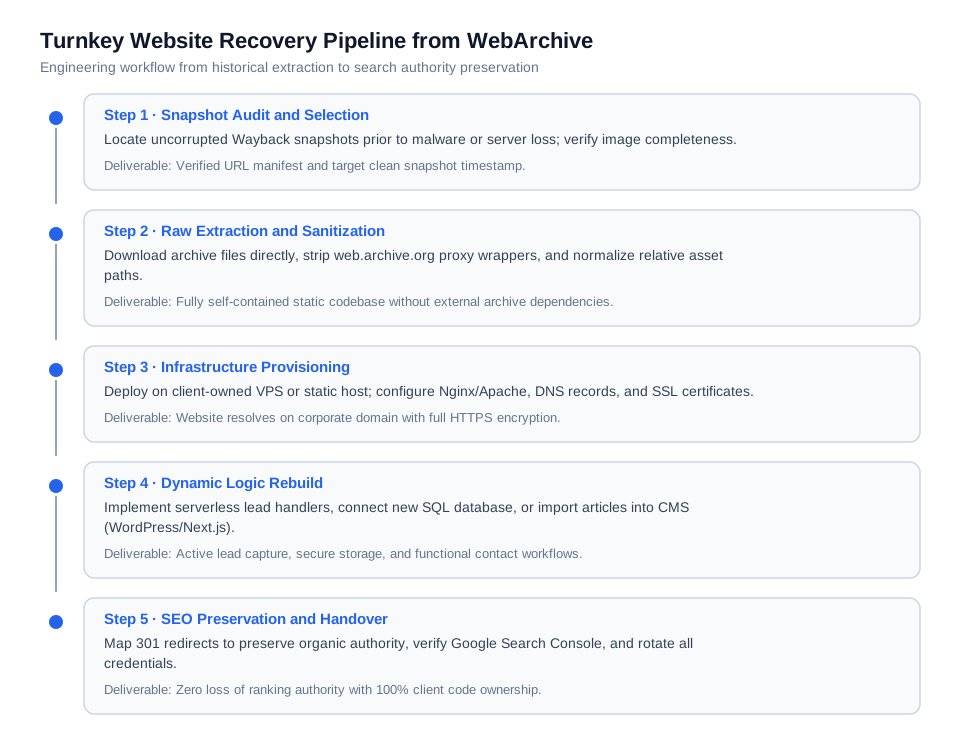
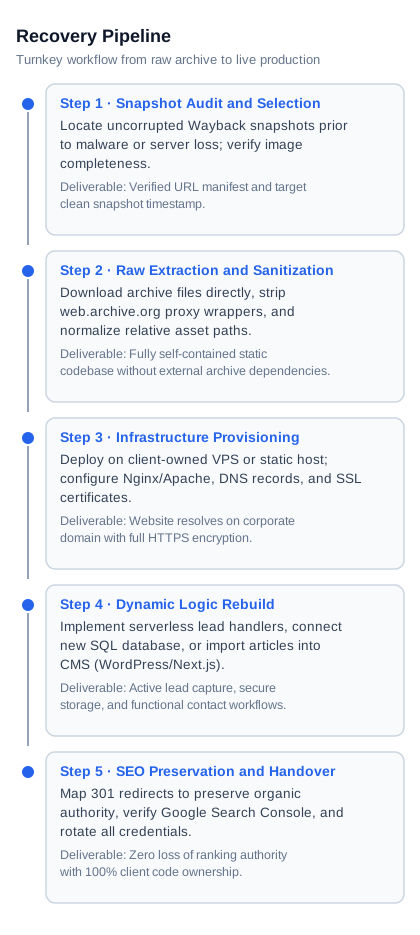
Figure 2: The five phases of professional website recovery — ensuring technical sanitization, modern hosting configuration, and organic search index protection.
The 5-Step Turnkey Recovery Pipeline
A dependable recovery specialist executes a standardized engineering workflow. Any contractor who suggests "uploading scraped HTML directly to an FTP folder" lacks production disaster-recovery experience.
Step 1. Historical Snapshot Audit and Date Selection
The developer inspects the Wayback Machine calendar timeline to identify the latest uncorrupted snapshot preceding the outage, hack, or deletion. The audit inventories core revenue-generating pages: homepage, service offerings, landing pages, and contact points. Media assets are cross-checked to ensure high-resolution source images were cached rather than low-resolution thumbnails.
Step 2. Deep Extraction and DOM Sanitization
Using programmatic scraping tools, the engineer downloads the raw files directly from Internet Archive clusters. Once retrieved, automated regex and parser pipelines sanitize the codebase:
- Stripping all Wayback Machine toolbar scripts, iframe injections, and analytics tags.
- Converting absolute
web.archive.orglinks to relative paths or the production domain canonical format. - Locating missing assets across adjacent historical snapshot dates and downloading them locally.
- Enforcing standard UTF-8 text encoding across all documents to prevent corrupted typography.
Step 3. Modern Infrastructure Provisioning
The sanitized codebase is deployed to a hosting environment owned exclusively by the client (e.g., an Ubuntu VPS managed via Nginx, or a modern edge-hosted static platform such as Cloudflare Pages or Vercel). The specialist optimizes server response times via Gzip/Brotli compression, binds DNS A/AAAA records, and provisions an automated Let's Encrypt SSL certificate.
Step 4. Dynamic Logic Re-Engineering
Depending on future business needs, the site follows one of two implementation paths:
- High-Speed Static Architecture (HTML/Tailwind/Next.js): Best suited for brochure sites, consultancies, and local businesses. Yields near-instant page load speeds (95+ Google PageSpeed Score), virtually zero attack surface, and negligible hosting maintenance costs. Contact forms are wired to secure serverless endpoints or direct CRM webhooks.
- CMS Conversion (WordPress/Headless CMS): Necessary if marketing teams need to regularly add blog posts, team members, or case studies. The developer converts the sanitized HTML/CSS templates into a lightweight custom WordPress theme, populating native post types and custom fields.
Step 5. SEO Preservation and Handover
The engineer verifies that every historical URL matches its original permalink structure. For pages that were restructured or consolidated, server-side 301 Permanent Redirects are implemented. An XML sitemap (sitemap.xml) and optimized robots.txt are generated, followed by ownership verification inside Google Search Console. Once complete, all root credentials, repository access, and hosting accounts are handed directly to the client.
2026 Budget Benchmarks and Turnaround Estimates
Project pricing depends on total page volume, the complexity of missing forms, and whether the site remains static or transitions into a CMS. Below are verified commercial benchmarks comparing independent senior engineers ($45–$95/hr) against traditional digital agencies ($150–$250/hr).
| Project Scope & Tier | Deliverable Details | Senior Engineer Budget ($45–$95/hr) | Agency Pricing ($150–$250/hr) | Typical Turnaround |
|---|---|---|---|---|
| Landing Page / Micro-site (1–5 pages) | Raw extraction, asset sanitization, mobile responsive fixes, working lead form, SSL and custom domain setup | $250–$650 | $1,200–$2,500 | 2–4 business days |
| Corporate Website (5–25 pages) | Multi-page structure, image localization, navigation repair, lead capture connected to corporate email/CRM, DNS configuration | $600–$1,500 | $2,500–$5,500 | 5–9 business days |
| Content Portal / Publication (25–150+ pages) | Batch extraction of extensive article library, conversion into clean Markdown or WordPress DB import, category taxonomy setup | $1,200–$2,800 | $4,500–$9,500 | 10–18 business days |
| Product Catalog / E-commerce (rebuilt logic) | Product catalog data extraction from archive + rebuilding shopping cart, checkout flow, inventory database, and Stripe payment gateway | $2,500–$6,000 | $8,000–$20,000+ | 3–6 weeks |
Adopting an hourly model with weekly caps provides complete financial transparency. Business owners only pay for verified milestones demonstrated on a staging server every 48 hours, avoiding agency project-management markups and unexpected scope additions.
Technical Vetting Checklist: Five Questions to Qualify Candidates
Before releasing milestone payments or sharing domain registrar access, screen prospective developers with five targeted technical questions to eliminate low-skilled resellers:
- "How do you remove hardcoded web.archive.org proxy wrappers across CSS, JavaScript, and HTML?"
Expected answer: Programmatic regex replacements or custom Node.js/Python parsing scripts that recursively scan all local assets, rewriting absolute archive URLs into root-relative paths. If a candidate claims they will "edit links manually," they will miss embedded stylesheet fonts and background image URLs. - "What is your protocol if crucial images are missing from our target snapshot date?"
Expected answer: The developer will query adjacent crawl dates via the Wayback CDX Server API, check secondary caches (Google Cache, Bing Cache), and propose clean vector graphics or licensed stock alternatives to preserve visual hierarchy without layout shifts. - "Under whose account will new hosting and domain records be configured?"
Expected answer: All hosting, cloud DNS, and email services must be registered under client-owned accounts. The developer operates via delegated IAM roles, temporary SSH keys, or staging credentials that can be revoked immediately upon project completion. Never permit a developer to host your restored site on their personal server. - "How will you rebuild contact and inquiry form processing?"
Expected answer: Deployment of an isolated server-side script or serverless handler with honeypot spam protection, Cloudflare Turnstile verification, and redundant dispatch (e.g., corporate inbox delivery plus encrypted database logging). - "Do you audit the extracted code for dormant malware or hidden spam injections?"
Expected answer: Yes. Historical crawlers may have captured the site while an undetected breach was active. An engineer must inspect JavaScript files,iframeembeds, and base64-encoded strings before serving pages from a live domain.
SEO Authority Protection: Retaining Google Rankings Post-Recovery
A website recovery project carries severe search engine visibility risks if handled carelessly. If a high-ranking URL such as /services/cloud-migration/ is restored as /cloud-migration.html, Google logs a 404 error, and years of earned backlinks and keyword rankings disappear.
Mandatory SEO Recovery Guidelines:
- Exact Permalinks: Maintain identical URL paths, including trailing slashes, subdirectories, and original file extensions.
- Systematic 301 Redirects: If obsolete content is retired or restructured, configure server-level 301 Permanent Redirects pointing old URLs to the most relevant surviving page.
- Metadata Restoration: Preserve original
<title>tags,<meta name="description">copy, and<h1>headings to verify site authenticity with search crawlers. - Google Search Console Verification: Claim DNS verification immediately upon deployment, submit an updated
sitemap.xml, and monitor the Index Coverage report to confirm rapid re-indexing.
Real-World Engineering Case Studies
Case 1: B2B Engineering Consultancy After Host Deletion
Challenge: An industrial engineering firm lost its hosting account following corporate card expiration and registrar restructuring. A 45-page portal featuring technical whitepapers, architectural schematics, and service certifications went offline with no internal backups.
Solution: A senior developer hired via ProofDevs ($65/hr) identified an uncorrupted snapshot from June 2025, extracted all 45 pages, purged archive scripts, and migrated the markup into a high-speed Next.js static site hosted on Cloudflare Pages. Inquiry forms were rewired to the company's HubSpot CRM.
Result: Fully operational within 7 business days for a total cost of $1,170 (18 engineering hours). Google PageSpeed scores improved from 42 to 98, and all historical organic rankings returned within two weeks.
Case 2: Local Service Network After Contractor Dispute
Challenge: An automotive repair network severed ties with an agency that withheld hosting credentials and demanded an extortionate maintenance fee before taking down the server. Domain ownership was secured, but all web assets were dark.
Solution: A freelance engineer scraped the 8-page service footprint from Wayback Machine, sanitized the CSS/JS assets, registered an independent Cloudflare Pages environment for the owner, and built a custom form dispatcher pushing customer leads directly into the shop managers' Telegram group.
Result: Site live within 48 hours at a total cost of $380 (5 billable hours). The owner gained total independence from the prior vendor with zero monthly hosting fees.
Case 3: Regional Media Publisher After Ransomware Attack
Challenge: A regional business news portal suffered a severe ransomware attack that encrypted all live server drives and automated backup repositories. Hackers demanded 1.5 BTC to unlock files.
Solution: Rather than paying extortion, the publisher hired a specialist ($75/hr) who used automated Python scrapers to extract 86 published articles, original images, and author metadata from uninfected historical Wayback snapshots, importing the structured data into a fresh, hardened WordPress installation on an isolated VPS.
Result: Publication restored in 11 business days for $1,650 (22 hours of work). 92% of original editorial content was rescued, preserving historical permalinks and user engagement.
Frequently Asked Questions
Can a website be 100% recovered from WebArchive?
Only public client-side assets can be recovered (HTML, text, styling, images). Databases, user passwords, customer accounts, and backend server code (PHP, Node.js) are never stored by Wayback Machine and must be re-engineered.
How much does it cost to recover a website from WebArchive in 2026?
A simple 1–5 page landing page costs $250–$650, a multi-page corporate website (5–25 pages) ranges from $600–$1,500, and large content portals (100+ pages) cost $1,200–$2,800 when working with vetted senior developers ($45–$95/hr).
How long does turnkey archive restoration take?
Small landing pages take 2 to 4 business days; corporate websites with custom forms require 5 to 9 business days; extensive CMS conversions take 10 to 18 business days depending on asset complexity.
How do I select the right snapshot date in Wayback Machine?
Select a date 2 to 4 weeks prior to the outage or security incident. Visually inspect the snapshot in your browser to confirm layout integrity, correct corporate contact information, and zero malware defacements.
Can extracted archive pages be converted into WordPress?
Yes. An engineer extracts the sanitized HTML and media, then builds a lightweight custom WordPress theme or imports articles into standard post types, enabling non-technical teams to edit content via the block editor.
What if some images are missing from the Wayback Machine snapshot?
Developers query adjacent crawl dates via the Wayback CDX API or retrieve cached files from Google and Bing search caches. If permanently missing, assets are replaced with brand-aligned vector illustrations or licensed imagery.
Do I need new hosting to launch a recovered site?
Yes. WebArchive provides static file assets that must be deployed to an active web server or static edge hosting platform, bound to your custom domain DNS with valid SSL encryption.
Why should I avoid free automated Wayback downloader tools?
Automated scrapers pull raw files filled with hardcoded web.archive.org proxy URLs, non-functional forms, toolbar bloat, and broken links that cause immediate downtime once archive servers throttle traffic.
Will our company retain full ownership of the recovered codebase?
Yes. Engaging an independent engineer through ProofDevs guarantees 100% intellectual property ownership, with all server credentials, repositories, and DNS records established directly in your name.
Does website recovery from WebArchive harm Google rankings?
If the developer preserves original URL paths, restores historical <title> and <meta> tags, and configures 301 redirects for modified pages, organic search positions typically restabilize within 2 to 4 weeks.
Can a site be restored if our original domain was bought by cybersquatters?
Yes. The extracted content can be deployed to a new brand domain. However, historical backlink equity will remain with the old domain unless it is recovered or acquired.
Does WebArchive store password-protected client portal pages?
No. Crawlers cannot bypass user authentication or paywalls. Only publicly accessible pages visible to anonymous visitors are preserved in the archive.
Source a Verified Recovery Specialist
Losing hosting infrastructure and proprietary source code is a critical business disruption. However, if digital traces survive in WebArchive, your core commercial assets can be restored rapidly. Avoid wasting days attempting manual scraping; engage an experienced systems developer who can extract clean files, re-engineer interactive workflows, and return your site to production under your complete control.
On ProofDevs, you can connect directly with pre-vetted engineers experienced in disaster recovery, site migration, and archive restoration. Submit your project requirements and target domain, and our specialists will perform a rapid snapshot audit and provide an exact scope and budget breakdown.
Written by Michael Melnyk
Senior IT Technical Writer & Technology Analyst
Senior Technical Writer and IT Industry Analyst with over 7 years of experience analyzing software engineering ecosystems, tech leadership models, and developer procurement frameworks.