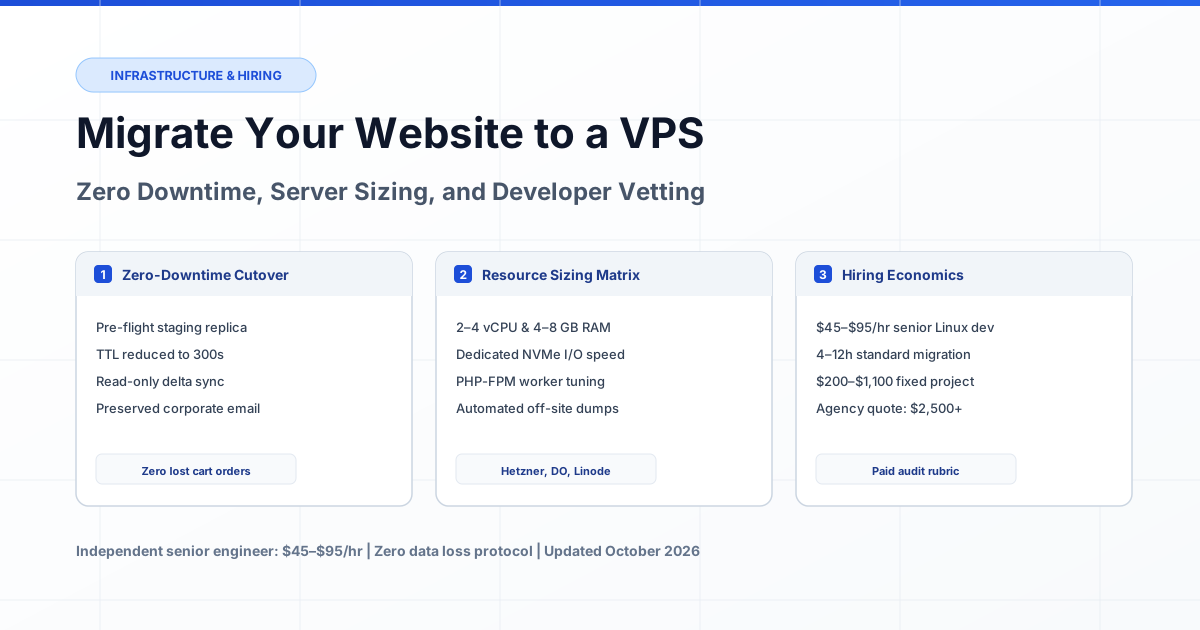
Where to Find a Specialist to Move Your Website to a New VPS: Freelance Markets, Managed Hosts & In-House Hires
Between open gig boards, a hosting provider's own migration crew, and a full-time sysadmin on a $70K–$125K salary, the right place to hire VPS migration help depends on what your server holds — live orders, mailboxes, and cron jobs nobody documented. Here is what each channel costs in October 2026 and which one fits your stack.


The safest place to find a specialist who migrates a website to a new VPS is a vetted engineering marketplace or curated developer directory, where senior sysadmins work at $45–$95 per hour under milestone escrow. The most expensive is the staffing route: US hiring benchmarks put an in-house systems administrator at a $70,000–$92,000 salary mid-level and $95,000–$125,000 senior (Kore1, 2026) — a commitment that makes no sense for a one-time cutover. Open gig boards sit at the opposite end: competent Linux engineers do answer projects there for $15–$60 flat, but the same feed carries the lowest-bid resellers, and with a migration a single missed inventory item can cost more than the whole project fee.
There is a middle path most owners never check: the hosting providers themselves. GoDaddy sells paid migrations as a support product, and several operators — KnownHost among the cited examples — bundle migration assistance into managed plans at no extra charge (provider help centers, reviewed October 2026). The catch: provider crews are strong at moving into their own environment and scoped out of anything custom around it. All rate bands and protocols below reflect verified marketplace data across North American and European deployments as of October 2026.
Where you hire matters more in this niche than in most web projects, because a bad hire here destroys revenue while appearing to work: the homepage loads, orders sit in "pending", and the damage surfaces only when payment webhooks or mail start failing. Below: every legitimate channel, priced, and matched to what your server holds.
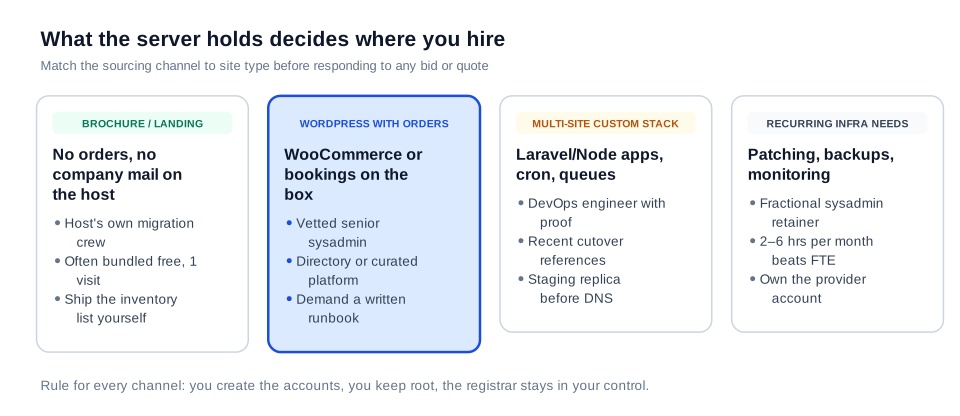
Figure 1: The server's contents decide which sourcing channel is safe — brochure content tolerates bundled crews, revenue-producing stacks demand a vetted engineer with a written runbook.
What You Are Actually Hiring: The Job Beyond Copying Files
A VPS migration specialist is a systems engineer who transfers a live website — code, databases, email, DNS records, certificates, and background jobs — from one server to another while visitors, customers, and payment processors keep working without noticing. The definition matters because hiring decisions collapse when the role is misread as "move my files."
Owners who scope migrations as file transfers get predictable failures, and hosting-industry guides that track large numbers of multi-site server moves report the same finding year after year: the copying almost never fails — the inventory does. The items that break things never show up on a homepage:
- Scheduled jobs: renewals, invoices, and backups stop silently when a cron entry is missed.
- Mail records: one overwritten MX or SPF line bounces corporate mail or buries it in spam for days.
- Certificates: a missed subdomain certificate produces padlock warnings on the first customer visit.
- Firewall allowlists: payment gateways and external APIs reject traffic from an IP they never met.
- Background workers: queue processors and Node daemons fail hours after cutover, far from the page anyone tested.
This is why a strong candidate's first question is "what does this server have that doesn't show in the URL?" — and a quick disqualifier is any bid that opens with "send me the zip backup." A candidate who leads with inventory has already lived through an undocumented payment callback hostname eating their weekend.
Six Legitimate Channels: Where Migration Talent Actually Lives
Six sourcing routes cover every legitimate way to find this skill in 2026. They differ in what they vet, what they add to the price, and what happens on your side if the move goes wrong.
Vetted Engineering Marketplaces and Developer Directories (Recommended)
Curated platforms pre-screen candidates around verifiable work history. Independent senior sysadmins price at $45–$95 per hour, deal with you directly, and accept milestone or escrow terms; the platform keeps dispute resolution on your side of the contract. The test signal: a provider who answers with an inventory template, proposes a fixed cutover window, and refuses to work on shared root-password trust — the discipline curated around specialists listed in the server administration directory.
Open Gig Boards and Micro-Task Sites
Open feeds list thousands of "VPS migration" packages at $15–$60 flat. Real senior engineers do fill calendar gaps here at below-directory rates, but the channel provides zero pre-vetting, so screening lands entirely on you. Chronic risks: under-scoped "moved it to cPanel, done" work, no escrow on custom timelines, and bidders promising "zero downtime, any server, same day" — a claim no honest engineer makes for a server holding live writes. A cheap labor pool for disposable assets only.
The Hosting Provider's Own Migration Crew
Providers sell migration as a support SKU, from bundled-free to a modest one-time fee, and crews know their own platform's failure modes cold. For mainstream stacks — WordPress, standard control panels at both ends — this is often the cheapest legitimate option. Respect the boundary: provider crews focus on the standard path their tooling handles and typically decline custom work (non-standard web servers, queue workers, legacy apps, multi-server splits). Ask where the scope ends, in writing, before relying on it.
Local IT Firms and Managed Service Providers (MSPs)
Regional MSPs bill roughly $85–$150 per hour for systems work and offer what marketplaces rarely do: a legal entity on paper and SLAs with teeth. The premium is rational for multi-site consolidations and compliance-bound audits, disproportionate for a two-site WordPress cutover — five hours of migration can trend toward a four-figure engagement by their ticket economics.
Staffing Agencies and the In-House Route
For a single migration this is the overkill option. Mid-level sysadmins run $70,000–$92,000 and seniors $95,000–$125,000 plus payroll overhead near 20–30% (2026 US hiring benchmarks); staffing agencies add 25–35% markups on contract-to-hire deals (typical industry estimate). The route only pays when infrastructure work becomes continuous — 10+ sites, security ownership, a multi-quarter DevOps roadmap — and it fails short-notice deadlines: recruiting pipelines take 8–12 weeks.
Communities, Referrals, and Your Own Network
The channel procurement checklists miss, and in many months the best signal per dollar. System administration communities (Reddit threads are a recurring pipeline where veteran freelancers surface), past developers, and colleagues with similar infrastructure produce pre-vetted candidates at directory prices or below. There is no escrow and no dispute path, so apply the same inventory-plus-paid-trial discipline demanded of a marketplace bid — trusted referrer or not.
What Sourcing and Executing Actually Costs in October 2026
Budget $180–$950 for a normal professional site migration sourced independently; expect four figures only from agencies, emergencies, or multi-site consolidations. A standard single-database site takes an experienced engineer 4–6 focused hours ($180–$570 at the $45–$95/hr band); e-commerce cutovers with live order data run 6–10 hours ($270–$950); custom full-stack apps with queue workers run 8–14 hours ($360–$1,330). These bands mirror verified freelance rate cards and published hiring guides, reviewed October 2026.
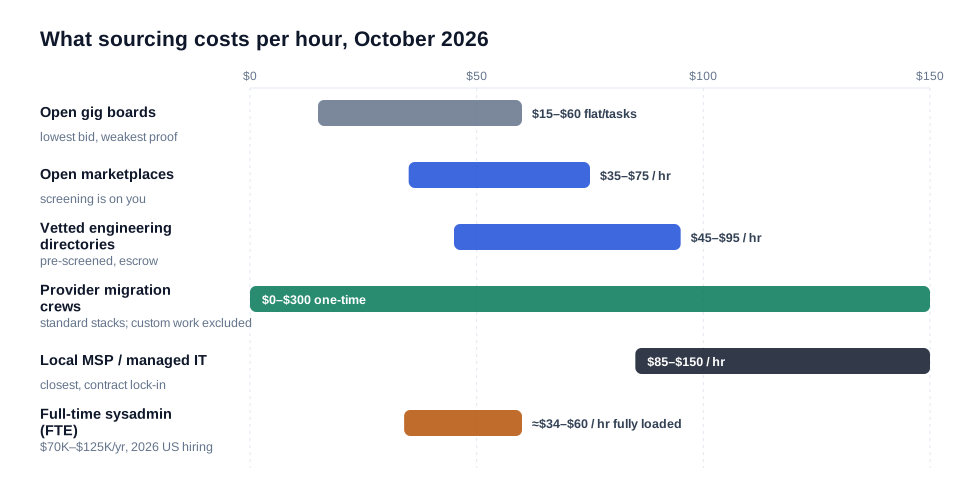
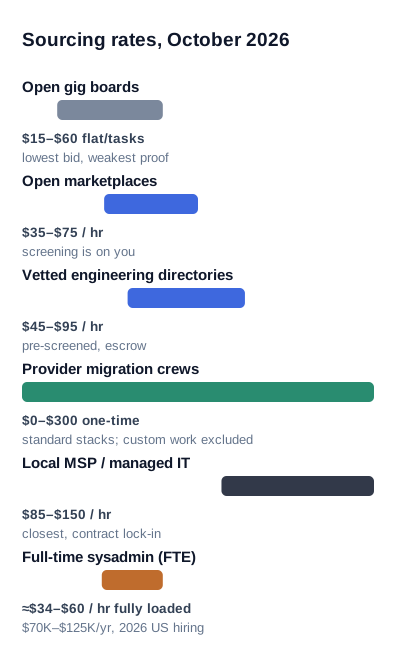
Figure 2: Hourly rate ranges by sourcing channel, October 2026 — the gap in failure cost between channels is bigger than the gap in hourly rates, which is why sourcing discipline matters more than the last $10/hr.
| Sourcing Channel | Typical Talent Cost | Added Overhead / Markup | Built-in Accountability | Best Suited For |
|---|---|---|---|---|
| Vetted directories & marketplaces | $45–$95 / hr; $180–$950 per migration | Platform fee usually inside the rate | Escrow, disputes, work history | Commercial sites, stores, live writes |
| Open gig boards | $15–$60 flat per task | None; vetting becomes your job | Review scores only | Disposable sites, staging moves |
| Provider migration crews | Bundled free – $300 one-time | Must land on their stack | Support SLA, company guarantees | Standard control-panel stacks |
| Local MSPs | $85–$150 / hr | Entity pricing, minimums | SLAs, formal audits | Multi-site, compliance-bound work |
| Staffing agency / contract-to-hire | $60–$110 / hr billed | 25–35% markup (est.) | Agency contract, replacement clause | Multi-quarter infrastructure programs |
| In-house sysadmin (FTE) | $70K–$125K / yr + overhead | Recruiting, benefits, management | Daily direct control | 10+ sites, security ownership |
The In-House Math Nobody Should Skip
A $95,000 senior sysadmin costs a business closer to $114,000–$125,000 fully loaded after payroll tax, benefits, and coverage — about $9,500–$10,400 per month. Yet the volume a single-server migration represents is 20–60 hours of systems work per year: patching, SSL renewals, disk and memory reviews, an occasional incident. A fractional retainer of 2–6 hours per month at $45–$95/hr ($90–$570, commonly $300–$500) covers the identical workload. The remaining ~$108K per year buys reserve capacity for 2 a.m. alerts — sensible only at a scale most migrations never reach.
When You Do Not Need to Hire Anyone for the Move
If the destination provider offers migration assistance and your stack is standard, you may not need to hire a contractor at all. This is the honest boundary case behind most "where do I find a specialist" searches. Before paying outside help, ask any destination provider three published questions: is migration bundled free with the plan, what does a paid one-time migration cover, and what does the provider's automated path support. Over-purchasing a personal migration on a single-site WordPress-standard stack wastes several hundred dollars — the most common over-spend in this market.
What Bundled Provider Migrations Cannot Solve
The exclusions are sharp: provider crews generally do not migrate custom Node.js daemons or queue workers, rarely rebuild bespoke firewall chains, and will not carry legacy off-provider DNS designs without payment. Any stack with those variables goes back to the independent-engineer lane. Rule of thumb: single CMS site, standard panels, external mail — provider path. Custom runtime, on-server mail, e-commerce writes, or emergency timeline — hired specialist. To see how a hands-on shared-to-VPS move is sequenced, a working administrator's walkthrough covers the flow: How to Migrate from Shared Hosting to VPS — Tips for Beginners — its value is the ordering: inventory before transfer, transfer before DNS.
Three Hiring Paths That Show the Real Trade-Offs
Case 1: A 14-Site Consolidation Sourced from a Server-Community Referral
Initial situation
A regional digital agency ran 14 client sites on an inherited reseller account facing a 40% renewal increase and an aging PHP backend. The owner moved toward a single Hetzner VPS consolidation and insisted on referrals instead of marketplace noise.
What got in the way
Six calendar years of undocumented operations: cron schedules, DNS zones spread across two registrars and one legacy provider, and an on-server mail route serving a corporate mailbox for one of the 14 sites — none of it written anywhere.
Solution
The owner posted a scoped brief in a server-administration community describing the inventory gaps, then commissioned a paid 4-hour audit from a community-referenced engineer. The audit surfaced 63 cron jobs, one expired DNS delegation, and an undocumented payment webhook target before any data moved. Execution ran in batches — quietest site first, store last — under escrow, with a shared inventory sheet and verified handovers between batches.
Result
Consolidation completed in five working days for $1,340 (audit plus execution), zero customer-visible downtime across all 14 sites, corporate mail intact. Monthly infrastructure cost fell from $210 to $58 — roughly $1,824 saved annually (example engagement, representative 2026 figures).
Case 2: The $40 Gig-Board Migration That Cost $1,850 to Undo
Initial situation
A fashion retailer on WooCommerce — two payment gateways, 6,500 orders — needed to escape an end-of-life host and booked the cheapest bid: a "$40 VPS migration, same-day, 5★" gig listing, with neither inventory nor escrow.
What got in the way
The contractor copied files onto an unmaintained database snapshot, declared completion in four hours, and requested a review before any cutover happened. No inventory, no staging verification, no delta reconciliation — and nameservers were repointed without regard to the MX record carrying on-server mail, so order notifications vanished mid-propagation.
Solution
Recovery required a second engagement, this time sourced through a vetted directory under escrow: DNS authority restored to a Cloudflare zone, deliverability re-verified, 26 hours of split-brain orders reconciled, certificates rebuilt, and a proper freeze-and-delta cutover executed — all 48 hours after the second engineer started.
Result
Remediation cost $1,850 (9.5 senior hours) plus roughly $4,700 in revenue lost during 26 hours of downtime — versus the $180–$570 a correctly scoped migration would have cost. The failure was not the listing; it was the missing inventory, escrow, and scoped access.
Case 3: SaaS Ops Team Prices an FTE, Then Buys Fractional Instead
Initial situation
A 22-person B2B SaaS company outgrew a colocated legacy box and planned a two-node cloud VPS consolidation. Operations opened a requisition for a full-time senior sysadmin to own the infra roadmap.
What got in the way
The work analysis said otherwise: true need totaled about 50 systems-hours per year with episodic spikes. Recruiting timelines ran 8–12 weeks against a December deadline, and the fully loaded position cost around $114K per year.
Solution
The team split the need into three products: an independent engineer for audit plus migration ($640, one-time), a 4-hours-per-month fractional retainer for patching and backup verification ($355 monthly, renegotiated to 2 hours after one quarter), and a single-day contractor for queue reconfiguration during the move (3 hours). The requisition was withdrawn; the budget was redirected into storage redundancy that genuinely lacked coverage.
Result
First-year systems spend of roughly $4,900 against a requisition profile carrying about $114,000 — and provider consolidation saved an additional $9,800 against the prior footprint (internal scope estimate, example engagement, October 2026).
Proving the Claim: How to Vet a Migration Specialist Before You Pay
Vet for process evidence, not certificates. The strongest predictor of a successful migration is whether the candidate leads with inventory, staging, and a rollback story — three things no résumé certifies. Screen in four steps:
- Demand an inventory-first response. A serious specialist answers your brief with requests: DNS zone export, PHP version, database size, mail routing. Candidates who quote within ten minutes of your post are pricing from hope.
- Verify cutover recency. Ask for the last two migrations their hands touched — provider, stack, date — and cross-check their screenshots. "I've done hundreds" is not evidence; a dated 2026 cutover log is.
- Push on rollback. Ask what happens if the new VPS misbehaves one hour after cutover. The senior answer is procedural: flip DNS back to the old A record inside a 300-second TTL window, old host kept alive 72 hours, repair under no pressure. Deflection ("it usually goes fine") is a fail.
- Commission a paid audit, not a free call. Buy 2–4 hours ($90–$380) to inventory the server, size the destination VPS, and deliver a written migration plan you keep regardless of who executes. The audit converts price guesswork into scope and routinely lowers the total cost of the move.
Credential and DNS Safety During the Handover
Never hand over your registrar password — at any stage. Every legitimate credential question reduces to one principle: the specialist gets scoped, temporary access; you keep root, billing, and the registrar; everything app-facing rotates after sign-off. The most common exposure in real incidents is procedural, not technical — a registrar login given "so they can move the nameservers" and never rotated.
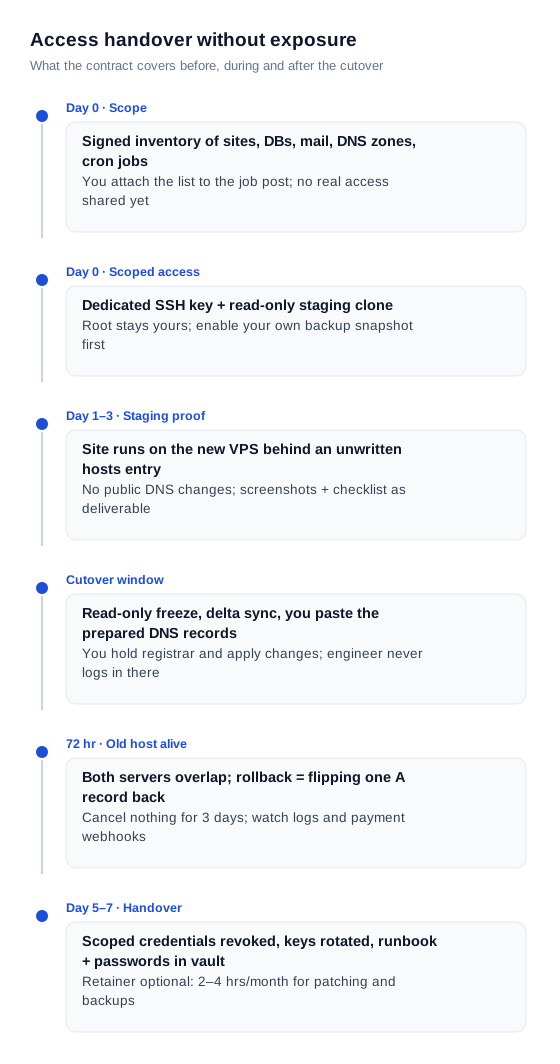
Figure 3: A seven-day handover protocol — scoped access first, staging proof without public exposure, customer-applied DNS records, 72-hour overlap, revocation last.
- Create, do not share. Provision a dedicated SSH key for the engagement; root stays with you.
- Registrar stays yours. The specialist prepares exact DNS records; you apply them. Cloudflare's TTL documentation is worth reading before cutover day (Cloudflare, time-to-live glossary).
- Rotate after sign-off. Passwords and API keys the engagement touched get rotated after delivery — gateway keys, mail relay credentials, storage keys.
- Write the protocol down. A half-page credential clause in the engagement letter eliminates most disputes before they start.
Typical Mistakes When Sourcing VPS Migration Help
- Buying the lowest bid blind. The $40 flat listing wins by ignoring everything that makes migration hard; Case 2's ~$6,550 combined damage is the standard consequence, not an outlier.
- Confusing "VPS experience" with "migration experience." Thousands of engineers administer servers for years without moving a live one. Ask for cutover artifacts specifically.
- Paying 100% upfront. The sane split: audit invoiced first, 50% on execution start, remainder withheld until the verification checklist passes — or full escrow where the platform supports it.
- Accepting a resold VPS inside the contractor's account. It locks the business behind the specialist's provider rights. The destination server must live in an account you own and control.
- Skipping the mail layer. If the plan never mentions MX, SPF, and DKIM records, mail downtime is already in the schedule — treat the omission itself as a red flag.
- Testing only the homepage. Verify checkout, one test order, mail in both directions, and cron firing on day one; hosting-industry checklists measure exactly these items for a reason.
- Canceling the old host the same day. Keep 72 hours of overlap; late mail and stale-DNS stragglers reach the old address for a day or two after any cutover.
Expert Advice: A Sourcing Playbook That Removes the Guesswork
Across dozens of engagements, one ordering separates outcomes more than any rate card: the inventory decides the channel, and the written plan decides the price.
- Write the inventory first. One page: domains, runtime versions, database engines, mail arrangement, scheduled jobs, third-party integrations. A complete brief attracts senior candidates and repels low-tier bids.
- Interview the destination provider alongside the contractor. Get each provider's migration program coverage and exclusions in writing; this single step frequently cancels the need for a paid third-party hire.
- Buy the migration as a fixed-scope package, not an open retainer. $300–$700 with defined deliverables is testable; "we'll provide ongoing support" is not. Retainers become valuable only after stabilization.
- Keep the old server three days past launch. Overlap is the cheapest insurance available: the repairs it enables are all reversible flips of a single A record.
- Set the post-migration rhythm immediately. Patching, off-site backups, and resource baselines belong on a 2–4 hour monthly schedule — and the engineer who migrated the stack is usually the fastest retainer hire; ask for a standing rate before they disengage.
Frequently Asked Questions
Where is the best place to find a specialist to migrate a website to a new VPS?
For commercial sites with live orders or user data, start in a vetted engineering marketplace or curated developer directory: senior sysadmins at $45–$95 per hour, escrow protection, verifiable history. For standard CMS stacks, check the destination provider's bundled migration program first — it can reduce the third-party spend to zero. Open gig boards are cheapest but shift 100% of vetting to you.
How much does it cost to hire a VPS migration specialist?
A standard single-site migration costs $180–$570 (4–6 senior hours at $45–$95/hr); WooCommerce or dynamic-data cutovers run $270–$950; custom applications with background services run $360–$1,330 (October 2026 benchmarks). Provider-bundled migrations, where offered, come in at $0–$300. Agency minimums start near $1,200–$2,500 for identical scope.
How long does a website migration to a new VPS take?
Hands-on time is 4–10 hours for most single-site projects, but plan 2–4 calendar days: DNS TTL is lowered about 48 hours before cutover, staging verification runs without public exposure, and a 72-hour old-host overlap ends the schedule. Multi-site consolidations take about a week (hosting-industry operational data, October 2026).
Is it safe to give a stranger access to my server and domain?
It is safe when access is created, scoped, temporary, and rotated: a dedicated SSH key for the engagement, root retained by you, registrar self-service preserved, and every touched credential rotated at sign-off. A contractor who insists on your registrar password — instead of preparing records for you to apply — is showing either unfamiliarity with standard practice or habits worth rejecting.
Will my site or email have downtime during the move?
A managed migration produces zero visitor-visible downtime for reads and a planned 3–20 minute write-freeze on dynamic systems during the final database sync. Email continues undisturbed when MX, SPF, and DKIM are inventoried before any change — mail servers retry delivery for hours on their own. A contractor who asks about email routing unprompted during discovery passes a meaningful green-flag test.
What proves the migration is complete if the homepage loads?
Seven checks: matching file and database counts on both servers, valid HTTPS on every subdomain, one real transaction completing end to end, mail flowing both ways outside spam, scheduled jobs firing once, clean day-one error logs, and the old server's access log showing no live visitors from the 72-hour overlap onward.
What questions should I ask before hiring a migration specialist?
Four carry most of the signal: how writes placed during the cutover are preserved without loss, how the new server is tested before any public DNS change, what the rollback procedure is an hour after launch, and what the plan covers for corporate mail. Senior candidates answer procedurally — freeze windows, hosts-file staging, TTL-aware rollbacks, record-level mail inventory; juniors answer with reassurance.
Do I need a full-time sysadmin after the migration?
Almost never at the volume a single migration represents: 20–60 systems-hours per year fits a $90–$570 monthly fractional retainer. A $70,000–$125,000 hire (2026 US benchmarks) pays for itself only when infrastructure becomes genuinely continuous — 10+ sites, compliance regimes, or a multi-quarter ops roadmap.
Can my hosting provider do the migration instead of a freelancer?
Yes — when you are moving into the provider's own environment and your stack is standard; crews there bundle the work or charge a modest one-time fee and know their platform's failure modes best. The boundary is custom work: non-standard runtimes, on-server mail, background services. Those parts go to an independent engineer regardless of the provider quote.
Will my site or email have downtime during the move?
For a single brochure or blog site with no on-server mail, an experienced-hobbyist route is realistic using host tooling — plan a weekend and count the 72-hour overlap in. Skip DIY when the server holds a store, bookings, custom runtime, or company mail: the economic exposure of a self-taught cutover outweighs the $180–$950 professional range.
Ready to source the migration through a channel built for accountability? Post your inventory brief to the ProofDevs server administration directory or request a fixed-scope VPS migration package with escrow. For the full execution methodology — staged cutover workflow, account ownership rules, and pricing detail — continue with how to hire a developer to migrate your website to a VPS.
Written by Michael Melnyk
Senior IT Technical Writer & Technology Analyst
Senior Technical Writer and IT Industry Analyst with over 7 years of experience analyzing software engineering ecosystems, tech leadership models, and developer procurement frameworks.