Where to Find a WordPress SEO Specialist Who Actually Drives Organic Growth
Most self-proclaimed WordPress SEO experts merely configure plugins and sell automated audit reports. Learn where to find vetted technical WordPress SEO specialists who solve underlying database bloat, Core Web Vitals, and search architecture.


The most effective channels to find a qualified WordPress SEO specialist are specialized engineering marketplaces and vetted freelance networks ($45–$95/hr), where you hire technical practitioners who inspect PHP templates, MySQL databases, and server caching directly. While WordPress powers over 43% of the web, more than 80% of self-described "WordPress SEO experts" on open gig directories are plugin installers and content resellers who lack the programming skills required to fix underlying Core Web Vitals bottlenecks, taxonomy indexing bloat, or schema markup conflicts. Reviewed October 2026. Sourcing benchmarks, hourly rates, and technical vetting protocols below reflect verified market data across North American and European business deployments.
For business owners, marketing directors, and e-commerce operators, organic search represents a primary growth channel. However, treating WordPress SEO as an editorial task rather than a technical systems challenge routinely leads to stalled search rankings, wasted crawl budget, and sluggish page speeds. If your site suffers from code-level indexing problems, examine our in-depth analysis on hiring a technical SEO specialist, read our commercial evaluation of custom website architecture versus WordPress, or connect with pre-vetted engineers on our hire WordPress developers directory.
The WordPress SEO Reality: Plugin Installers vs Technical Practitioners
The central hiring trap in WordPress SEO is mistaking plugin configuration for search engine optimization. Installing an SEO plugin such as Yoast, Rank Math, or All in One SEO takes five minutes. Any junior assistant can follow green checkmarks inside a post editor. However, these plugins cannot resolve the structural infrastructure issues that determine whether search engines crawl, render, index, and rank your content efficiently.
The plugin illusion: An SEO plugin merely generates basic meta tags, creates XML sitemaps, and outputs default schema. It cannot fix a bloated theme that injects 3,000 DOM elements into a single landing page. It cannot optimize a MySQL database where the wp_options table has expanded to 180 megabytes due to unindexed autoloaded transients. It cannot restructure faceted WooCommerce product attributes that generate 15,000 thin, duplicate URLs that waste Google's crawl budget.
Why generic SEO consultants fail on WordPress: A traditional marketing agency consultant approaches SEO through third-party tools like Semrush or Ahrefs. They run an automated crawl, download a generic 40-page PDF report, and send you a list of "issues" such as slow Time to First Byte (TTFB), missing canonical tags, or render-blocking CSS. When you ask them to fix these issues, they tell you to "forward the report to your web developer." This creates an expensive, unproductive loop where the business pays an SEO consultant to identify problems they cannot solve and pays a developer who does not understand search intent.
What a genuine WordPress SEO specialist does: A senior technical practitioner combines search strategy with code execution. They understand WordPress core architecture, the template hierarchy, hooks and filters, database optimization, and server environments (Nginx, LiteSpeed, Apache). When schema markup fails rich result tests, they write custom filter functions in the child theme rather than installing a fifth competing plugin. When page speed scores drop, they inspect server queries, configure object caching (Redis), and defer non-critical scripts without breaking checkout functionality.
The 4 Sourcing Channels: Where to Find Verified Talent
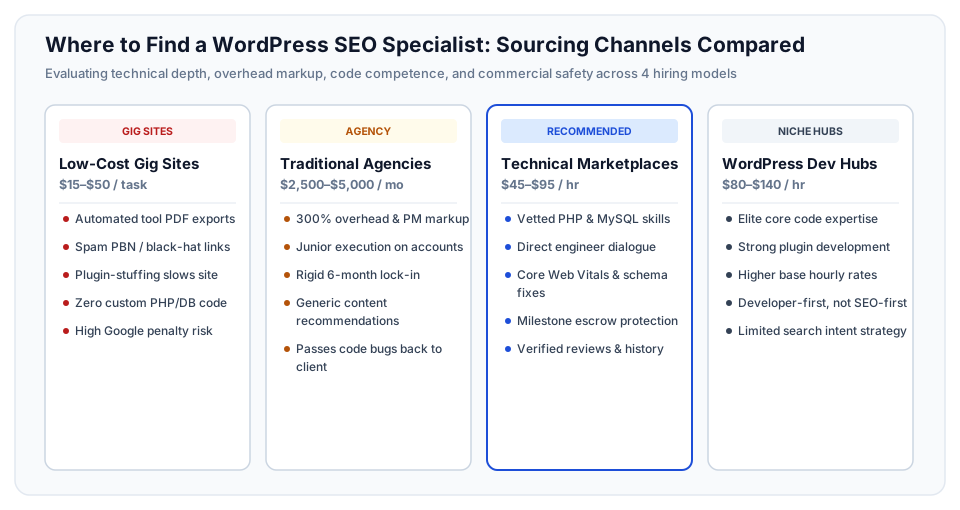
Where you look determines the caliber of WordPress SEO specialist you attract, the pricing structure you incur, and the level of operational risk to your website. Business buyers typically source talent across four distinct channels:
Channel 1: Specialized Engineering & Freelance Marketplaces (Recommended)
Platforms like Upwork, vetted tech marketplaces, and dedicated contractor directories provide direct access to independent technical specialists with verifiable track records and milestone-based escrow protection.
- Commercial Structure: Direct engagement with solo senior practitioners at transparent hourly rates ($45–$95/hr) or fixed milestones. No agency overhead markups.
- Technical Depth: High. You can screen specifically for engineers who understand PHP, JavaScript, SQL, server optimization, and advanced search indexing.
- Accountability: Transparent work histories, verified client feedback, public portfolio earnings, and dispute resolution mechanisms.
- Best For: Growing small businesses, e-commerce stores, and mid-market firms needing direct technical execution without a multi-month agency contract.
Channel 2: Micro-Task & Low-Cost Gig Directories
Open gig platforms (such as Fiverr or open freelance bidding boards) attract high volumes of low-cost bidders offering "$50 Complete WordPress SEO" packages.
- Commercial Structure: Ultra-low flat fees ($15–$150 per task).
- Technical Depth: Negligible. Contractors rely almost exclusively on automated tool exports, pirated plugins, and dangerous automated backlink networks (PBNs).
- Commercial Risk: Severe. Common outcomes include toxic link profiles that trigger manual Google penalties, installed plugins with security vulnerabilities, and broken site layouts caused by haphazard caching setups.
- Best For: Disposable hobby blogs where search penalties carry zero financial consequence. Strictly avoid for commercial businesses.
Channel 3: Traditional Digital Marketing Agencies
Full-service marketing agencies offer broad retainers covering SEO, PPC, social media, and content writing under a single contract.
- Commercial Structure: Expensive monthly retainers ($2,500–$6,000/mo) typically paired with mandatory 6-month or 12-month lock-in agreements.
- The Margin Trap: Up to 60% of your retainer subsidizes agency overhead: sales teams, account executives, and corporate office leases. Actual account work is routinely delegated to junior staff who run automated audits.
- The Execution Gap: Most traditional marketing agencies do not employ backend WordPress developers on their SEO teams. When structural code changes are required, they deliver recommendations as static text documents, placing the execution burden back on your internal team.
- Best For: Large corporations with dedicated internal development departments who only require external strategic reporting.
Channel 4: Niche WordPress Developer Networks
Specialized WordPress platforms (such as Codeable or elite WordPress developer communities) curate experienced core programmers.
- Commercial Structure: Premium hourly rates ($80–$140/hr) with strict vetting on WordPress coding standards.
- Technical Depth: Exceptional code quality and deep understanding of WordPress core APIs, action hooks, and security.
- The Search Strategy Gap: While these professionals write flawless PHP and clean database queries, many are developers first and search marketers second. They can optimize your database and speed up your theme, but they may lack expertise in search intent clustering, competitive content gap analysis, or external entity building.
- Best For: Companies that already have an in-house SEO strategist and need an expert WordPress engineer to implement complex architectural changes.
Sourcing Channels Comparison: Cost, Depth, and Operational Risk
Evaluating talent acquisition channels across concrete financial and technical metrics prevents costly misallocations of marketing capital. The table below illustrates the trade-offs between the four primary sourcing routes:
| Sourcing Channel | Average Cost | Code Competence | Overhead Markup | Turnaround Time | Primary Risk |
|---|---|---|---|---|---|
| Technical Freelance Marketplace | $45–$95 / hr | High (PHP, SQL, Server) | Minimal (0–10% platform fee) | Rapid (3–7 days start) | Requires proper upfront vetting to filter junior applicants |
| Low-Cost Gig Platform | $15–$75 / task | Near Zero (Script/Plugin only) | None (Direct commodity) | Instant (24–48 hours) | Black-hat spam links, site crashes, Google search penalties |
| Traditional Digital Agency | $2,500–$6,000 / mo | Low to Moderate (Advisory only) | Massive (50–70% overhead) | Slow (3–6 week onboarding) | Long contracts with junior execution and zero direct code fixes |
| Niche WordPress Dev Hub | $80–$140 / hr | Elite (Core API, Custom Hooks) | Moderate (Curated markup) | Moderate (1–2 weeks) | Strong coding skills but potential lack of search intent strategy |
Project Scopes and Budget Benchmarks: What WordPress SEO Costs
Engaging a technical WordPress SEO specialist should be structured around discrete deliverables with clear milestones rather than open-ended, undefined monthly retainers. Depending on the health and size of your website, engagements typically fall into one of four scope tiers:
| Scope Tier | Estimated Hours | Typical Cost ($45–$95/hr) | Core Technical Deliverables | Business Impact |
|---|---|---|---|---|
| Tier 1: Technical SEO & Database Audit | 12–25 hrs | $800–$1,800 | Crawl budget analysis, wp_options query review, sitemap cleanup, canonical tag audit, indexability report |
Identifies root-cause ranking blockers and stops search crawler budget waste |
| Tier 2: Core Web Vitals & Speed Optimization | 18–35 hrs | $1,200–$2,800 | LCP/INP/CLS remediation, asset deferral, database transient cleanup, Redis/LiteSpeed caching configuration | Passes Google Core Web Vitals assessment, reduces bounce rates, improves conversion rates |
| Tier 3: Taxonomy & Schema Restructuring | 30–55 hrs | $2,000–$4,500 | Pruning thin tag/category archives, custom JSON-LD schema implementation, breadcrumb hierarchy, internal link graph repair | Prevents keyword cannibalization and secures rich snippet search visibility |
| Tier 4: Ongoing Growth & Technical Retainer | 25–45 hrs/mo | $1,500–$3,500 / mo | Content cluster expansion, continuous crawl monitoring, new template SEO integration, technical debt maintenance | Consistent organic search traffic expansion and protection against core algorithm updates |
3 Real-World Case Studies: From Search Failure to Growth
Examining documented failure modes illustrates why hiring a technical practitioner beats relying on traditional agency retainers or plugin checklists.
Case Study 1: The Multi-Plugin Speed and Canonical Collapse
The Context: A direct-to-consumer lifestyle brand running on WooCommerce noticed organic search traffic declining by 35% over four months. Despite publishing weekly blog articles, new product lines failed to index.
The Breakdown: To improve site performance and search rankings, the company's internal marketing coordinator had installed Yoast SEO, WP Rocket, a separate schema generator plugin, and an image optimization plugin. The plugins conflicted: both Yoast and the schema plugin injected competing JSON-LD scripts with conflicting Organization data. Meanwhile, WP Rocket's script minification broke the canonical URL output on paginated collection pages, causing Googlebot to flag thousands of product pages as duplicate content. The site's Time to First Byte (TTFB) climbed to 3.8 seconds.
The Turnaround: The brand hired an independent technical WordPress SEO specialist through a freelance marketplace. The specialist removed the redundant schema plugin, consolidated settings within a single SEO framework, wrote a clean custom filter in the child theme's functions.php to handle canonical pagination, and configured server-level Redis object caching. Within three weeks, TTFB dropped from 3.8 seconds to 420 milliseconds, the canonical errors cleared in Google Search Console, and organic revenue rebounded by 48% within 60 days.
Case Study 2: The Faceted Taxonomy Crawl Budget Disaster
The Context: A specialized hardware distributor with 1,200 catalog products noticed their primary category pages slipping from page 1 to page 4 on Google. An automated audit tool showed zero 404 errors, leaving the executive team puzzled.
The Breakdown: A previous web design contractor had enabled multi-attribute faceted navigation (filtering by size, color, voltage, and manufacturer) without setting URL parameter controls. As a result, WordPress generated over 18,000 unique URLs for empty tag combinations and duplicate attribute archives. Googlebot was spending 85% of its allocated crawl budget indexing thin, empty filter combinations rather than crawling high-margin product and category pages.
The Turnaround: A senior technical SEO contractor was brought in for a 40-hour restructuring project ($2,600). The contractor audited the entire URL structure, applied noindex,follow robots directives to thin attribute archives, adjusted Google Search Console URL parameter handling, and consolidated 350 redundant product tags into 14 well-structured category clusters. Googlebot ceased crawling thin pages, re-indexed the primary catalog, and organic search impressions grew by 115% over the following quarter.
Case Study 3: The Expensive Agency Retainer Squeeze
The Context: A boutique commercial real estate brokerage spent $3,800 per month for nine months with a mid-sized digital marketing agency. The agency delivered monthly PDF keyword tracking reports, but overall organic inquiries remained flat.
The Breakdown: When the brokerage requested technical changes to improve poor Core Web Vitals scores on their custom property listing template, the agency stated that code modifications were "outside scope" and required an additional $180/hour development fee. The agency's monthly work consisted merely of editing meta descriptions and posting generic 600-word articles that failed to match commercial search intent.
The Turnaround: The brokerage terminated the agency agreement and engaged an independent technical WordPress SEO specialist on a flexible 20-hour monthly retainer ($1,400/mo). The specialist audited the custom property template, replaced heavy JavaScript sliders with native CSS, implemented custom Schema.org RealEstateListing microdata, and created high-intent neighborhood landing pages. Within five months, the brokerage secured top-3 rankings for four primary commercial property terms, generating $62,000 in direct client commissions while reducing their monthly marketing spend by 63%.
How to Screen and Hire: The 4-Stage Verification Protocol
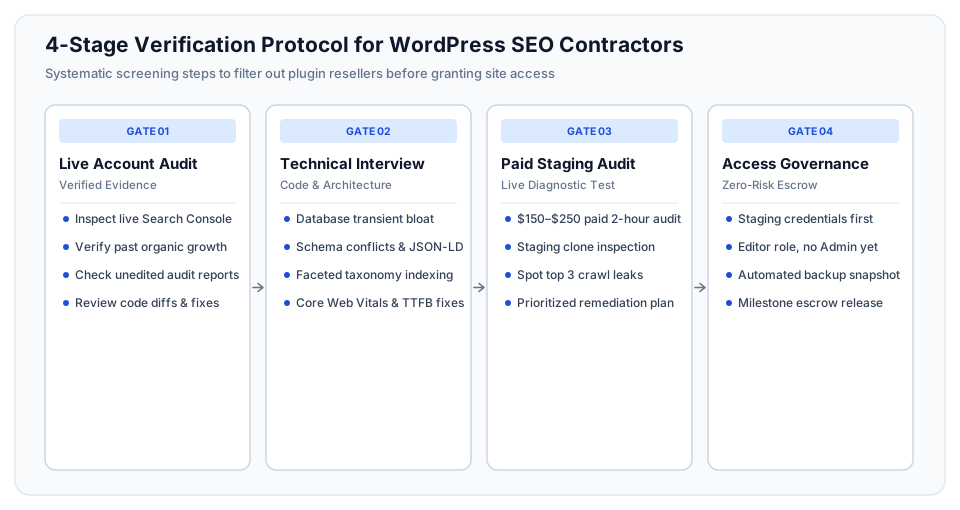
Never hire an SEO contractor based solely on polished proposals or generic client testimonials. Screen candidates through a rigorous four-stage verification protocol designed to evaluate technical competence and operational integrity:
Stage 1: The Live Account Walkthrough
Do not accept static PDF case studies or anonymized screenshots, which are easily falsified. Require a 20-minute live video screenshare where the candidate presents Google Search Console and Google Analytics accounts they personally managed:
- Inspect Unedited Search Console Data: Look for sustained organic click growth over 6 to 12 months. Verify that growth was driven by non-branded commercial keywords rather than existing brand name queries.
- Examine the Coverage & Indexing Tab: Ask the specialist to explain how they diagnosed and resolved past "Discovered – currently not indexed" or "Crawled – currently not indexed" warnings. A knowledgeable specialist explains the root cause immediately.
- Review Code Deliverables: Ask to see pull requests or child theme files where they implemented technical SEO fixes, such as custom schema filters or asset optimization scripts.
Stage 2: The Technical Architecture Interview
Conduct a 30-minute technical interview evaluating how the candidate handles WordPress core architecture, database efficiency, and crawling mechanisms:
- Question: "How do you resolve a situation where multiple WordPress plugins output conflicting JSON-LD schema markup?"
Senior Answer: Explain how to unhook redundant schema actions using WordPress hooks (remove_action), or disable native schema outputs inside individual plugin settings. Describe how to inject a centralized, valid Schema.org script through the child theme'swp_headhook or a custom site-specific plugin. - Question: "How does an oversized wp_options table affect SEO, and how do you fix it?"
Senior Answer: Explain that autoloaded options inwp_optionsload on every single page request. If expired transients or bloated plugin data inflate this table to tens of megabytes, Time to First Byte (TTFB) spikes, slowing down page loads for both users and search bots. The fix involves identifying large autoloaded records with SQL queries, purging expired transients, and moving non-essential data out of autoload. - Question: "What is your approach to handling faceted navigation and URL parameters in WooCommerce?"
Senior Answer: Differentiate between search-valuable attribute combinations (which should have static, indexable category URLs with unique content) and combinatorial filter parameters (which should be canonicalized back to the parent category or set tonoindex,followto preserve crawl budget).
Stage 3: The Paid 2-Hour Staging Audit
Before committing to an ongoing retainer or high-budget project, commission a paid 2-hour diagnostic audit for a fixed fee of $150 to $250. Provide read-only access to a staging clone of your website (never production) and ask for a 2-page diagnostic report covering:
Trial Scope: "Audit our staging site's WordPress configuration, Core Web Vitals bottlenecks, schema health, and indexing hierarchy. Identify the top three technical issues leaking search traffic, and deliver a prioritized 30-day action plan detailing exactly what code or settings changes are needed to resolve them."
Evaluate the report: Does it offer custom, code-level recommendations specific to your theme and plugins, or does it deliver a cut-and-paste export from an automated scanning tool? High-caliber specialists provide actionable, site-specific diagnoses.
Stage 4: Access Governance and Security
Protect your production website and commercial data during the hiring and onboarding process:
- Staging Environment First: Never grant a new contractor direct administrative access to your live production environment. Perform all audits, speed optimizations, and code changes on a staging server.
- Principle of Least Privilege: Provide an Editor account for content audits. Only grant Administrator privileges on staging when plugin or code testing is required. Never share master hosting panel credentials or root database passwords.
- Version Control Discipline: Require all PHP, CSS, and JavaScript modifications to be committed to a private Git repository (GitHub/GitLab) with clear commit messages before deployment to production.
- Full Backup Before Deployment: Always create a complete database and file backup snapshot before pushing staging changes to the production server.
Common Red Flags: When to Walk Away
Identify unqualified contractors early to protect your marketing budget and domain authority:
- Guaranteed #1 Rankings: No legitimate SEO professional guarantees specific ranking positions. Google's ranking algorithms evaluate hundreds of factors, including competitor actions and search intent shifts. Promises of guaranteed rankings indicate black-hat tactics or deception.
- Recommending Third-Party Backlink Packages: If a specialist promises "500 High DA Backlinks for $100," terminate discussions immediately. These links originate from automated link farms and private blog networks (PBNs) that routinely trigger severe Google algorithmic or manual penalties.
- Solving Everything with More Plugins: If a contractor's immediate response to every performance or SEO problem is installing another third-party plugin, they are an amateur configurator, not an engineer. Each additional plugin introduces security vulnerabilities, database queries, and code bloat.
- Refusing to Explain Technical Changes: Professional specialists communicate their methodology transparently. If a candidate claims their optimization technique is a "proprietary secret" that they cannot explain, they are concealing low-value or risky practices.
- Demanding Production Access for Initial Proposals: Any professional can assess your public-facing HTML, Core Web Vitals, and search visibility from the outside using browser developer tools and crawlers. Demanding live WordPress Administrator credentials before signing a contract is an operational security risk.
Frequently Asked Questions
Where is the best place to find an experienced WordPress SEO specialist?
The best place to find a verified technical WordPress SEO specialist is on specialized freelance marketplaces (such as Upwork) and curated engineering networks, where you can inspect verified client reviews, past earnings, and code capabilities directly at transparent rates of $45 to $95 per hour. Avoid low-cost open gig platforms where contractors rely on automated tool exports and dangerous black-hat link schemes.
How much does it cost to hire a WordPress SEO specialist?
An experienced independent WordPress SEO specialist costs between $45 and $95 per hour. Project-based technical audits typically range from $800 to $1,800, Core Web Vitals and speed optimizations cost between $1,200 and $2,800, and ongoing monthly technical growth retainers range from $1,500 to $3,500 per month depending on site complexity.
What is the difference between a WordPress developer and a WordPress SEO specialist?
A WordPress developer focuses on building custom themes, plugins, and functionality, but may not understand search intent, crawl budget management, or keyword clustering. A technical WordPress SEO specialist bridges both disciplines: they understand search engine indexing algorithms and write custom PHP, schema markup, and database queries to optimize organic search performance.
Can an SEO plugin like Yoast or Rank Math replace an SEO specialist?
No. SEO plugins are administrative utilities that generate XML sitemaps and allow you to input meta tags, but they do not optimize websites automatically. They cannot resolve database bloat in wp_options, fix slow server Time to First Byte (TTFB), restructure faceted WooCommerce URL parameters, or eliminate JavaScript render-blocking bottlenecks.
How long does it take for a WordPress SEO specialist to show measurable results?
Technical crawlability and page speed fixes produce measurable indexing improvements in Google Search Console within two to four weeks. Meaningful organic traffic and keyword ranking increases typically materialize within three to six months as search engines recrawl, reindex, and re-evaluate the authority of optimized pages.
Should I hire a freelancer or an agency for WordPress SEO?
For businesses spending under $10,000 per month on marketing, hiring a vetted independent freelance specialist provides superior capital efficiency and direct communication. Traditional agencies charge 50% to 70% markups for management overhead and often lack backend developers on their SEO teams, forcing you to hire outside developers anyway.
What WordPress access credentials should I provide to an SEO contractor?
Initially, provide read-only access to Google Search Console and an Editor-level account on a staging environment clone. Never grant production Administrator access or cPanel/hosting credentials until the specialist has passed a technical screening and signed a formal agreement with clear milestone escrow protections.
How do I know if an SEO specialist understands technical WordPress architecture?
Ask them how they diagnose Time to First Byte (TTFB) bottlenecks, how they clean expired transients from the wp_options database table, and how they resolve conflicting JSON-LD schema generated by competing plugins. A senior practitioner explains specific hooks, database queries, and caching mechanisms without hesitating.
What are the risks of hiring cheap SEO services on open gig boards?
Cheap gig services ($20–$100) often deploy automated link-building scripts, spam comment backlinks, and pirated plugins containing malware. These practices violate Google Webmaster Guidelines and frequently result in manual search penalties that can de-index your entire domain, costing thousands of dollars to remediate.
Does Core Web Vitals optimization actually affect WordPress search rankings?
Yes. Core Web Vitals is an official Google ranking factor that measures Largest Contentful Paint (LCP), Interaction to Next Paint (INP), and Cumulative Layout Shift (CLS). Passing Core Web Vitals signals page experience quality to Google algorithms and directly decreases visitor bounce rates, improving user engagement and organic conversion rates.
How do I prevent an SEO specialist from breaking my live WordPress site?
Mandate that all code modifications, plugin deactivations, and database cleanups take place on an isolated staging clone. Require changes to be tracked in Git version control and verified across all device viewports before being deployed to the live production server after taking a full backup snapshot.
What deliverables should be included in an initial WordPress SEO audit?
An initial audit must include an indexability and crawl budget evaluation, a Core Web Vitals diagnostic report, an audit of duplicate content and canonical tags, a review of database transients and query performance, schema markup validation, and a prioritized 30-day technical remediation roadmap with estimated engineering hours.
Written by Michael Melnyk
Senior IT Technical Writer & Technology Analyst
Senior Technical Writer and IT Industry Analyst with over 7 years of experience analyzing software engineering ecosystems, tech leadership models, and developer procurement frameworks.