Best Website Builder for Small Business: Wix vs Squarespace vs Shopify
A website builder should match the job your business needs to do every day. Compare Wix, Squarespace, and Shopify by business model, upkeep, commerce, flexibility, cost, and the point where a developer becomes the better choice.


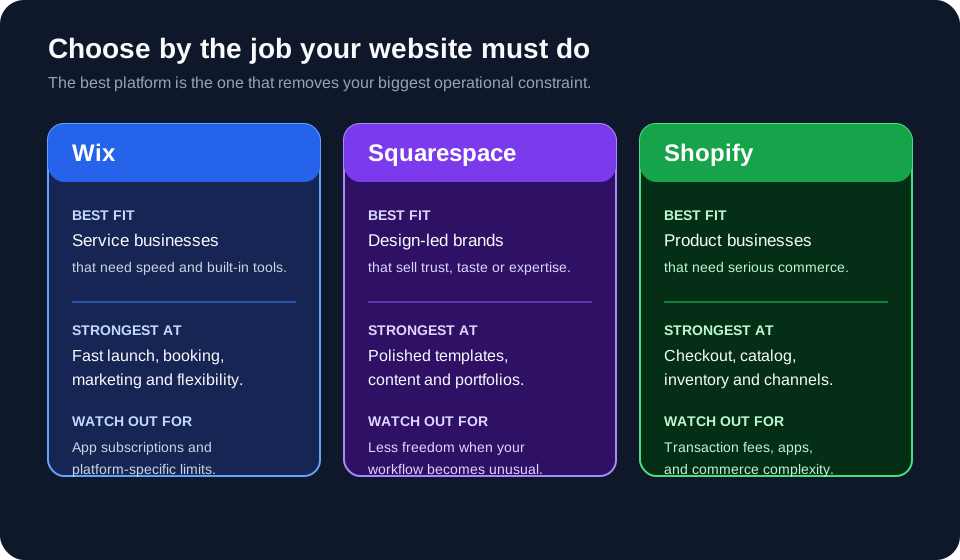
The best website builder for a small business depends on what the site must do every week. Wix is usually the practical starting point for a service business that needs pages, forms, bookings, and built-in business tools. Squarespace is a strong fit for a design-led brand, portfolio, or professional service where presentation is part of the sale. Shopify is the clearest choice when products, checkout, inventory, shipping, and sales channels are the center of the business.
No platform wins every category. A builder can get a standard website online quickly, but it cannot remove an unusual pricing rule, a complex internal workflow, or a critical integration simply because the template looks good. Reviewed September 2026. Prices and features change by country, billing period, taxes, payment provider, and plan; verify the current offer before buying.
Quick answer: which website builder should a small business choose?
Choose the platform that fits your primary business action, not the one with the longest feature list.
| Business situation | Best starting point | Why |
|---|---|---|
| Local service business | Wix | Fast setup, flexible pages, forms, bookings, and other built-in business tools. |
| Consultant, studio, photographer, or portfolio | Squarespace | Strong visual system and polished templates make the work easier to present consistently. |
| Retailer or product brand | Shopify | Commerce operations—catalog, checkout, inventory, shipping, and channels—are the core product. |
| Business with unusual rules or private workflows | Test first | A builder may be enough, but a short technical assessment can reveal expensive workarounds before you commit. |
For a standard brochure site, the choice is mostly about editing experience, design, business tools, and the cost of staying operational. For an online store, payment fees, inventory behavior, shipping, and integrations matter more than the homepage editor.
What should you compare before choosing a builder?
Compare the recurring workflow, not only the demo site. A small business owner usually needs to answer five questions before selecting a platform:
- Can the team update it? If every text change requires a contractor, the apparent simplicity is not real simplicity.
- Can customers complete the main action? That may be booking, calling, requesting a quote, buying a product, or joining a membership.
- What is included in the monthly plan? Check hosting, domain connection, storage, email, payments, analytics, and any required add-ons.
- What happens when the business grows? Look at collaborators, products, languages, locations, integrations, permissions, and export options.
- Where does the platform stop? Identify the first workflow that would need custom code, an app subscription, or a manual workaround.
This last question prevents a common mistake: choosing a platform for the first ten minutes of setup and discovering its limits after the business has accumulated content, orders, customer records, and integrations.
Wix: best for a flexible service-business website
Wix is a sensible first choice when the website needs to support a service business rather than operate as a deep commerce system. Its value is the combination of a visual editor, templates, hosting, domain connection, forms, scheduling, marketing tools, and optional business solutions in one account.
At the time of this review, Wix lists a free tier and paid plans whose displayed annual-billing examples range from $17 to $159 per month in the US. The company notes that prices vary by geographic location and that the plan page should be used to check the offer available to you. See the official Wix plans page before budgeting.
Wix works well when:
- your main goal is enquiries, calls, bookings, or a clear local presence;
- someone on the team wants to edit pages without touching code;
- you need more layout freedom than a tightly opinionated template system provides;
- you want to add scheduling, a blog, payments, or basic store features without assembling a separate stack.
Wix becomes less comfortable when:
- the site must follow a very specific design system across many templates;
- the business needs a complex product catalog, advanced inventory logic, or unusual checkout behavior;
- the team has installed many apps and no one owns the resulting subscriptions, permissions, and updates.
Wix is not automatically “the cheapest” option. The subscription is only one part of the cost. Add domain renewal, email, paid apps, payment processing, professional copy or photography, and occasional implementation help before comparing totals.
Squarespace: best for design-led brands and professional services
Squarespace is often the right fit when a visitor must understand the quality and character of the business before making contact. That makes it attractive to photographers, architects, consultants, studios, restaurants, creative professionals, and small brands that sell through presentation as much as through product mechanics.
Squarespace currently presents Basic, Core, Plus, and Advanced website plans. Its official pricing page says the platform includes managed hosting and a free trial, while annual billing can reduce the monthly equivalent. The exact price and commerce fees depend on the plan and location, so use the official Squarespace pricing page for the current numbers.
Squarespace works well when:
- visual consistency matters more than unlimited layout freedom;
- the site is primarily pages, articles, galleries, services, forms, or a small catalog;
- the owner wants a managed platform with fewer infrastructure decisions;
- the brand needs a professional result quickly and can work within the platform’s content model.
Squarespace becomes less comfortable when:
- the business needs a workflow that does not map cleanly to pages, products, services, or standard forms;
- different teams need granular operational permissions and complex content relationships;
- the site must be moved to a completely different stack without a content migration project;
- custom behavior is becoming the main product rather than a small enhancement.
The tradeoff is deliberate: Squarespace removes many design and hosting decisions, but that convenience can become a constraint when the business needs behavior outside the standard system.
Shopify: best for a product business that needs commerce operations
Shopify is not merely a website editor with a store bolted on. It is a commerce platform with a website layer. Choose it when the business needs reliable product management, checkout, inventory, shipping, discounts, customer accounts, analytics, marketplaces, or in-person sales.
Shopify’s current US pricing page lists annual-billing examples of $29 per month for Basic, $79 for Grow, and $299 for Advanced; monthly billing is higher. It also lists payment processing rates, possible third-party transaction fees, and optional tools such as POS Pro. Those numbers are plan- and market-dependent, so check the official Shopify pricing page rather than copying a number from an old comparison.
Shopify works well when:
- products, variants, stock, orders, returns, and shipping are daily operations;
- the business wants to sell through a website, social channels, marketplaces, or physical locations;
- the team expects to connect marketing, fulfillment, accounting, reviews, or customer-support apps;
- the store needs a commerce-first platform that can grow beyond a small catalog.
Shopify becomes less comfortable when:
- the business only needs five informational pages and does not need store operations;
- the owner keeps adding apps instead of deciding which workflow is actually required;
- the checkout, pricing, subscription, or fulfillment rules are unusual enough to require custom extensions;
- transaction fees and app subscriptions make the total cost higher than expected.
If the business sells products, do not compare Shopify to Wix or Squarespace only by the monthly subscription. Compare the full operating cost: plan, payment processing, transaction fees, apps, shipping tools, accounting connections, and the time spent maintaining the catalog.
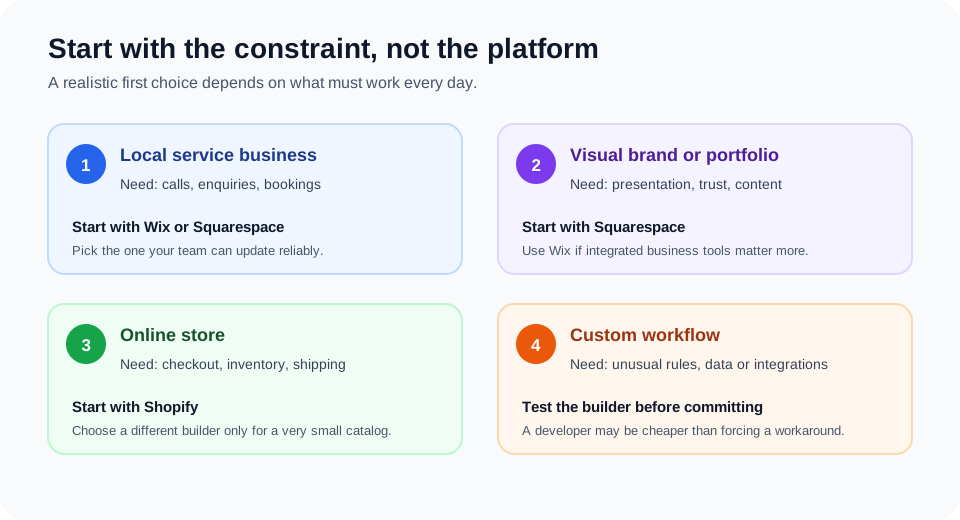
Wix vs Squarespace vs Shopify by real business scenario
The same platform can be a good or bad choice depending on the business model. These scenarios make the tradeoff more concrete.
A local plumber, salon, clinic, or consultant
Start with Wix or Squarespace. The important path is usually service page → trust signal → enquiry, call, or booking. Choose Wix if scheduling, forms, and flexible business tooling matter most. Choose Squarespace if the visual presentation is the main differentiator and the workflow is simple.
A photographer, design studio, or independent consultant
Start with Squarespace when the portfolio, case studies, and visual rhythm do most of the selling. Wix can still be the better option if the site needs more interactive sections, bookings, or business features that the team wants to manage in one place.
A clothing, food, beauty, or specialty-product store
Start with Shopify when the business expects real order volume, multiple product variants, shipping rules, inventory updates, or sales across several channels. A small catalog can work on another builder, but the cost of switching after inventory and customer operations grow is worth considering at the start.
A business that sells a custom service or has unusual pricing
Prototype the customer-facing part in a builder, but test the difficult rule early. Examples include pricing that changes by distance and volume, a customer portal with permissions, a booking process that depends on staff capacity, or an integration that must keep two systems in sync.
When is a website builder no longer enough?
A builder is no longer enough when the workaround becomes more important than the website. Warning signs include staff copying data between systems, customers receiving different prices depending on the path they take, a checkout or booking process that needs manual repair, or a critical integration that breaks whenever an app changes.
Do not jump straight from “the template is limiting” to a large custom build. First write down the user task, the business rule, the data involved, the systems that must connect, and what a successful first release would prove. A short test can show whether a platform configuration, a small extension, or custom software is justified. If you need help defining that boundary, use this guide to choosing a developer for a small business or startup.
A developer should improve the business outcome, not add code for prestige. They may configure the platform, create a safe integration, migrate content, repair a broken workflow, or build only the part that the builder cannot support. The best first engagement is often a paid assessment or a bounded pilot with a clear acceptance check.
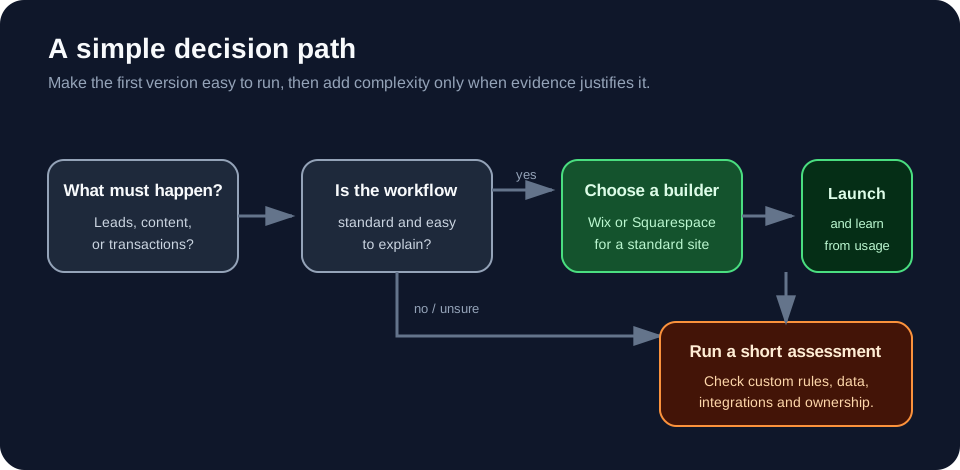
How to choose without wasting money
- Name one primary conversion. Choose calls, quote requests, bookings, purchases, or another observable action.
- List the must-have workflow. Include the people, permissions, data, payment steps, notifications, and handoffs involved.
- Build the smallest realistic version. Do not buy an enterprise plan to solve a problem you have not observed.
- Price the operating stack. Include the plan, domain, email, payment fees, apps, professional help, maintenance, and migration risk.
- Test the hardest requirement first. A beautiful homepage does not prove that booking, inventory, pricing, or integration logic will work.
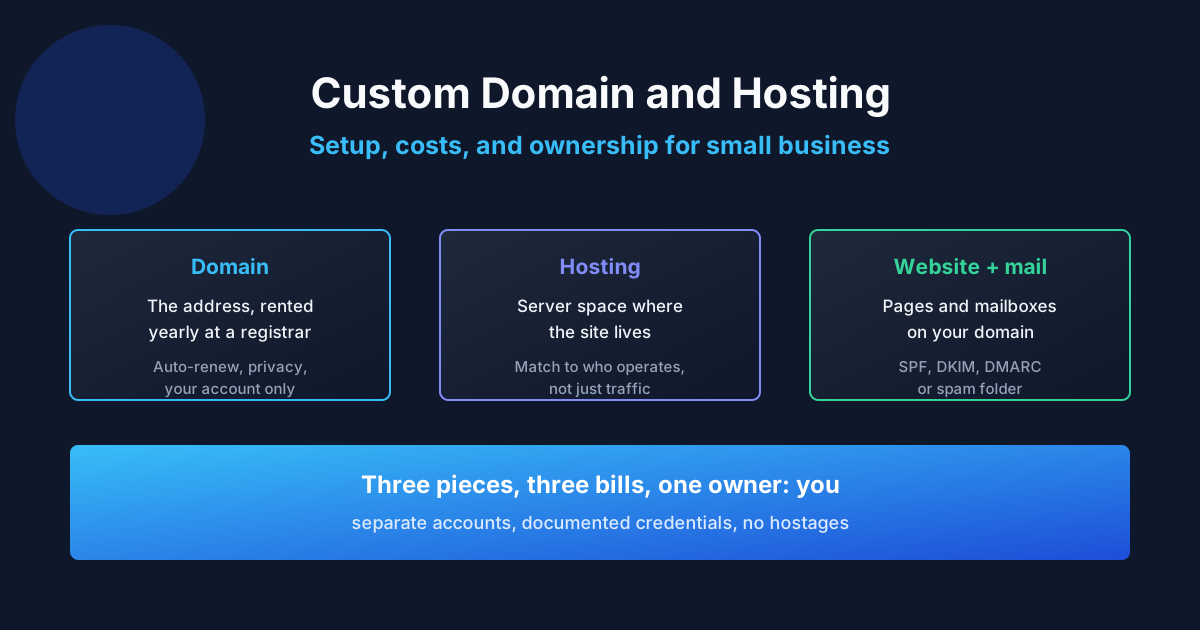
- Keep the accounts under business control. The domain, platform account, payment account, analytics, and connected services should not be trapped in a contractor’s personal login.
Use a builder when it gives the business a dependable way to learn and operate. Consider custom work when the workflow itself creates value that the platform cannot express without fragile workarounds.
Common mistakes small businesses make
- Choosing from templates alone: a polished demo does not prove that the platform fits your booking, checkout, or content workflow.
- Comparing subscription prices without transaction costs: payment processing, app fees, and paid add-ons can change the total.
- Installing an app for every missing feature: this creates a stack nobody owns and can make troubleshooting harder than the original problem.
- Ignoring editing responsibility: decide who will publish content, update products, respond to leads, and remove old promotions.
- Letting a contractor own the accounts: losing access to the domain, payments, analytics, or platform account can stop the business.
- Building custom features before proving demand: test the customer behavior before paying to automate an unproven workflow.
- Assuming migration is automatic: content, redirects, product data, SEO fields, forms, and analytics often need a deliberate migration plan.
Expert advice
For most small businesses, the right first website is the one the owner can keep accurate. A slightly less flexible platform that is updated every week will outperform a technically impressive site that nobody can maintain. Start with the smallest platform that handles the main customer action, then watch where the business loses time or revenue.
That evidence should drive the next decision. If the problem is content, improve the content. If the problem is conversion, fix the customer journey. If the problem is an operational rule that the platform cannot represent, document it and commission the smallest technical change that removes the bottleneck.
Frequently asked questions
What is the best website builder for a small business?
There is no universal winner. Wix is a strong starting point for many service businesses, Squarespace suits design-led brands and portfolios, and Shopify is the better default for product businesses that need commerce operations.
Is Wix or Squarespace better for a small business?
Choose Wix for more built-in business tools and layout flexibility. Choose Squarespace when polished presentation and a simpler content model matter more than unusual functionality.
Is Shopify worth it for a small online store?
Shopify can be worth it when checkout, inventory, shipping, product variants, or multiple sales channels are important. For a very small catalog with mostly informational content, another builder may cost less to operate.
Can I build a small-business website without a developer?
Yes, if the site uses standard pages, forms, content, or simple products and someone can maintain it. A developer becomes useful for migration, integrations, custom rules, accessibility fixes, performance work, or a workflow that the platform does not handle reliably.
Which website builder is easiest to update?
Ease depends on the person doing the work. Wix emphasizes visual flexibility, Squarespace emphasizes a controlled design system, and Shopify organizes work around products and orders. Test the exact editing tasks your team will perform.
Which platform is best for local SEO?
All three can support basic SEO settings, custom domains, structured content, and local business pages. Rankings depend more on useful local information, relevance, reviews, links, technical quality, and consistent maintenance than on the platform name alone.
Can I move my website from Wix or Squarespace to Shopify?
Usually, yes, but migration is not a single-click transfer of every layout and feature. Plan for content, products, redirects, images, customer data, analytics, forms, and any custom integrations separately.
Does Shopify include web hosting?
Shopify’s plans include hosted online-store infrastructure and SSL. You still need to budget for the plan, domain, payment processing, apps, and any external services used by the business.
Does Squarespace have a free plan?
Squarespace offers a free trial rather than a permanent free website plan according to its current pricing information. Confirm the current trial and plan terms for your region before publishing a business site.
Does Wix include hosting?
Wix includes hosting for sites on its platform. A custom domain, removal of platform branding, business features, and higher limits may require a paid plan.
When should a small business hire a web developer?
Hire one when the work involves a custom workflow, integration, migration, performance or accessibility issue, secure data handling, or a business rule that a builder cannot support cleanly. Start with a defined outcome and acceptance check.
Should a developer build my website from scratch?
Not automatically. A good developer should first check whether Wix, Squarespace, Shopify, or another established tool covers the requirement. Custom development is justified when the workflow, customer experience, or integration is valuable enough to own and maintain.
If you are deciding between configuring a builder and commissioning custom work, this small-business developer hiring guide can help you define the scope before you speak with candidates. For a platform recommendation or implementation discussion, contact ProofDevs with a short description of the business and its main workflow.
Written by Michael Melnyk
Senior IT Technical Writer & Technology Analyst
Senior Technical Writer and IT Industry Analyst with over 7 years of experience analyzing software engineering ecosystems, tech leadership models, and developer procurement frameworks.