Update PHP on a VPS After the php2shell Flaws: Fixed Versions, Patch Cost, and Who Should Do It
Your site was safe on Monday and exposed by Wednesday, and your hosting company may not touch a VPS you manage. A business owner's plan for the first 24 hours after the php2shell disclosure.


Updated October 22, 2026. If your website or web app runs on PHP and lives on a VPS you manage, update PHP to a fixed version within 24 to 72 hours. On October 21, 2026 the PHP project released patches for two critical flaws, tracked as CVE-2026-109618 and CVE-2026-109619 and nicknamed "php2shell". Each is scored 9.2 on the CVSS v4 scale, and each can let an anonymous visitor run commands on your server without logging in. The fixed releases are PHP 8.5.12, 8.4.27, 8.3.36 and 8.2.35.
Many owners assume their hosting company handles this. On managed hosting that is often true. On an unmanaged or self-managed VPS it is not: nobody patches the server unless you, your developer or a hired administrator does. A same-branch patch update done properly usually takes 2 to 8 hours of engineering time, which is $90 to $760 at an independent senior rate of $45 to $95 per hour. A jump from an old unsupported version takes far longer. This guide explains what happened, how to tell whether you are exposed, what to do in the first 24 hours, what it costs, and who should do the work. If you want a vetted engineer, you can hire a server administration specialist for a fixed one-time task.
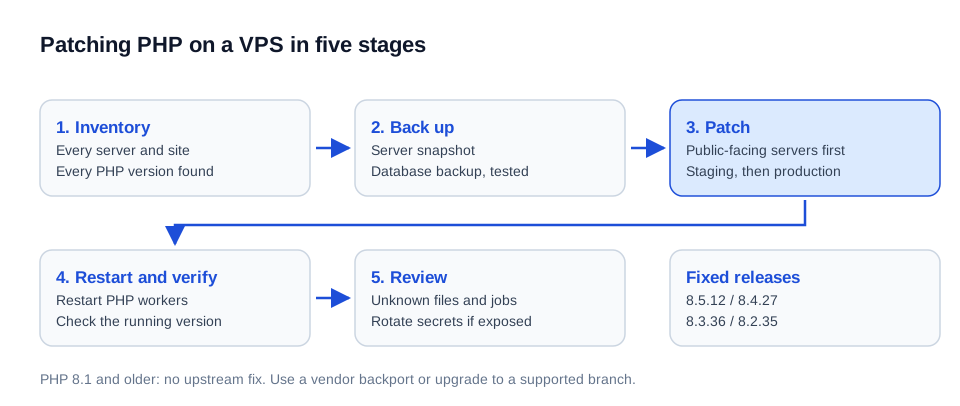
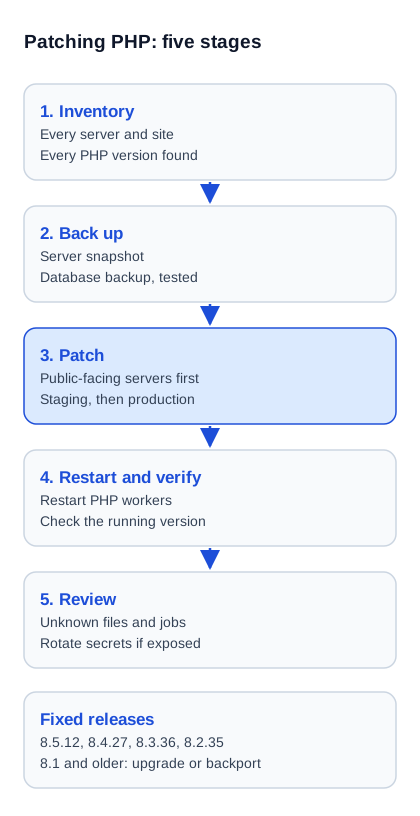
Figure 1: The five-stage path for patching a PHP server: find every PHP, patch in risk order, restart, verify, then check for signs of break-in.
What the php2shell Flaws Are, in Plain Terms
Remote code execution (RCE) is a flaw that lets an outsider make your server run commands of their choosing. Unauthenticated RCE means the outsider needs no account, no password and no mistake by your staff; one crafted web request is enough. For a business, that means customer data, order records, admin sessions and stored passwords on the server are within reach, and the server itself can be turned into a platform for spam or attacks on others.
According to Help Net Security, the two flaws are in PHP's core request handling, not in a plugin or a particular website. One involves PHP running out of memory halfway through setting up a request. The other lets leftover internal state from one request be reused by a later request handled by the same worker process. Because the weakness is in PHP itself, it does not matter whether your site is WordPress, Laravel, Magento, a custom application or a single contact form.
Per Rapid7's analysis, every installation that serves web requests is at risk, including PHP-FPM, Apache with mod_php, php-cgi, FrankenPHP and LiteSpeed. Apache with mod_php is the highest-risk setup because exploitation can succeed before your application code runs. The command-line PHP used for scheduled jobs was not listed as affected.
How Urgent Is It? What We Know About Exploitation
Treat it as urgent but not as a reason to panic: as of October 21, 2026 the US cybersecurity agency CISA reported no observed exploitation, while Amazon's threat team recorded one attempt on October 17, four days before public disclosure. The patch details leaked early on a forum, and Rapid7 reports signs that researchers are reproducing the attack independently and expects a public exploit soon.
These sources disagree on whether real attacks have started, which is normal in the first 48 hours. The practical reading is simple: assume attack tools will circulate within days, and patch internet-facing servers first. Rapid7 also warns that the absence of suspicious log entries does not prove a server is safe, because no confirmed indicators of compromise have been published yet. CISA's alert recommends inventorying all PHP, patching internet-facing systems first, and taking systems offline if they cannot be updated.
Which PHP Version Is Safe Now
A server is safe against these two flaws only on PHP 8.5.12, 8.4.27, 8.3.36 or 8.2.35 (or a newer release of the same branch), or on a vendor package that includes the backported fix. Anything on PHP 8.1 or older is end-of-life, gets no routine upstream updates and should be treated as exposed.
| Your PHP branch | Fixed release | Security support until (php.net) | What to do |
|---|---|---|---|
| 8.5 | 8.5.12 | 31 Dec 2029 | Update to 8.5.12 or later. |
| 8.4 | 8.4.27 | 31 Dec 2028 | Update to 8.4.27 or later. |
| 8.3 | 8.3.36 | 31 Dec 2027 | Update to 8.3.36 or later. Best balance for most business sites. |
| 8.2 | 8.2.35 | 31 Dec 2026 | Patch now, then plan a move to 8.3 or 8.4 before year end. |
| 8.1, 8.0, 7.4 and older | No upstream release; minimal source backports exist | Ended | Get a vendor-backported package, or upgrade to a supported branch. Do not leave it exposed. |
Support dates are from the PHP supported versions page, checked October 22, 2026. Note that PHP 8.2 stops receiving security fixes at the end of this year, so patching it now is a stopgap, not a destination.
Are You Exposed? Five Common Hosting Situations
Your exposure depends on who controls the server software. The question to ask is "who runs the update, and has it been run?" rather than "is my site affected?", because every PHP site is.
| Where your site runs | Who patches PHP | What you should do |
|---|---|---|
| Shared hosting or fully managed hosting | The host | Ask support in writing for the patched version and date. Check the version in your control panel. |
| Managed VPS (host maintains the OS) | Host, often only the operating system packages | Confirm in writing that PHP is included in the managed scope. |
| Unmanaged VPS or cloud server | You, your developer or your administrator | Act now. This is the group most likely to be forgotten. |
| VPS with a control panel and several PHP versions | You, per version and per site | Patch every installed version, then check each site is on the version you expect. |
| Containers or custom images | Whoever builds the image | Rebuild images on fixed base versions and redeploy. Updating a running container does not fix the image. |
Two traps catch owners repeatedly. First, a server often has more than one PHP installed: an old version left from a previous project, a separate one for scheduled jobs, and one inside another product such as a mail or billing tool. Second, a vendor repository may lag; Rapid7 notes that users of the Remi RPM repository had no updates on October 21 and should use distribution packages or build from source.
The First 24 Hours: A Business Owner's Plan
The plan has six steps, and a competent administrator can complete steps one to five on a typical single-server setup in 2 to 8 hours.
- Inventory. List every server, every site on it and the PHP version each uses. Include staging, old test servers and anything forgotten.
- Back up. Take a server snapshot and a separate database backup before changing anything, and confirm the backup can be restored.
- Patch in risk order. Public-facing production first, then staging. Use the vendor's patched package where your operating system provides one.
- Restart the PHP workers. The fix does not apply to processes already running. This step is skipped surprisingly often.
- Verify. Confirm the running version on each site, not just the installed package, and test login, checkout and forms.
- Review for compromise. Look for unfamiliar files, new scheduled jobs, unknown admin users and PHP processes starting shells or downloading tools.
A web application firewall can reduce risk while you work. Help Net Security reports that Cloudflare deployed initial protection rules for known exploit routes to all customers, including free plans. A firewall is a temporary layer: PHP's own position, summarized by Rapid7, is that only the update is a complete fix.
Temporary measures if you cannot patch today
Rapid7 lists partial mitigations that an administrator can apply at server level before the update: turning off the session upload-progress feature, disabling the PHP 8.5 fatal-error backtrace feature, and limiting the size and number of uploaded multipart requests if your application does not need them. These must be set where the application cannot override them and require a worker restart. They narrow the attack paths, they do not remove the flaw, and CISA's guidance for systems that cannot be updated at all is to take them offline.
What an Update Costs: Patch, Branch Jump, or Legacy Rescue
Cost depends on how far your current version is from a fixed one, and on how much testing your application needs. The figures below are planning estimates for an independent senior engineer at $45 to $95 per hour; an agency typically charges $150 to $250 per hour for the same work.
| Situation | Typical work | Hours | Cost ($45–$95/hr) |
|---|---|---|---|
| Same branch, one server (8.3.x to 8.3.36) | Inventory, backup, package update, restart, verification | 2–8 | $90–$760 |
| Several servers or sites, mixed versions | Per-server patching, panel configuration, staging check | 6–16 | $270–$1,520 |
| Branch jump (8.1 to 8.3 or 8.4) | Compatibility check, extension and library updates, staging test, cutover | 8–30 | $360–$2,850 |
| Legacy jump (7.x to 8.3 or newer) | Code fixes, dependency upgrades, test coverage, phased release | 20–80+ | $900–$7,600+ |
| Post-patch compromise review | File and account review, logs, scheduled jobs, secret rotation | 4–12 | $180–$1,140 |
The expensive part is almost never the patch itself. It is the testing needed when the application has not been touched for years, or the discovery that the "simple" site depends on outdated extensions or a plugin its vendor abandoned. If that sounds like your site, read the broader guide on hiring a PHP developer to fix vulnerabilities.
Why a Quick Update Can Break a Site
Patching within the same branch rarely breaks anything, because patch releases fix bugs without changing behavior. Moving to a newer branch is different: removed features, stricter rules and extensions that no longer exist can stop a site from loading. The usual fallout is a blank page, a failed checkout, or a plugin that stops working.
The safe order is the same each time: copy the production setup to a staging server, update PHP there, exercise the money paths (login, payment, forms, email, scheduled jobs), then repeat on production with a rollback plan. For a site with no staging, building one is part of the job, and it pays for itself at the next update.
Three Realistic Scenarios
Scenario 1: Online shop on an unmanaged VPS, PHP 8.3
A shop owner pays a freelancer once a year and has no monitoring. The server runs PHP 8.3 from the operating system's package repository. The fix is a same-branch update to 8.3.36 and a worker restart. Estimated effort is 3 to 5 hours, about $135 to $475, and the main risk is forgetting the restart, which leaves the old code running while the package list shows the new version.
Scenario 2: Agency site on PHP 8.1 that "has always worked"
A services company's WordPress site runs on PHP 8.1 on a VPS set up by an agency that no longer supports it. PHP 8.1 is end-of-life, so there is no ordinary patch. The proper fix is a move to 8.3 after a compatibility check of the theme and plugins. Estimated effort is 12 to 24 hours, about $540 to $2,280, and the check usually finds one or two plugins that need replacing. Until the move, the server needs a vendor backport or a firewall rule set as a stopgap.
Scenario 3: SaaS in containers on three servers
A small SaaS runs its application in containers on three servers. Updating the servers' own PHP does nothing, because the application uses PHP inside its images. The fix is to rebuild images on a fixed base version, run the test suite, and redeploy server by server. Estimated effort is 6 to 12 hours, about $270 to $1,140.
Who Should Do the Work
Choose by who already knows the server. If your hosting contract explicitly includes PHP updates, make them do it and ask for written confirmation. If not, the choice is between your in-house developer, a one-time contractor and a maintenance retainer.
| Option | Best for | Watch out for |
|---|---|---|
| Hosting provider | Managed plans with PHP in scope | "Managed" often covers the operating system only. Get the scope in writing. |
| In-house developer | Teams that deploy to the server weekly | Developers who build features are not always server administrators; ask for a rollback plan. |
| Independent senior engineer (one-time) | Unmanaged VPS, no regular admin | Needs access and a clear scope. Use your own accounts so you keep control. |
| Maintenance retainer | Sites where downtime costs money | Check response times and that patching is in the written scope; see how to hire a website maintenance expert. |
Questions to ask any contractor before granting server access:
- How will you find every PHP version on the server, including ones not used by my main site?
- What is your rollback plan if the site breaks after the update?
- How will you prove the new version is actually running, not only installed?
- Will you check for signs of earlier compromise, and what will the report cover?
- Which of my passwords, keys and tokens should be rotated afterwards, and who does it?
Grant access through a temporary account with a defined end date, keep the server and domain registered in your own name, and revoke the access when the job is done. If the server holds customer data, ask for a short written summary of what was changed. The related guide on hiring a developer to migrate a website to a VPS covers ownership and access practices in more detail.
After Patching: Check Whether Someone Already Got In
Patching closes the door but does not tell you whether it was already used. Because no published signs of attack exist yet, the review looks for general warning signals rather than a known fingerprint.
- Files in website folders that nobody on your team created, especially recently changed PHP files in upload or cache directories.
- New or changed scheduled jobs, and new user accounts, administrators or access keys.
- Web server processes that start shells, download tools or open unexpected outbound connections, which is the behavior CISA tells defenders to watch for.
- Unusual spikes in outgoing mail, traffic or processor use.
If a server was exposed and unpatched since before October 17 and holds sensitive data, rotate database passwords, application secrets, payment and email provider keys, and administrator passwords after the review. Rotating is cheap compared with explaining a breach to customers. A server found to be compromised should be rebuilt from a clean image, not just cleaned.
Common Mistakes
- Updating the package but not restarting PHP, so the old code keeps running.
- Patching the main site and forgetting staging, old test servers or a second PHP version.
- Assuming a firewall or the hosting provider has already solved it.
- Jumping several branches in production with no staging copy.
- Staying on PHP 8.1 or older because the site still loads.
- Giving a contractor permanent root access and leaving it in place.
- Treating the update as a one-off instead of setting a monthly patch routine.
Expert Tip: Make This the Last Fire Drill
Put three things in place this month: a named owner for server updates, a staging copy of production, and a monthly review of PHP and operating system patches. Add a calendar reminder for December 31, 2026, when PHP 8.2 loses security support. A site that follows this routine absorbs the next critical advisory as a two-hour task rather than a weekend emergency.
Frequently Asked Questions
What are the PHP php2shell vulnerabilities?
They are two critical flaws in PHP's core, CVE-2026-109618 and CVE-2026-109619, each scored 9.2 on CVSS v4, that can allow unauthenticated remote code execution on servers serving web requests. They were patched on October 21, 2026.
Which PHP versions fix the php2shell flaws?
PHP 8.5.12, 8.4.27, 8.3.36 and 8.2.35 contain the fixes. PHP 8.1 and older receive no routine upstream updates, though minimal source backports exist for 7.4, 8.0 and 8.1 and some distributions offer their own patched packages.
Is my WordPress or Laravel site affected?
Yes if it runs on an unpatched PHP, because the flaws are in PHP itself and not in the application. The platform does not matter; the PHP version and its patch level do.
How much does it cost to update PHP on a VPS?
A same-branch patch on one server typically takes 2 to 8 hours, so $90 to $760 at $45 to $95 per hour. A move from PHP 8.1 to 8.3 or 8.4 takes about 8 to 30 hours ($360 to $2,850), and a legacy 7.x site can take 20 to 80 hours or more.
Does my hosting company update PHP for me?
On shared and fully managed hosting, usually yes. On an unmanaged VPS, no: you or your administrator must do it. On "managed" VPS plans the scope often covers the operating system only, so ask the provider to confirm PHP in writing.
How fast do I need to patch?
Within 24 to 72 hours for internet-facing servers. CISA reported no exploitation at publication, but Amazon recorded an attempt on October 17 and Rapid7 expects a public exploit soon.
Can a firewall protect me instead of updating?
Only temporarily. Cloudflare released initial protection rules for known exploit routes, but PHP's position is that the update is the only complete fix, and a firewall cannot cover every variation.
Do I need to restart the server after updating PHP?
You need to restart the PHP worker processes or the web server that loads PHP, and a full reboot is only needed if the operating system requires it. Without the restart, running processes keep the old, vulnerable code.
What if my site runs on PHP 8.1 or older?
Treat it as exposed. Ask your operating system vendor for a backported package, or schedule an upgrade to PHP 8.3 or 8.4. Until then, restrict access with a firewall and consider taking the site offline if it handles sensitive data, as CISA advises for systems that cannot be updated.
How do I check which PHP version my site uses?
Ask your developer or host to check the version that actually serves the website, not only the one installed on the server, because servers often have several versions. A control panel's PHP selector or a server administrator can confirm it in minutes.
How do I know if my server was already hacked?
You cannot rely on logs alone, since no published indicators exist yet. A compromise review looks for unknown files, new scheduled jobs and accounts, and web processes launching shells or making unusual outbound connections, and takes about 4 to 12 hours.
Should I update to PHP 8.5 right now?
For most business sites, patch your current supported branch first, then plan a tested move to 8.3 or 8.4. Moving to the newest branch in an emergency adds compatibility risk to a security fix, and PHP 8.3 is supported until the end of 2027.
Not sure what is running on your server or who owns the update? Get matched with a verified senior PHP engineer for a one-time patch and review, or bring in a server administrator to inventory and patch every PHP on your VPS, using your own accounts and with a written summary at the end.
Written by Michael Melnyk
Senior IT Technical Writer & Technology Analyst
Senior Technical Writer and IT Industry Analyst with over 7 years of experience analyzing software engineering ecosystems, tech leadership models, and developer procurement frameworks.