How to Hire a Website Maintenance Expert: Vetting, Rates, and SLAs
Hiring the wrong person for website maintenance leads to broken production updates and missed downtime. Here is how to vet and hire a senior maintenance engineer on flexible hours with clear SLAs.

Updated September 2026. A website is not an inert digital brochure; it is an active software system connected to database clusters, third-party payment webhooks, SSL certificates, DNS servers, and browser rendering engines. The moment a site launches, its dependencies begin to decay. Plugins release security patches, API versions deprecate, and database query latency creeps upward under real traffic. Without disciplined maintenance, even clean web builds develop operational debt within six months.
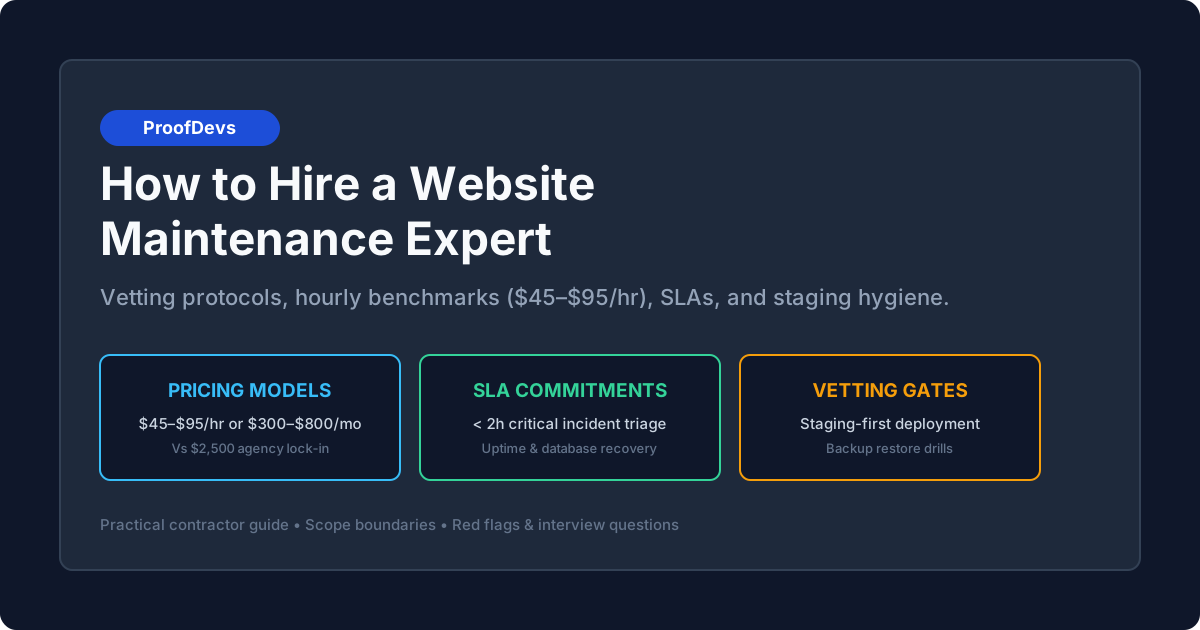
A website maintenance expert is a specialized software engineer who maintains site uptime, monitors infrastructure health, executes safe staging-first updates, performs verified disaster recovery drills, and resolves unexpected production incidents under strict Service Level Agreements (SLAs). For small to mid-sized businesses, the hiring challenge lies in finding an independent senior specialist ($45–$95/hr or $300–$800/month capped retainer) who takes full engineering ownership, rather than paying an agency $2,500/month for junior ticket-passers. If you are currently facing an active outage or broken checkout, you can request emergency website bug fixes and incident recovery or connect directly with website maintenance and support developers for ongoing protection.
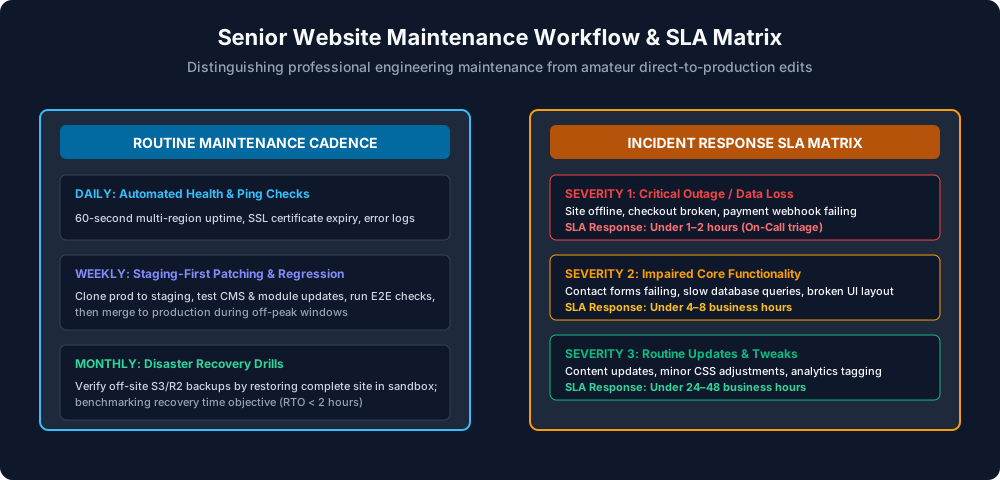
Figure 1: Professional website maintenance workflow — combining a routine proactive cadence (daily health, weekly staging, monthly disaster drills) with a tiered incident escalation SLA matrix.
The Hidden Costs of Unmaintained Web Infrastructure
Non-technical business owners often treat website maintenance as an optional expense until an unhandled event forces an expensive emergency rebuild. Neglecting website maintenance triggers predictable technical failures:
- Silent Checkout and Lead Capture Failures: A payment gateway (such as Stripe or PayPal) updates its API webhook signature requirements. Without maintenance updates, the checkout button appears functional to visitors, but orders fail to record in your administrative panel, causing thousands in unrecovered revenue.
- SEO Ranking Deterioration: Cumulative layout shifts, uncompressed user uploads, and fragmented database queries gradually degrade Core Web Vitals scores. Google search algorithms downgrade slow pages in organic rankings, reducing qualified inbound leads.
- Security Breaches and Blacklisting: Outdated CMS plugins, unmaintained NPM packages, and unpatched server runtimes leave known CVE vulnerabilities exposed. Automated botnets exploit these entry points to inject phishing URLs or crypto-miners, resulting in immediate Google Search Console security blacklists and browser warning screens. For specialized threat analysis, consult our guide on hiring a website security specialist for small business.
- Catastrophic Unverified Backups: Many companies believe their hosting provider handles backups automatically, only to discover during a server disk failure that the automated snapshot failed months ago or cannot be restored to a clean database schema.
Four Hiring Models Compared: Contractor vs Agency vs In-House vs Plugins
When seeking ongoing website maintenance, companies generally choose between four operational models. Understanding the trade-offs between pricing, communication, and engineering depth is critical for budget planning.
| Model | Typical Cost | Core Deliverables | Strengths | Critical Limitations |
|---|---|---|---|---|
| Independent Senior Specialist | $45–$95 / hr or $300–$800 / mo retainer |
Staging updates, automated uptime monitoring, verified backups, 5–10h dedicated monthly engineering | Direct communication with the engineer writing code; staging-first hygiene; transparent weekly caps; zero agency bloat | Individual bandwidth capacity; requires clear agreed SLA windows |
| Traditional Web Agency | $1,500–$4,000 / mo retainer | Bundled maintenance hours, account management, monthly executive summary PDF | Multi-disciplinary team availability; formal corporate liability insurance | 60% of invoice subsidizes non-technical account managers; actual maintenance delegated to unsupervised junior staff; rigid 6–12 month contract locks |
| Full-Time In-House Developer | $95,000–$140,000 / yr ($65–$85/hr equivalent) |
Dedicated 40h/week internal technical ownership | 100% focused on internal company priorities; immediate real-time availability | Severe financial overhead for small businesses; maintenance alone rarely justifies 40 hours of weekly workload |
| Automated Maintenance Plugins | $100–$300 / yr | One-click auto-updates, baseline uptime pings, local server backup archives | Inexpensive self-serve setup | Auto-updates frequently break live layouts and checkout flows; no human regression testing; zero code debugging support |
For growing businesses, contracting an independent engineer through hourly and part-time arrangements with pre-approved monthly hour caps offers the optimal balance: you receive senior-level code audits and guaranteed incident SLAs without funding agency sales overhead or carrying full-time payroll.
Scope Boundaries: What Maintenance Includes vs Excludes
The most common source of friction between business owners and maintenance contractors is ambiguous scope boundaries. Professional maintenance contracts maintain a clear line between operational upkeep and new project development.
What Professional Maintenance Covers (Operational Upkeep)
- Staging-First Package Updates: Upgrading CMS cores, frameworks (Next.js, Node.js), third-party plugins, and dependencies on an isolated staging clone, running regression tests, and deploying to production during low-traffic windows.
- Disaster Recovery Drills: Scheduling off-site backups (stored in independent AWS S3 or Cloudflare R2 buckets) and conducting monthly test restorations to verify recovery time objectives (RTO under 2 hours).
- Uptime and Telemetry Monitoring: Multi-region automated polling every 60 seconds for HTTP status codes, SSL certificate expirations, and critical transaction flow endpoints.
- Database Optimization: Cleaning revision tables, optimizing slow SQL query indexes, and pruning transient logs that bloat database memory.
- Minor Bug Fixes: Resolving layout anomalies, fixing broken form validation, and patching minor script errors (typically tasks requiring under 2 to 3 hours).
What Maintenance Explicitly Excludes (New Development)
- Full Website Redesigns: Overhauling design systems, rebuilding page templates, or changing underlying CMS platforms.
- Net-New Custom Feature Development: Building custom booking engines, customer portals, or new third-party integrations from scratch.
- Content Writing and Graphic Creation: Writing blog articles, editing product photography, or drafting marketing copy.
- Third-Party Platform Subscription Fees: Paying for hosting servers, domain registrations, SendGrid email delivery, or SaaS subscriptions.
Service Level Agreements (SLAs): Structuring Response Times
A maintenance contract without defined Service Level Agreements is merely an informal promise. When your checkout breaks on a Friday afternoon, you cannot afford to wait 72 hours for an uncommitted contractor to check their email.
Professional maintenance agreements organize incidents into three distinct severity tiers:
| Severity Tier | Definition & Examples | Target Response Time | Target Resolution Window |
|---|---|---|---|
| Severity 1 (Critical Incident) | Complete site outage, server crash (502/504), broken checkout gateway, active malware infection | Under 1–2 hours (On-Call triage) |
2–6 hours (Stabilization or immediate rollback) |
| Severity 2 (High Priority) | Core feature impairment: contact forms failing, broken search indexing, mobile layout breakage, slow query timeouts | Under 4–8 business hours | 8–24 business hours |
| Severity 3 (Routine Maintenance) | Minor styling adjustments, dependency patching, monthly reporting, analytics tag updates | Under 24–48 business hours | 2–4 business days |
Ensure your agreement defines what "Response" means: it must signify an active engineer investigating error logs and communicating triage options, not an automated auto-responder email acknowledging receipt.
Stack-Specific Maintenance: Matching Expertise to Your Technology
Website maintenance requirements vary significantly across technical stacks. Hiring a WordPress plugin updater to maintain a headless Next.js web application will result in critical operational failures.
1. Custom Web Applications (Next.js, Node.js, Python, PostgreSQL)
Custom full-stack web applications require software engineering rigor rather than CMS admin panel clicking:
- NPM / Dependency Security Patches: Auditing package dependencies with automated tools (Dependabot, Snyk) and testing major version transitions in staging environments.
- Database Migration & Connection Pooling: Monitoring PostgreSQL connection pool exhaustion (such as Supabase or AWS RDS limits), optimizing unindexed queries, and verifying data migration scripts before running production schema changes.
- Serverless & Edge Function Health: Inspecting execution timeouts, Vercel/AWS Lambda cold starts, and environment variable synchronization.
2. Content Management Systems (WordPress, WooCommerce)
WordPress requires strict staging governance because the ecosystem relies on disparate third-party plugins:
- Never Update Plugins on Live Production: An experienced maintenance engineer clones the production database and files to an isolated staging subdomain, runs updates, validates forms and checkouts, and pushes changes live during off-peak hours.
- Database Table Hygiene: Purging transient options, spam comment metadata, and orphaned post revisions that degrade MySQL response times.
- PHP Version Compatibility: Verifying theme and plugin code against modern PHP runtimes (PHP 8.2+) to prevent fatal server errors.
3. eCommerce Platforms (Shopify, Custom Checkout)
eCommerce maintenance focuses heavily on checkout integrity and third-party app compatibility:
- API Deprecation Tracking: Shopify regularly sunsets older Storefront and Admin API versions. Maintenance engineers update private app calls before deprecation deadlines break integrations.
- Third-Party App Performance Audits: Auditing marketing script tags and review widgets injected into the theme that drag down mobile page load speeds and conversions.
How to Vet a Website Maintenance Expert: 5 Critical Questions
To identify true maintenance engineers who prioritize defensive reliability over amateur shortcut-takers, use these targeted interview questions:
Question 1: "Can you describe your exact workflow for updating a core framework or plugin?"
- Red Flag: "I click 'Update All' directly in the admin panel during the day. If something breaks, I quickly restore a backup." (This guarantees user-facing downtime and broken checkouts).
- Green Flag: "I pull production to an isolated staging environment, execute updates, run automated and manual regression tests on core user flows (forms, auth, checkout), verify error logs, take a pre-deployment backup, and deploy to production during scheduled low-traffic hours."
Question 2: "How do you verify that our backups actually work?"
- Red Flag: "My hosting provider has automatic daily backups, so we don't need to worry about it."
- Green Flag: "I configure independent, off-site encrypted backups to AWS S3 or Cloudflare R2. Once a month, I perform a disaster recovery drill: restoring the backup to a sandbox server to measure recovery time and verify database data integrity."
Question 3: "What uptime monitoring tools do you use, and how do you handle alerts?"
- Red Flag: "I check the website every morning from my browser."
- Green Flag: "I configure automated external monitoring (UptimeRobot, Better Stack, or Datadog) that pings your site every 60 seconds across multiple geographic locations. Outages trigger immediate SMS and Slack notifications with automated HTTP error code captures."
Question 4: "How do you track tasks and communicate hours spent against our monthly retainer?"
- Red Flag: An opaque invoice sent at the end of the month with a single line reading: "Website Maintenance: $600."
- Green Flag: "We use a shared ticket board (Trello, Linear, or GitHub Issues) where every task is documented. At the end of each month or sprint, you receive a detailed report showing tickets completed, uptime percentages, backup drill logs, and hours consumed against your pre-approved cap."
Question 5: "What happens if a major incident occurs outside normal business hours?"
- Red Flag: "I work Monday to Friday, 9 to 5. Anything over the weekend will wait until Monday morning."
- Green Flag: "Our SLA defines Severity 1 outages (site down, payments broken) as priority incidents with 2-hour response windows seven days a week. Routine requests are handled during regular business hours."
Pre-Hire Practical Trial: The 3-Hour Staging Maintenance Audit
Before committing to an ongoing monthly maintenance retainer, trial the candidate with a focused, paid pre-hire milestone:
- Grant Staging-Only Access: Provide access to an isolated staging copy of your website and read-only repository access.
- Assign a Concrete Diagnostic Scope: Commission a 3 to 4 hour initial technical audit:
- Inspect the current backup configuration and document recovery procedures.
- Identify outdated dependencies, security vulnerabilities, or database performance bottlenecks.
- Propose a prioritized maintenance roadmap with recommended SLA response tiers.
- Evaluate the Output: Assess whether their technical report is written in clear business language, whether their staging changes adhere to clean Git practices, and whether their communication is responsive and structured.
If the engineer demonstrates thorough architectural discipline during this trial, you can transition them to an ongoing monthly retainer or flexible hourly arrangement with complete confidence. For a broader look at pricing structures across web projects, see our website management services cost guide.
Frequently Asked Questions
How much does it cost to hire a website maintenance expert?
Independent senior website maintenance specialists typically charge between $45 and $95 per hour, or offer capped monthly maintenance retainers ranging from $300 to $800 per month for small to mid-sized businesses (covering 5 to 10 hours of active upkeep, staging patches, and on-call emergency response). Traditional software agencies charge $1,500 to $4,000 per month for comparable maintenance packages due to account management overhead.
Can my original website developer handle ongoing maintenance?
Often yes, but with a major caveat: original project developers frequently prefer building new features rather than performing repetitive maintenance hygiene like plugin updates, database cleanups, and backup restore drills. If your original developer is slow to respond to routine tickets or treats maintenance as an afterthought, contracting a dedicated maintenance engineer ensures consistent uptime and strict SLA accountability.
What is the difference between web hosting and website maintenance?
Web hosting provides the physical or cloud server space where your files and database live (hardware, network connectivity, power). Website maintenance is the active engineering work that keeps the software running on that server updated, secure, and fast (patching code, monitoring error logs, optimizing database queries, and verifying backups). Your web host will not fix broken plugins or repair checkout errors when code fails.
What happens if a plugin or framework update breaks my website?
A professional maintenance expert never updates code directly on your live website. All updates are first deployed and tested on an isolated staging clone. If an update introduces a conflict or broken flow, the engineer isolates the issue and fixes the code before production deployment. In the rare event an unexpected bug surfaces post-deployment, the engineer rolls back to a pre-update backup snapshot within minutes.
Should I pay hourly or on a monthly retainer for maintenance?
A hybrid monthly retainer with a pre-approved hour cap is the most effective model. For example, a $450/month retainer covering up to 6 hours of proactive updates, monitoring, and emergency response guarantees that the engineer reserves dedicated time for your site every month. Any larger feature additions beyond the cap are billed at an agreed hourly rate ($45–$95/hr) with prior written approval.
Written by Michael Melnyk
Senior IT Technical Writer & Technology Analyst
Senior Technical Writer and IT Industry Analyst with over 7 years of experience analyzing software engineering ecosystems, tech leadership models, and developer procurement frameworks.